
When a customer buys a subscription, Revenue Cloud records what they now own as an asset. Every change after that, more seats, fewer seats, a renewal, a cancellation, adds to the asset's history instead of overwriting it. This page explains how that works, which action fits which customer request, and the traps we see people fall into.
The example we use throughout: a QuantumBit customer buys one QB API Management Solution subscription for $12,000 a year, starting September 25. It's the same subscription the Assets lab builds in a real org.
How it works
What an asset is
In short: an asset is a record of something a customer owns. Revenue Cloud adds a history to it.
- The standard Asset object has always recorded a product a customer owns: serial number, install date, status.
- Revenue Cloud keeps that object and adds lifecycle management on top. (On the name: Salesforce's Winter '27 help says Revenue Management, while its release notes and Trailhead also say Agentforce Revenue Management. It's one product. We say Revenue Cloud.)
- Anything sold can be an asset: a product, a service, a subscription, or a bundle that mixes them.1
How you can tell an asset has lifecycle management:
HasLifecycleManagementis checked. The system sets it, it starts as false, and it can never be changed once the asset exists.2- The asset carries read-only totals that the system keeps up to date:
LifecycleStartDate(from the first state period),LifecycleEndDate(from the last one, and empty for evergreen),CurrentLifecycleEndDate,CurrentQuantity,CurrentMrrandTotalLifecycleAmount. - The classic Quantity field is never filled in by lifecycle management. Read and report on
CurrentQuantity; it's also what the asset viewer shows.
Bundles become hierarchies of assets, up to 10,000 in one hierarchy. The top asset has AssetLevel 1 and the assets inside a bundle have AssetLevel 2.
How an order becomes an asset
In short: an asset appears only when an order is activated, never when a quote is accepted.
Four things have to be true:
- The product is assetizable. Is Assetizable on the product is on by default. For a bundle, the top product's setting applies to everything inside it.3
- The order is marked for Revenue Cloud. It carries an Application Usage Assignment of type
RevenueLifecycleManagement. Salesforce's help adds it with an Apex trigger on Order. Contracts need the same assignment, or the asset viewer won't show a contract's assets.4 - A flow runs on activation. A record-triggered flow on Order, with Status equals Activated, checks for that assignment and calls Create or Update Asset from Order. On a new sale it creates one asset per order product; on an amendment, renewal or cancellation order it changes the existing assets.5 The same flow handles those later orders.6
- The person running it has the Assetize Order permission set.5
Two variations:
- Per order line. Create or Update Asset from Order Item turns lines into assets one at a time, when each reaches a stage such as fulfilled.7
- With Dynamic Revenue Orchestrator (DRO, the order fulfillment engine). Order products become assets, and the technical lines DRO breaks them into become fulfillment assets, reconciled every 24 hours. The Fulfillment Quantity Calculation Method decides their quantity: Always One keeps it at one, Aggregate adds up the related assets.8 DRO sends one change per asset at a time, and never assetizes an order product older than the asset's latest action.9
How an asset keeps its history
In short: three child records form a ledger. Nothing is overwritten; every change adds a row.
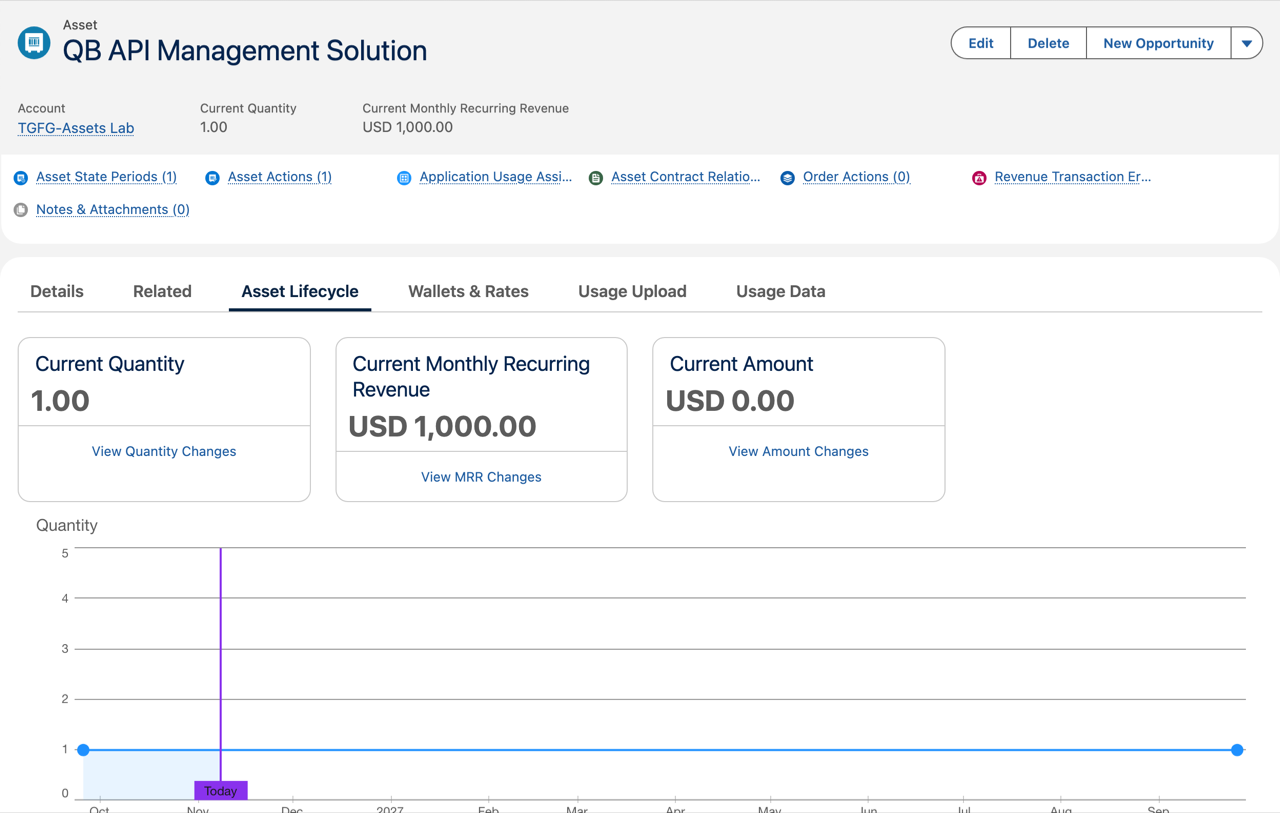
- Asset state period (ASP). A stretch of time during which quantity, amount and MRR stay the same. There's one per change, the asset's dashboard shows the current one, and you can't edit them. On an evergreen asset the last one has no end date.10
- Asset action. One change on one date. The first is the initial sale; each upsell, downsell, cross-sell, renewal, cancellation or transfer adds another.1
- Its Business Category comes from a fixed list you can't customize (the full list is in the data model table below). Upsells means a higher quantity, or a higher total at the same quantity. Downsells is the opposite.
- Its
ActionDateis when the change was booked, which can differ from when it takes effect. Cancel in June, effective in October: the action is dated June, the new period starts in October.11 - Asset action source. Traces each action back to the order product that caused it, with quantity, net unit price, total, dates, proration policy and selling model.12
Because it's a ledger, undoing a change doesn't delete anything. A rollback is a new, opposite transaction.13
Two more relationships:
- Bundles are held together by
AssetRelationship, with the roles Bundle, Add-on, Set, Simple and Variation Parent.14 - Contracts link to assets through
AssetContractRelationship. It's created automatically when a contract-linked order with theRevenueLifecycleManagementassignment is assetized, is never dated past the contract's end, and can also be created by hand by a Sales Operations Rep.15
The Managed Asset Viewer
In short: the asset list on the Account and Contract pages, and the place to start every change.
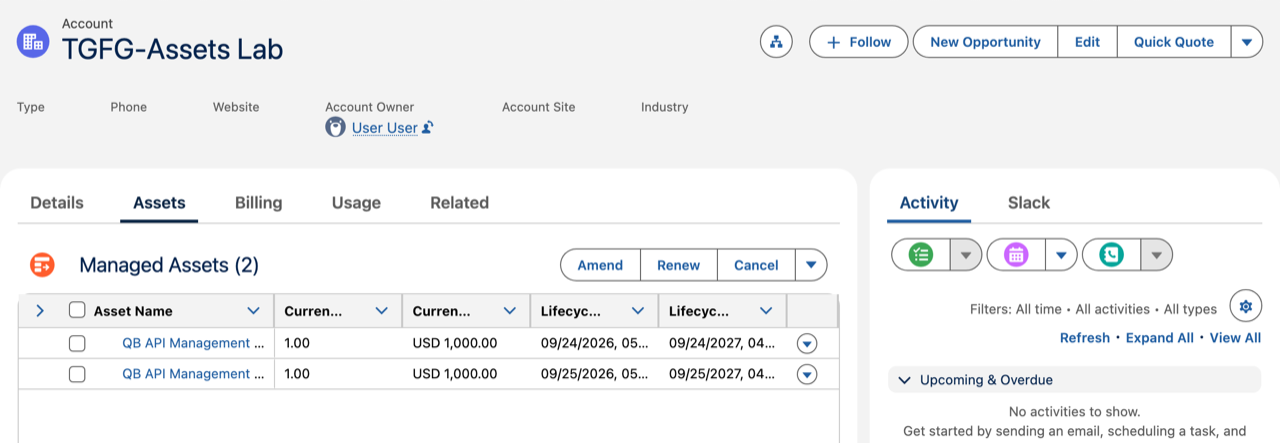
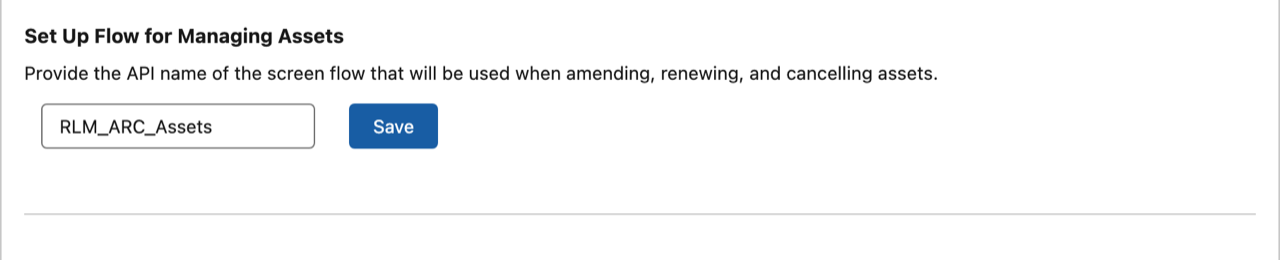
RLM_ARC_Assets.- It sits on Account and Contract record pages next to the Assets related list, and uses that list's columns.
- It expands bundles. Clicking an asset name opens a side panel; the View row action opens the asset record. On the record, the Related tab holds actions and state periods, and the Dashboard tab graphs quantity over time.1617
- It shows only the attributes active today.
The Amend, Renew and Cancel buttons all run one flow, named in Revenue Settings under Set Up Flow for Managing Assets:
- By default it creates a quote; you can change that to create an order instead.
- It times out after 10 seconds, so in the UI you can't build an amendment, renewal or cancellation with 1,000 lines. Start smaller, then add assets with the API or the Add Assets button.18
- Every request creates a quote, and each one finishes through an order, the same path as a new sale.19
- Starting from the Contract page fills in the contract number and applies the contract's prices and adjustment schedules, unless the asset's pricing source says otherwise.20
- For a bundle, select the top asset, not a child.
Amending
In short: amend changes quantity from a date you pick. You enter the change, not the new total.
- Select the asset, click Amend, pick the amendment date and submit.
- On the quote line, Start Quantity is what the customer has now and Quantity is the change: enter 8 to add eight licenses, or minus 3 to remove three. End Quantity shows the result.17
- Once the order is activated and assetized, the asset gets an Upsells or Downsells action and a new state period starting on the amendment date.
How amendments are priced:
- Removing units is priced Last In, First Out (LIFO) against what the customer paid before.
PricingSourceon the asset (Last Transaction, or Price Book or List Price) andQuantityIncreasePricingTypedecide how added units are priced.21
Two limits that come up often:
- If the asset already has a future-dated amend, renew or cancel, it can't take a change with an earlier start date.
- A plain amendment changes quantity, not the end date.
Two newer kinds of amendment (Spring '26, release 260):
- Field amendment. Change a designated line field, such as billing frequency, and the line becomes Amend with subtype Field Amendment.
- Price amendment (called a price-only amendment before Winter '27). Quantity change of zero. It credits the old price and charges the new one, prorated from the effective date, and counts as an Upsell or Downsell depending on which way the total moves.22
- Before Winter '27 you could only apply a discount amount or percent. Now you can also enter a new Sales Price on the quote line or Unit Price on the order line.22
- Setting a new price needs Sales Price Amendments on in Revenue Settings. It's off by default in existing orgs and on in new ones.23
- Usage-based products take a discount but not a new Sales Price or Unit Price.24
Renewing
In short: renew extends a subscription, either by its usual term or to dates you choose.
- Automatic Renewal extends by the asset's renewal term.
- Override Renewal Term takes explicit dates and refunds the unused portion.25
The renewal quote gets its Renewal Term and Renewal Term Unit from the asset or the contract. Where they come from depends on how the asset was sold:
| How the asset was sold | Where the renewal term comes from |
|---|---|
| Order without a contract | Copied from the order product. If it's missing, the renewal is blocked |
| Order with a contract | Left blank on the asset and read from the contract, so renewing from the Account page fails validation |
| Future-dated asset | Needs a current asset contract relationship |
The contract side of this, from asset contract relationships to negotiated prices, is on the Contracts page.
In every case the fix is the same: enter Renewal Term and Renewal Term Unit on the asset in the viewer.26
How renewals are priced:
RenewalPricingTypeon the asset (Last Negotiated Price or List Price), plus Unit Price Uplift on the line.- Lot-based (As-Is) renewals, behind the As-Is Renewals setting, renew each lot at its original price with the uplift applied per lot. Set the asset's Pricing Source to Last Transaction first. If it's blank or anything else, the renewal is priced at today's list price instead.27
- CPI uplift (Winter '26, release 258) uses a price revision policy and index rates: $100 at 3.5% CPI plus a 2% spread renews at $105.50.28
Special cases:
- Expired assets renew from a date on or after the old end date. The gap becomes a state period with quantity zero. Expired usage-based assets can be renewed only in orgs with the Revenue Management Advanced license and no Revenue Management Billing license.29
- One-time products in a renewed bundle are set to No Change with quantity zero; they can't be renewed.30
- Ramped assets can be renewed early (Summer '26, release 262). Only term-defined products, or bundles whose children are all term-defined, qualify. Since Winter '27 that includes usage-based ramped assets, with the Revenue Management Advanced license but not the Revenue Management Billing license.31
Cancelling
In short: cancel stops a subscription from a date. It's final.
- Click Cancel, choose the date and submit.
- The cancellation quote sets the line quantity to minus the asset's total, so End Quantity is 0. It's priced LIFO.
- After activation the asset gets a Cancellations action, but no new state period. The dashboard shows the last day of the current period.1732
Cancellation can't be undone, and it removes any future-dated state periods.
Proration, dates and time
In short: charges for part of a period are prorated by days; start times can be exact to the second.
- Proration multiplier = time used ÷ total time. A $50 monthly service bought on the 15th of a 30-day month is 15/30, so $25.33
- Proration uses dates only.
- Time precision is separate. Start Time, End Time and Start End Time Zone on the Transaction Line Editor let an asset start at 9:00 AM PST (stored in UTC), and an amendment at 11:00 AM PST splits the state periods at that second. With no time given, a start defaults to 12:00:00 AM and an end to 11:59:59 PM, local time.34
- The time zone stays with the asset (Winter '27). Assetization stores the line's time zone on the state period, and later amendments, renewals and cancellations use it instead of UTC. All lines in one transaction must share a time zone. Assets assetized before this use UTC until they're reassetized or their state periods get a time zone.34
Termed or evergreen, and changing the end date
In short: a termed subscription has an end date you can move; an evergreen one never ends until cancelled.
- A term-defined asset has a
LifecycleEndDate. - An evergreen asset's last state period has no end date, so its end-date fields are empty.
Changing the end date (Spring '26, release 260): edit End Date and Subscription Term on an amendment or renewal line. Rules:
- Termed subscriptions only, never evergreen.
- Not for ramp deals or usage products.
- It must be the last change before the subscription ends, and can't sit inside another amendment.
- Making it longer counts as an upsell; shorter counts as a downsell.35
Renewal automation
In short: two ready-made templates can create renewal opportunities and renew subscriptions automatically.
- Create and Update Renewal Opportunities creates opportunities for renewable assets while they're being assetized, one per shared end date.
- Automatically Renew Expiring Assets is a scheduled flow. It creates and activates renewal orders for assets flagged Automatically Renew. The default workflow user needs
InitiateRenewal, and you can setNumberOfDaysInTheFutureandRetryCount. - Automatically Renew Asset by Default is set on the product selling model; Automatically Renew is set on the quote line, order product and asset.36
- Get Renewable Assets Summary supplies renewal prices to the opportunity flow.37
Transfers, swaps and rollback
In short: move quantity to another account, replace one product with another, or undo the last future-dated change.
Transfer. For example, move 200 of 500 licenses from Account A to Account B: A goes down and B gets a new asset.
- It creates two quotes: a source quote (Amend, subtype
TransferFrom) and a destination quote (Add, subtypeTransferTo). - It needs Advanced Order Creation From Quote. The source order is activated first, and no other change can happen until both orders are assetized.
- Limits: 50 lines, no ramped, usage or expired assets, one price book.38
- Salesforce's enablement material dates transfers to Winter '26, but the developer guide lists the
TransferFromandTransferTosubtypes at API version 65 (Summer '25).
Swap, upgrade, downgrade (Spring '26, release 260). Amendment subtypes that link a pair of lines instead of removing one product and adding another: SwapOut and SwapIn, UpgradeFrom and UpgradeTo, DowngradeFrom and DowngradeTo.39
Rollback. Reverses the most recent future-dated amendment or renewal with an opposite Amend transaction, subtype Rollback, linked to the action it reverses.40
Usage-based assets
In short: usage assets carry rates and grants, and both follow the asset's changes.
- Rates and grants show read-only on the Usage Rates tab.
- An amendment moves the rate to the new terms. Renewing or cancelling forfeits unused grants. Grants are prorated on amendment, refresh and cancellation.
- Example: 10 units at 100 grants each, plus 5 more mid-month at 200 grants each, gives (10 × 100) + (5 × 200 ÷ 2) = 1,500 grants this month and 2,000 next month.41
- Grants are tied to the opportunity's account, then the Account for Quote; if both are missing, it fails.42
- Amend usage assets with output type Quote, then create the order. Going straight to an order skips the rate card entries and activation fails.43
Conflicts with future-dated changes
In short: two orders can't safely change one asset at the same time.
- If the order that created the asset still has unfinished fulfillment steps, an amendment can leave two orders updating one asset.
- The DRO templates Submit Order with Validation and Get Steps from Order list the unfinished steps, let you discard them, and submit, for orders of up to 200 lines.44
- With future-dated changes: no renewing an asset that already has a future-dated renewal, no reducing below zero, no derived-pricing products, and no amending a usage product that has both a future-dated and a backdated change.45
- Backdating (Winter '27). You can now amend, renew or cancel standard and ramped assets, and transfer or swap standard assets, with an effective date in the past. The date must be on or after the asset's start date, and the asset can't have a future-dated cancellation. It needs the standard asset flow,
runtime_revenue_arcflows__arcFlow, set in Revenue Settings.4647 - Usage assets can't be backdated: their amendments, renewals and cancellations need today's date or later, and ramped usage assets need today's date.42
Permissions
| To do this | You need |
|---|---|
| Use the asset viewer | Read, Create, Edit and Delete on Asset |
| Amend | The InitiateAmendment API permission set, plus Sales Rep persona permissions |
| Renew | InitiateRenewal API |
| Cancel | InitiateCancellation API |
| Run assetization flows | Assetize Order |
| Set exact times on orders | PlaceOrder API |
| Create asset contract relationships by hand | Sales Operations Rep |
Source for this table.13
The data model
The chain to remember: an order product is assetized into an asset; each change to the asset is an asset action, traced back to the order product that caused it by an asset action source; and each stretch of time with the same quantity and price is an asset state period. Bundles hang together through asset relationships, and contracts through asset contract relationships. The diagram in "How an asset keeps its history" shows the same chain.
| Object | Fields worth remembering |
|---|---|
Asset |
HasLifecycleManagement (system, can't be changed), LifecycleStartDate, LifecycleEndDate, CurrentLifecycleEndDate, CurrentQuantity, CurrentMrr, TotalLifecycleAmount, AssetLevel, ParentId, PricingSource (LastTransaction, PriceBookListPrice), QuantityIncreasePricingType, RenewalPricingType (LastNegotiatedPrice, ListPrice), RenewalTerm, RenewalTermUnit (Months, Annual), Product2Id, AccountId. Quantity is the classic field and is not maintained by lifecycle management |
AssetStatePeriod |
AssetId, StartDate, EndDate (empty on the last evergreen period), Quantity, Mrr, Amount (unused), BillingFrequency, UnitPriceUplift, PriceRevisionPolicy, RampIdentifier, SegmentIdentifier, SegmentType. Not editable |
AssetAction |
AssetId, ActionDate, CategoryEnum (Business Category: Initial Sale, Upsells, Downsells, Cross-Sells, Renewals, Cancellations, Transfers, Swaps, Upgrades, Downgrades, Terms And Conditions Changes, Other), Type (Generate, Change, Cancel, Convert), Subtype (FieldAmendment, Rollback, StartDateAdjustment, TransferFrom, TransferTo, SwapIn, SwapOut, UpgradeFrom, UpgradeTo, DowngradeFrom, DowngradeTo), QuantityChange, MrrChange, Amount, CanRollBack, RolledbackAssetAction, Total* rollups |
AssetActionSource |
AssetActionId, ReferenceEntityItemId (OrderItem or WorkOrderLineItem), ExternalReference, Quantity, UnitPrice, NetUnitPrice, TotalPrice, StartDate, EndDate, ProductSellingModelId, ProrationPolicyId, PricebookEntryId, SegmentIdentifier, Discount |
AssetRelationship |
AssetId, RelatedAssetId, AssetRole and RelatedAssetRole (Bundle, Add-on, Set, Simple, Variation Parent), GroupingKey, ProductRelatedComponent, RelatedAssetPricing, RelatedAssetQtyScaleMethod, RelationshipType (Replacement, Upgrade, Crossgrade) |
AssetContractRelationship |
AssetId, ContractId, StartDate, EndDate (never past the contract end) |
AppUsageAssignment |
RecordId (order or contract), AppUsageType = RevenueLifecycleManagement |
Product2 |
IsAssetizable (root value wins over children), UsageModelType, CanRamp |
To use the Customer Asset Lifecycle Management APIs, a user needs the Access Customer Asset Lifecycle Management APIs permission and Read on Asset, Asset Action, Asset Action Source, and Asset State Period.10
Which action when
Which lifecycle action?
| Customer says | Action, and what it creates |
|---|---|
| "Add 8 more seats from next month" | Amend, amendment date next month, Quantity 8. Amendment quote, Upsells action, new ASP |
| "Drop 3 seats" | Amend with Quantity minus 3. Downsells action, LIFO credit |
| "Change billing from quarterly to monthly, nothing else" | Amend and change the field on the line. Field Amendment subtype (Spring '26) |
| "Give them 10% off for the rest of the term, same seats" | Amend with a discount, quantity change zero. Price amendment (Spring '26) |
| "Lower their price to $45 a seat, same seats" | Amend and enter the new Sales Price, quantity change zero. Price amendment with Sales Price Amendments on (Winter '27) |
| "Extend for another year at the end of the term" | Renew, Automatic Renewal. Renewal quote, Renewals action, new ASP |
| "Renew now for 18 months from today" | Renew, Override Renewal Term with explicit dates. Refund of the unused portion |
| "Stop the service on the 30th" | Cancel with that date. Quantity set to negative total, Cancellations action, no new ASP |
| "Move 200 of the 500 licenses to the subsidiary" | Transfer. Source quote (Amend, TransferFrom) and destination quote (Add, TransferTo) |
| "Replace product A with product B" | Swap. SwapOut line with negative price, SwapIn line with positive price (Spring '26) |
| "We booked a future-dated renewal by mistake" | Rollback. Amend transaction with Rollback subtype pointing at the reversed action |
Quote or Order as the flow output?
| Situation | Output type |
|---|---|
| Rep negotiates, documents, approvals, or the asset is usage-based | Quote (the default), then Create Order |
| Straight-through change with nothing to negotiate | Order |
| Usage assets through the API | Always Quote; going straight to an order misses the rate card entries |
Where does the renewal term come from?
| Asset origin | Source of Renewal Term and Unit |
|---|---|
| New sale order without a contract | Copied from the order item; missing values block the renewal |
| New sale order with a contract | Read from the contract when renewing from the Contract viewer |
| Renewed from the Account viewer with no contract passed | Asset fields must be filled, otherwise a validation error |
| Future-dated asset on a contract | A current asset contract relationship is required |
Termed or evergreen?
| Need | Choice and consequence |
|---|---|
| Fixed end date, renewals, uplift, end-date changes | Term-defined selling model; LifecycleEndDate populated |
| Runs until canceled | Evergreen; last ASP and LifecycleEndDate empty; end-date change not allowed |
| One-time product inside a subscription bundle | Assetized, but skipped at renewal (No Change, quantity zero) |
Which automation?
| Requirement | Build |
|---|---|
| Assets must exist as soon as the order is activated | Record-triggered flow on Order, Status Activated, Create or Update Asset from Order |
| Assets should reflect fulfillment progress per line | Create or Update Asset from Order Item, called from the DRO plan |
| Forecast renewals in the pipeline | Create and Update Renewal Opportunities template |
| Auto-renew subscriptions before they expire | Automatically Renew Expiring Assets template, Automatically Renew flags on selling model and line |
| Renewal price tied to inflation | Price revision policy plus index rates, CPI uplift (Winter '26) |
Watch out
Assets come from activated orders by a flow, not when the quote is accepted and not from the order itself. "The asset is created when the quote is accepted" is a common misunderstanding.
The asset viewer shows a contract's assets only when the contract has an Application Usage Assignment of type RevenueLifecycleManagement. The assetization flow checks for the same assignment on the order.
For bundles, select the top asset in the viewer, not a child.
Amendments and renewals add a state period. Cancellations add an action but no state period.
Removing units (downsells, cancellations) is priced Last In, First Out: the most recently bought units are credited first.
A plain amendment can't change a termed subscription's end date; a renewal or the end-date change feature does. Evergreen end dates can never change.
One-time products are never renewed. In a renewed bundle they get No Change and quantity zero.
If an asset already has a future-dated amend, renew or cancel, you can't start an earlier change. Backdating works since Winter '27, but never before the asset's start date and never on usage assets.
Renewal fails with a validation error when Renewal Term and Renewal Term Unit are missing on both the asset and the contract. Enter them on the asset in the viewer; you don't need a flow.
Is Assetizable on the top of a bundle wins over its children. HasLifecycleManagement and LifecycleStartDate can never be edited.
Lifecycle management never fills in the Asset's Quantity field. Report on CurrentQuantity and CurrentMrr.
Ramped assets can't be transferred, swapped, have their end date changed, or be rolled back. They can be renewed early, but only through the early renewal of ramped assets. Usage assets and expired assets can't be transferred or swapped.
Salesforce's help disagrees with itself on rollback. Roll Back the Last Transaction says a rollback reverses the most recent future-dated amendment or renewal; Considerations for Assets with Future-Dated Changes says a rollback amendment can't roll back a future-dated amendment. Try it in your lab org before you rely on it.4045
Numbers worth knowing: the Amend, Renew, Cancel flow times out after 10 seconds, so add up to 1,000 lines afterwards rather than at once; 50 lines per transfer; 200 order lines for Submit Order with Validation; fulfillment assets reconciled every 24 hours; 10,000 assets in one hierarchy; 12:00:00 AM local as the default start time and 11:59:59 PM as the default end time; proration multiplier = time used ÷ total time (15/30 = 0.5); the usage grant example is 1,500 prorated, then 2,000 for a full month.
If you know Salesforce CPQ
| Salesforce CPQ term | Revenue Cloud term | What changed |
|---|---|---|
Subscription (SBQQ__Subscription__c) created by the Contracted checkbox on the Opportunity |
Lifecycle-managed Asset created by the Create or Update Asset from Order flow on order activation | One object for subscriptions and one-time products, driven by orders, not by contracting an opportunity |
| Contracted Assets (Asset records made by the Contracted process for one-time products) | Same Asset object, with HasLifecycleManagement, ASPs, and asset actions |
The asset is the ledger, not a static snapshot |
| Amend button on the Contract, amendment opportunity and quote | Amend in the Managed Asset Viewer on the Account or Contract page | The amendment quote carries quantity changes; no amendment opportunity required if Create Quotes Without a Related Opportunity is on |
Renewal Opportunity (SBQQ__RenewalOpportunity__c) and Renewal Quote, Renewal Forecast and Renewal Quoted checkboxes |
Create and Update Renewal Opportunities flow template, Renew action in the viewer, Automatically Renew Expiring Assets template | Templates you customize, plus a Get Renewable Assets Summary action, instead of contract checkboxes |
Renewal Uplift (SBQQ__RenewalUpliftRate__c) on the Subscription |
Unit Price Uplift on the line and ASP, RenewalPricingType on the asset, price revision policy for CPI |
Uplift lives on the transaction line and can float with an index |
| Renewal Pricing Method (Same, List, Uplift) | PricingSource and RenewalPricingType on the Asset (Last Transaction or List Price), As-Is Renewals for lot-based |
Per asset instead of per package setting |
Prorate Multiplier (SBQQ__ProrateMultiplier__c) and Subscription Prorate Precision |
Proration and Subscription elements in the pricing procedure, proration multiplier equals time used over total time | Computed by Salesforce Pricing; date precision only |
| Evergreen subscriptions (Subscription Type Evergreen) | Evergreen product selling model; last ASP has no end date | Same idea, end date can't be changed |
Contracted Price (SBQQ__ContractedPrice__c) |
Contract item prices and price adjustment schedules applied on amend and renew from the contract | Contract pricing is a decision table you refresh |
| Cancel by amending quantity to zero | Cancel action with a cancellation date | Explicit action, Cancellations category, no new ASP |
| Asset transfer between accounts | Transfer action | No legacy equivalent |
| Swap, upgrade, downgrade subtypes | Swap, Upgrade, Downgrade amendments (Spring '26) | No legacy equivalent |
Newer than the exam
The Rev-Con-201 exam is written against Summer '25. These arrived later. They matter on real projects, but the exam won't ask about them yet.
- Transfer Assets Between Accounts, source and destination quotes, 50 lines per transfer. Dated Winter '26 by Salesforce's enablement material, but the dev guide shows the transfer subtypes at API 65 (Summer '25), so this one may be on the exam.
- CPI-based renewal price uplift with price revision policies and index rates (Winter '26, 258).
- Swaps, upgrades, and downgrades as amendment subtypes with linked lines and Swaps, Upgrades, Downgrades business categories (Spring '26, 260).
- Amend, renew, and cancel assets that already have future-dated changes, with the ASP timeline reset (Spring '26, 260).
- Change Subscription End Dates of Termed Assets without a renewal (Spring '26, 260).
- Field amendments and price amendments (then called price-only amendments), quantity change zero (Spring '26, 260).
- Rollback of a future-dated amendment or renewal, with billing creating negative schedules on activation (Spring '26, 260).
- Multiple ramped and non-ramped assets amended in one transaction (Spring '26, 260).
- Usage assets created from the Create or Update Asset from Order Item action (Spring '26, 260).
B2BCommerce self-serve amend, renew, and cancel (Spring '26, 260).- Early renewal of ramped assets with cancellation credits and an autogenerated ramp schedule (Summer '26, 262).
- Milestone billing plans recalculated for amended, renewed, and canceled assets when Support Milestone Plans for Amended Billing Schedules is on (Summer '26, 262).
- Future-dated and backdated amendments and renewals enhanced (Summer '26, 262).
- Backdated amendments, renewals, and cancellations for standard and ramped assets, and backdated transfers and swaps for standard assets (Winter '27, 264).46
- Price amendments that set a new Sales Price or Unit Price, behind the Sales Price Amendments setting (Winter '27, 264).23
- Time zone stored on the asset state period and reused by amendments, renewals, and cancellations (Winter '27, 264).34
- Early renewal of usage-based ramped assets, and renewal of expired usage-based assets, with the Revenue Management Advanced license (Winter '27, 264).3129
Sources
Every numbered note above links to the Salesforce article it comes from. This page is current to Winter '27 (release 264): each note was checked against the Winter '27 version of its article.
- Screenshots from our lab org (built with Salesforce's launchpad), Winter '27 (264), taken 2026-11-08
- Salesforce Help and the Revenue Lifecycle Management Developer Guide, Winter '27 (264), as published 2026-09-04 to 2026-09-07; checked by Taggalong 2026-10-25
- Trailhead: Asset Lifecycle Management with Agentforce Revenue Management, read 2026-09-22
-
Trailhead: Asset Lifecycle Management with Agentforce Revenue Management, Provide Post-Sales Support ↩↩
-
Add an Order Application Usage Type Automatically in Revenue Management ↩
-
Developer Guide: Create or Update Asset From Order Item Action ↩
-
Trailhead: Asset Lifecycle Management with Agentforce Revenue Management ↩↩↩
-
Trailhead: Asset Lifecycle Management with Agentforce Revenue Management, Manage Customer Asset Amendments ↩
-
Trailhead: Asset Lifecycle Management with Agentforce Revenue Management, Manage Customer Asset Renewals and Cancellations ↩
-
Use Consumer Price Index for Automated Renewal Price Uplifts ↩
-
Honor Precise Time Zones in Asset Lifecycle Start and End Dates ↩↩↩
-
Changing Subscription End Dates of Termed Assets Considerations ↩
-
Transfer Assets Between Accounts; Asset Transfer Considerations ↩
-
Handle Conflicts During Asset Date Amendments by Using Submit Order with Validation Flow ↩