
Billing is everything that happens after an order is activated. Billing schedules decide when and how each product is invoiced. Invoice runs turn those schedules into invoices. Tax is calculated, and credits and payments settle what the customer owes. This page explains how the records fit together, which requirements need the separate Billing license, and the traps we see people fall into.
The example we use throughout: a QuantumBit customer buys one QB API Management Solution subscription for $12,000 a year, starting September 25, billed monthly in advance. It's the same subscription the Assets page follows, and the Billing lab finds its billing records in a real org.1
How it works
Where billing sits in the lifecycle
In short: billing starts when an order is activated, and runs from schedules to invoices to payments.
The Rev-Con-201 exam calls this section Invoice Management. On the name: Salesforce's Winter '27 help says Revenue Management, while its release notes and Trailhead also say Agentforce Revenue Management. It's one product. We say Revenue Cloud.
The Trailhead module describes five billing stages:2
- Move from quote to order.
- Create billing schedules.
- Generate invoices.
- Collect payments.
- Record the accounts receivable subledger.
Nothing starts until an order is activated. Then:
- Activation runs the out-of-the-box Order to Billing Schedule flow.
- The flow calls the Create Billing Schedules for Orders API.
- The API reads the order through the
BillingContextcontext definition.OrderEntitiesMappingmaps order fields to the billing transaction nodes. BSGEntitiesMapping maps the billing schedule nodes to the Billing Schedule, Billing Schedule Group, and Billing Schedule Group Relationship objects.3 - The result is one billing schedule group per order product, with one or more billing schedules inside it.
After that, invoice schedulers pick up schedules that are Ready for Invoicing, tax is calculated, and credits and payments settle the invoices.
In our example, activating the order on September 25 creates one billing schedule group for QB API Management Solution. It holds one schedule for $12,000, Ready for Invoicing, with nothing billed yet.1
Two rules come with turning Billing on:4
- Billing can't be turned on while Subscription Management is enabled.
- Once Billing is on, order activation fails unless the order has a Bill To Contact, a Billing Address, and a Shipping Address.
Invoice Management versus the Billing add-on
In short: the Revenue Cloud Advanced license includes basic invoicing; the separate Billing license adds everything else.
The Revenue Cloud Advanced license includes a limited billing feature set. The enablement material calls it Invoice Management. The Revenue Cloud Billing license adds the rest.
| Included with Advanced | Needs the Billing license |
|---|---|
| Billing policies and treatments, payment terms | Billing milestone plans and milestone invoices |
| Billing schedules and groups generated from orders | Standalone billing schedules from any object or external transaction, invoice grouping, billing arrangements |
| Invoices for one-time and subscription products, tax calculation | Usage-based invoices |
| Invoice Preview API only | Invoice previews in the UI and preview PDFs, invoice PDF documents, invoice email, sequential numbering |
| Billing profiles, suspend and resume billing | Debit memos, payments and refunds, collections, write-offs, disputes |
| Legal entities, accounting periods, credit memos | Chart of accounts, transaction journals, foreign exchange gains and losses |
| Billing Account Details, Billing Operations Console | Billing Settlements Central, Billing agents |
Source for this table.5 The two consoles in the last row each have their own article.67
A quick rule:
- A requirement that mentions milestones, usage invoicing, payments, or dunning needs the Billing license.
- A requirement that stays inside subscription invoices, credits, and tax is fine on Advanced.
Setup, defaults, and personas
In short: one Setup page holds billing's defaults, and persona permission sets decide who does what.
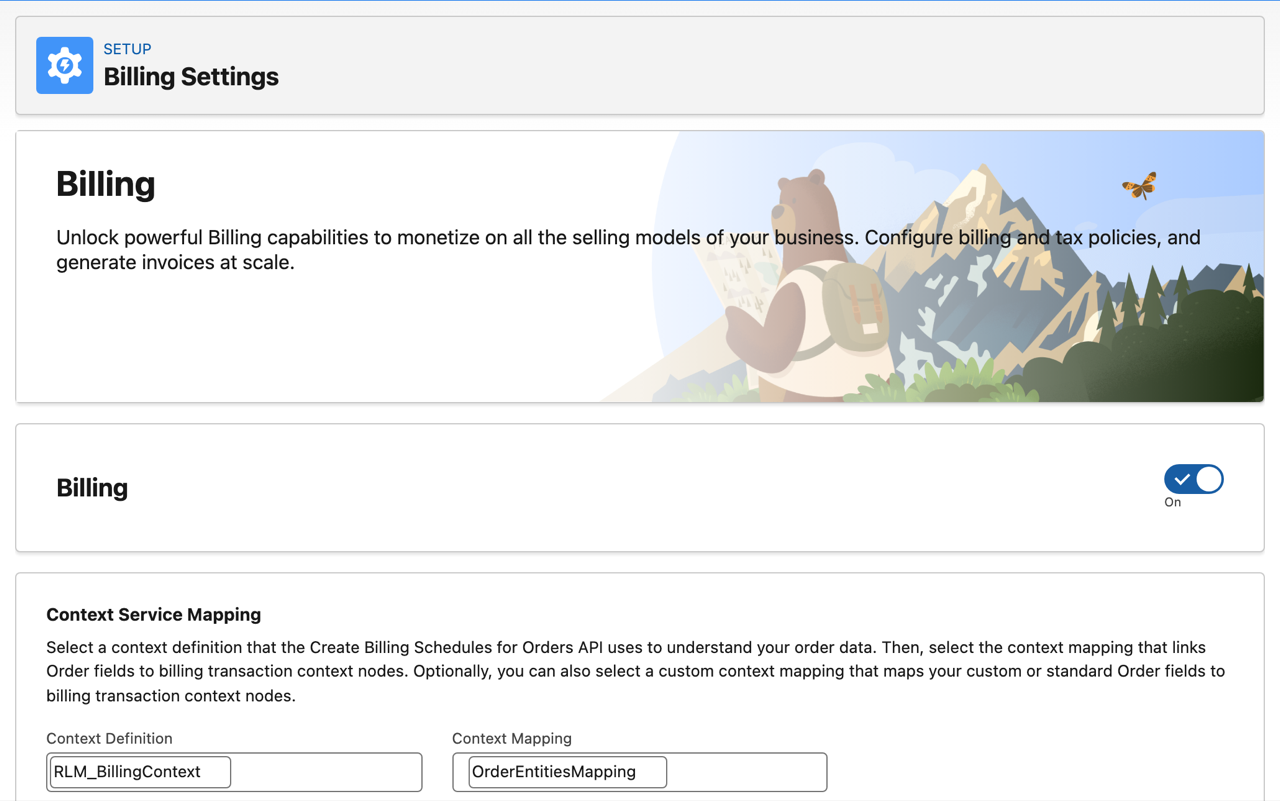
RLM_BillingContext, the context definition that turns orders into billing schedules.Billing is turned on in Setup on the Billing Settings page. Its Billing Defaults section holds:8
- the org default billing treatment, tax treatment, and legal entity
- the Data Processing Engine definition that closes legal entity accounting periods
The Trailhead module names the other settings that matter:9
- Convert Negative Invoice Lines to Credit Memo Lines
- the credit application level
- Apply Credits to Posted Invoices
- Store Transaction Amount in Corporate Currency
Trailhead gives the credit application level as invoice line or invoice. Winter '27 labels the two choices Line Level and Header Level. With the Billing license the setting is called Credit, Refunds and Payment Application Level.10
The Context Service Mapping section is where you select the extended BillingContext and its source mapping.11
Access comes from persona permission sets:12
| Permission set | What it's for |
|---|---|
| Billing Admin | Policies, treatments, legal entities, defaults |
| Billing Operations User | Invoice runs |
| Billing Customer Service User | On-demand invoices, suspend and resume |
| Credit Memo Operations User, Tax Admin, Accounts Receivables Admin | Credit memos, tax, and accounting periods |
| Three Billing-license personas | Collections and payments |
One trap: an invoice batch run fails when the billing permission sets arrive through a permission set group. At least one System Administrator needs Billing Admin and Data Pipelines Base User assigned directly.13
Billing policies, treatments, and treatment items
In short: a policy on the product picks a treatment, and the treatment's items say when and how much to bill.
Three records nest inside each other:
- Billing policy. It sits on the product record. It decides whether the product is billed at all and, if so, in advance or in arrears.14
- Billing treatment. The policy holds treatments. Each one can be scoped to a legal entity, and carries Exclude from Billing and a milestone billing flag.15
- Billing treatment item. Each treatment holds items. An item sets the timing and amount of one billing event, 100% of the amount by default.
Item fields to know:16
- Type: Percentage or Flat Amount.
- Billing Type: Advance or Arrears.
- Controller: whether the group's value wins over the schedule's.
- Zero-amount handling: what to do with a zero amount.
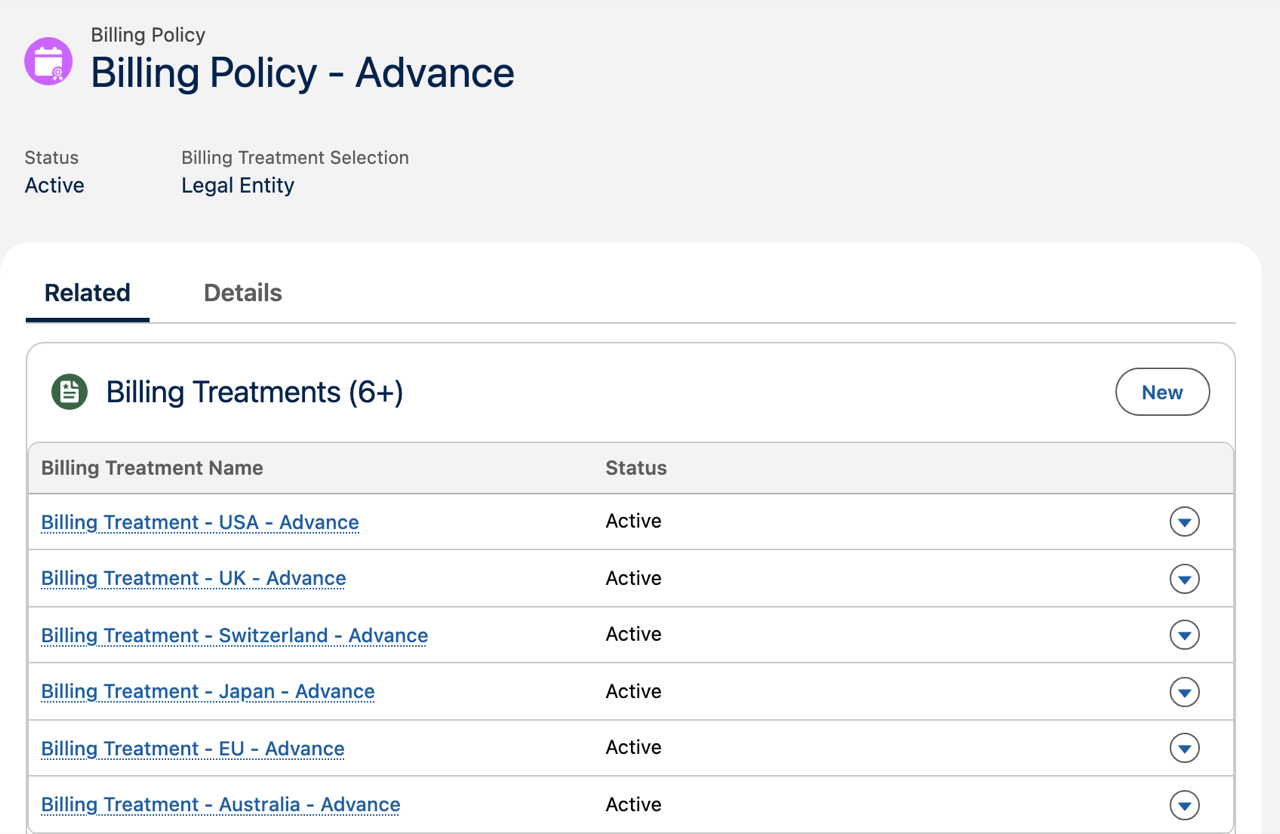
Billing treatment resolution decides which treatment an order product gets. The policy's Billing Treatment Selection is Default, Manual, or Legal Entity.17
- With Legal Entity, the order product's legal entity (or the org default) is matched against the policy's treatments.
- If none matches, the policy's default treatment is used.
- A product without a policy uses the org default treatment.
- If there is no default, or the records are not active, the billing calculation fails.18
In our example, QB API Management Solution carries Billing Policy - Advance, whose selection is Legal Entity. The order's legal entity is Default Legal Entity - US, so the product gets Billing Treatment - USA - Advance.1
Records are created top-down and activated bottom-up: items, then treatments, then the policy.19
Advance and arrears move the next billing date. Take a monthly product starting January 1 with billing day of month 15:16
| Billing Type | Next billing date | When it invoices |
|---|---|---|
| Advance | December 15 | At the start of each period |
| Arrears | January 15 | On the last day of each period |
The last column comes from the period boundary article.20
Billing schedules and groups
In short: a schedule says when one order product is invoiced; a group collects that product's schedules, and invoicing processes the group.
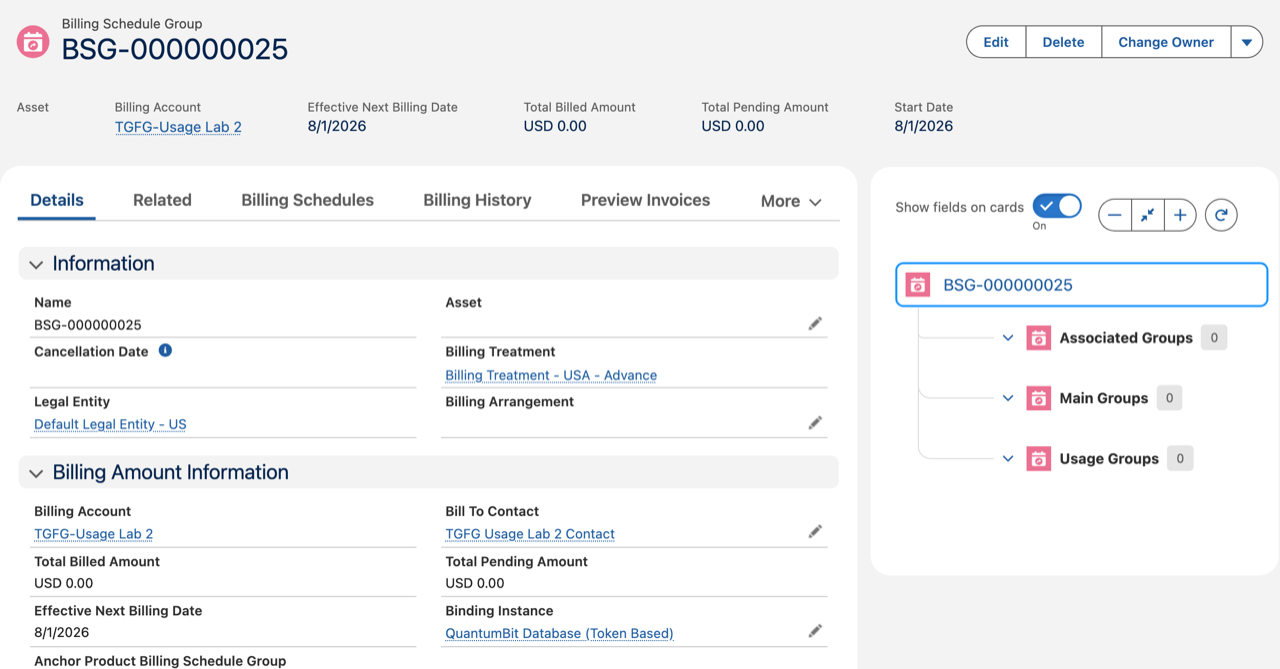
- Billing schedule. Defines when and how one order product is invoiced: total amount, start and end dates, next billing date, billing treatment, billing term unit, and bill day of month.9
- Billing schedule group. Consolidates the schedules for one order product. It is what invoicing processes.
- Billing period item. Each invoiced period of a schedule becomes one.
When an asset is amended, canceled, or renewed, the new order adds a schedule to the same group. The new schedule has Category Amendment, Cancellation, or Renewal and a link to the original schedule, so the group nets to the right quantity. Bundles get a main group for the root and associated groups per child.21
Schedule statuses are Ready for Invoicing, Processing, Error, and Completely Billed.22
Periods, proration, and suspension
In short: the period boundary sets where each billing period starts, proration comes from pricing, and a suspension defers charges.
The period boundary decides where periods start:
| Period boundary | Where each period starts |
|---|---|
| Align to Calendar | Calendar months or years |
| Anniversary | The order's start day |
| Day of Period | A chosen day, plus a start month for quarterly or annual |
| Last Day of Period | The last day, so usage is collected first |
Quarterly and semiannual frequencies support only Anniversary and Day of Period.23 Our example uses Anniversary, so its periods start on the 25th.1
Proration is the adjustment when a subscription starts or ends inside a period. It is not a billing setting. It comes from the proration policy in pricing, which has a remainder strategy and an Allow partial proration periods option.24
Suspend and resume. You can suspend billing from an Account or a Billing Schedule Group for a date range.25
- Nothing is invoiced in the window.
- The skipped charges are billed when billing resumes, unless you issue a credit memo.
- In Winter '27, Billing checks suspensions as of the invoice run's target date, not the date the run happens.26
Two more schedule behaviors:
- Invoice grouping (Billing license). The invoice group type on a schedule (Default, Billing Schedule, or Custom) decides whether invoices consolidate or split.27
- Usage products. They get a schedule and group per binding instance and usage resource. The schedule stays Ready for Invoicing and is never Completely Billed. Its invoice lines carry the liable summary dates and overage quantities.28
Generating invoices
In short: there are three ways to get an invoice: a scheduled run, an on-demand action, or an API.
| Way | What it is | Use it for |
|---|---|---|
| Scheduled | An invoice scheduler on the Billing Batch Schedulers tab | Regular invoicing |
| On demand | The Generate Invoices quick action | One account or one order, now |
| Ingestion | The Invoice Ingestion API | Invoices from any record or external system |
The invoice scheduler has these settings:13
- A start date and time zone, and an Active flag.
- A Post invoices checkbox. Deselected, the run creates draft invoices.
- A frequency of Once, Daily, Weekly, or Monthly. Start run now makes it a one-time run.
- A target date. Schedules whose next billing date is on or before it are picked up. Winter '27 can also select schedules by a billing period count instead of, or as well as, the target date.
- An invoice date stamped on the invoice, with offsets.
- Weekend and holiday skipping, and an end date.
- Filters for billing batch, charge type, legal entity, account, and currency.
In our example the schedule's next billing date is September 25, so any run with a target date of September 25 or later picks it up.1
Each execution is an Invoice Batch Run that ends Completed or Failed, with Revenue Transaction Error Logs for failures.29 Limits to know:30
- Runs use Data Processing Engine.
- An invoice holds at most 2,000 invoice lines.
- An org can have 30 active billing batch schedulers.
The Generate Invoices quick action is on the Account layout by default, and you can add it to Order. You pick a target date, an invoice date, and draft or posted. Suspended schedules are skipped. Order invoices appear in the All Invoices related list (new in Spring '26, release 260).31
The Invoice Ingestion API creates standalone invoices from any record or external system. It also turns posted debit memos into draft invoices.32
Draft, posted, and void
In short: an invoice starts as a draft, posting fixes it with actual tax, and voiding reverses a posted invoice with a credit memo.
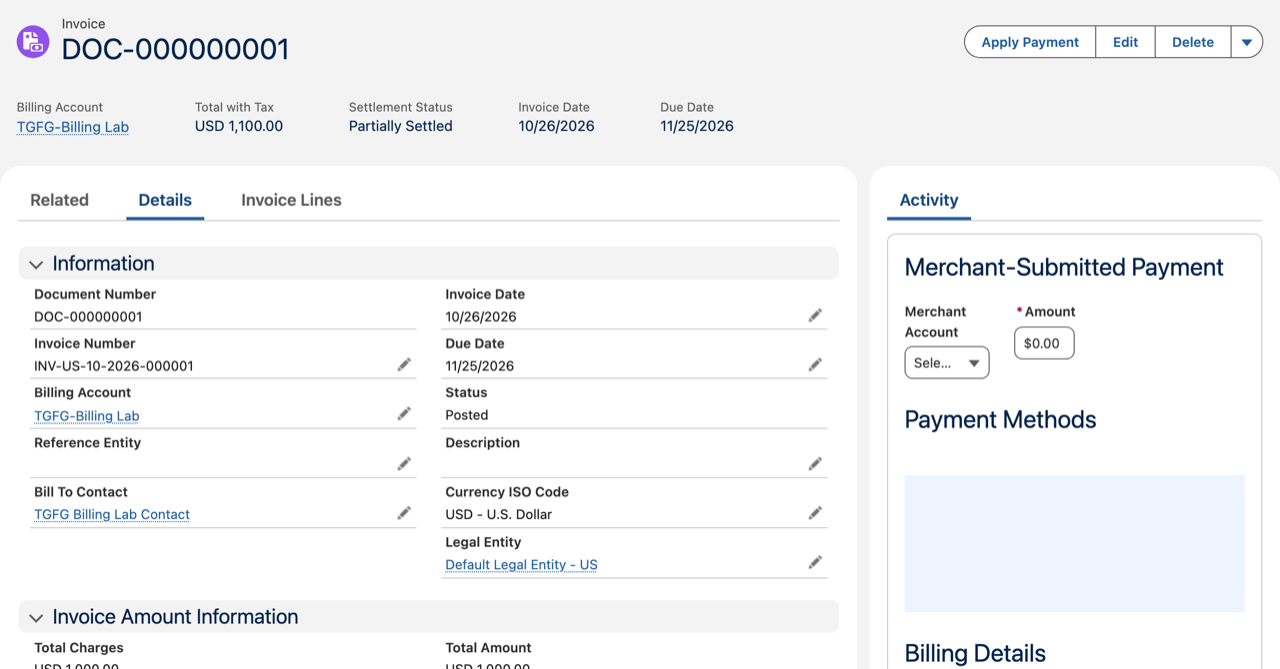
- Invoices start as Draft and become Posted through the Post Draft Invoice action or API.33
- Pending, Error, Canceled, Void In Progress, and Voided are processing states.34
- Draft invoices carry estimated tax. Posted invoices carry actual tax.
Void Invoice works on a posted invoice:35
- It creates a credit memo that mirrors the invoice.
- It resets the billing schedules.
- It voids the related taxes too, and the credit memo's status follows the tax engine's response.
You void newest first, and never an invoice that is partially settled.
With the Billing license, posted invoices go further:
- They become PDFs from the Default Invoice Template or a billing profile template.
- They are emailed using preferences from the billing account, then the legal entity, then Billing Settings.36
- Upcoming invoices can be previewed for the next two billing periods.37
Tax
In short: four records connect a product to a tax engine, and tax is calculated when invoices are generated.
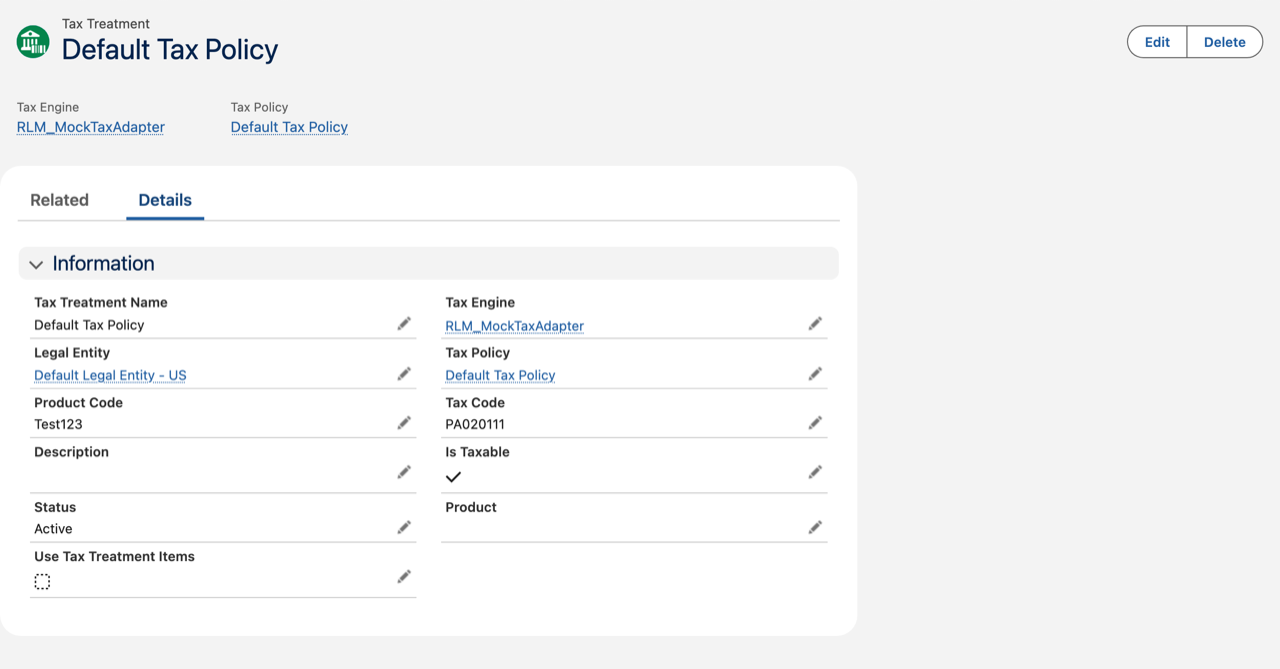
The four records:38
- A tax engine provider registers the Apex adapter.
- A tax engine points at a provider, with a named credential and seller code.
- A tax policy on the product holds tax treatments.
- A tax treatment names the engine, legal entity, tax code, and whether the product is taxable.
Treatments are activated before policies.
How tax is calculated:39
- The tax policy on an order product carries over to its billing schedule.
- At invoice generation, the Calculate Tax API calls the treatment's engine.
- The engine's answer is written as Invoice Line Tax records, which roll up to the line and the invoice.
There are three ways to calculate tax. You can mix engines by legal entity.
| Option | How it works |
|---|---|
| Partner or your own engine | A partner such as Vertex or Avalara, or your own engine, through the TaxEngineAdapter interface38 |
| Revenue Standard Tax Engine (new in Spring '26, release 260) | Matches shipping address, product code, legal entity, and currency against tax rates in the Revenue Standard Tax Entries decision table, and applies rates in priority order. Meant for simple line-level rates, not full compliance. In Winter '27 it can also match custom tax rate fields, using that table or a clone of it tied to the tax engine40 |
| Import | Tax computed outside Salesforce is imported as Invoice Line Tax records onto draft invoices, before posting41 |
Header taxes (new in Spring '26, release 260) capture one tax amount per invoice. They need two settings:42
- The application level set to Header Level. Before Winter '27 this choice was called Invoice.
- Capture Taxes at Header on the tax engine. The checkbox appears only when the application level is Header Level.
In our example's org, the group carries the Default Tax Policy treatment, whose engine is a mock adapter standing in for Vertex or Avalara.1
Legal entities, billing profiles, and payment terms
In short: the legal entity is the company that bills, the billing profile is how a customer is billed, and the payment term says when payment is due.
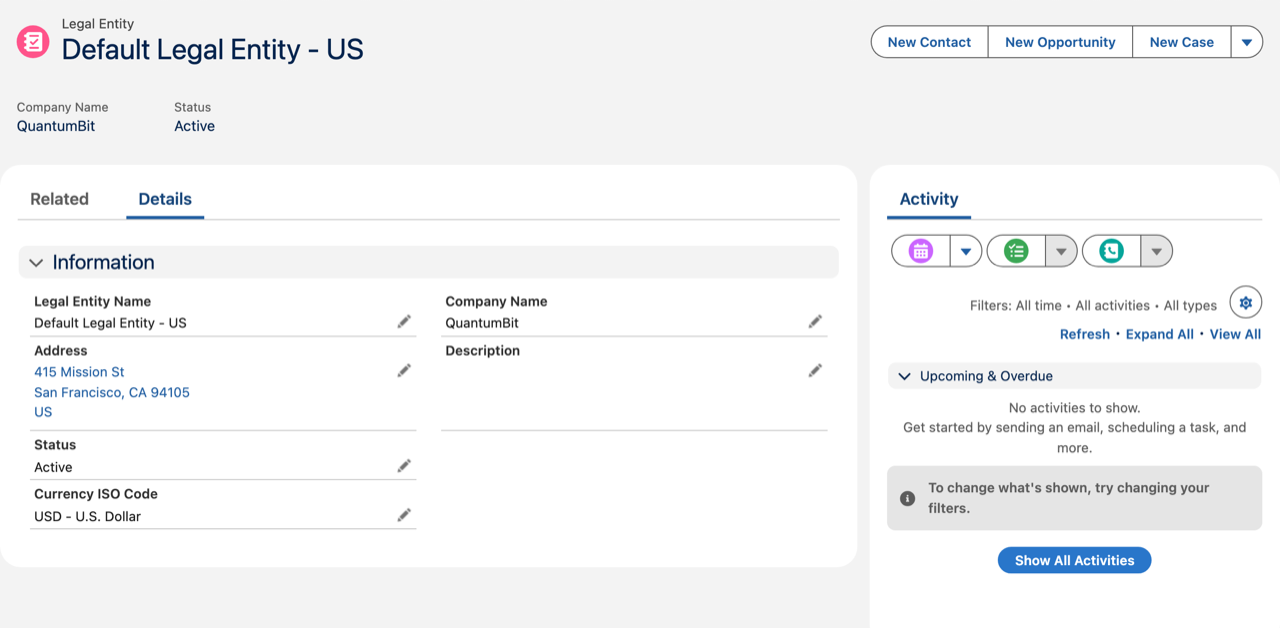
Legal entity. It defines how the business is structured. Its currency is fixed at creation. It governs which billing and tax treatments, finance periods, and finance books apply.43 It flows like this:44
- A billing schedule group takes its legal entity from the order item, then the order, then the org default.
- Invoices inherit it from the group.
- Credit memos inherit it from the referenced invoice.
Billing profile. It's a Billing Account record under an Account, with addresses, bill day of month, bill-to contact, payment terms, and email and invoice templates. Each account has one default profile. Values resolve in this order: the transaction, then the associated profile, then the account's default profile, then org defaults. Editing a profile leaves existing schedules alone.45
Payment term. It sets the due date.46
- A term is active only once it has a payment term item.
- Each term has one Standard item.
- Orders without a term use the org default, and the term flows to the schedules and the invoice.
| Item type | Due date | Example |
|---|---|---|
| Period-Based | Invoice date plus the period | Net 30: posted July 1, due July 31 |
| Derive End of Month and Add Period | Last day of the invoice month plus the period | Net 45 EOM: posted April 15, due June 14 |
Our example uses the org's Default Payment Term, Period-Based for 30 days.1
Credits, debits, payments, and collections
In short: credit memos reduce what a customer owes, debit memos add to it, and payments and collections settle it.
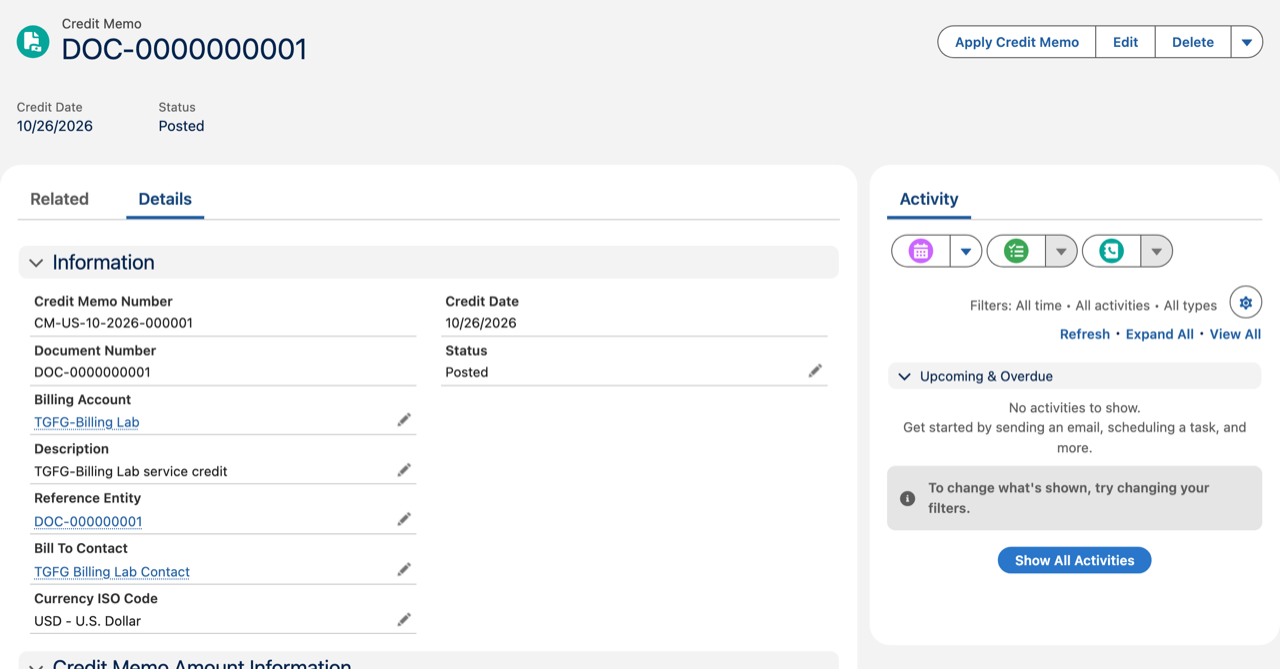
Credit memos are in both licenses. You can create them three ways:47
- Standalone.
- Against invoice lines.
- By automatic conversion of negative invoice lines. Reduce a subscription from 4 to 3 seats and you get a minus $100 line. It becomes a $100 credit memo, applied to the invoice.
Credits apply at the header or line level (Invoice or Invoice Line before Winter '27), and can auto-apply to posted invoices.10
Debit memos add charges after billing, such as late or cancellation fees. They need the Billing license. Voiding a posted credit memo creates an offsetting debit memo (new in Spring '26, release 260).48
Payments need the Billing license and Salesforce Payments.49
- Saved payment methods.
- Payment schedules with items.
- Payment batch runs. They apply payments to the highest invoice line balance first, in the same currency only, with retry rules for failures.50
Refunds. Refund orchestration (new in Summer '26, release 262) returns money to the original payment method when an amendment or cancellation credits a settled invoice. Winter '27 calls this a referenced refund, and it needs the original payment to go through a payment gateway. Winter '27 adds unreferenced refunds, which pay out an available credit balance against a credit memo.51
Write-offs create a credit memo that zeroes the invoice.52
Collections is Billing-license only. It adds collection plans with an item per unpaid invoice, payment promises, and dunning emails.53 Orchestrated dunning uses Dynamic Revenue Orchestrator (DRO) templates.54
Accounting. Accounting periods are in both licenses. Chart of accounts, journals, and foreign exchange gains and losses are Billing-license only.55
The data model
The chain to remember: a product carries a billing policy, which holds billing treatments, each made of billing treatment items. Activating an order turns each order product into a billing schedule group holding one or more billing schedules, and each invoiced period of a schedule is a billing period item. A billing batch scheduler runs invoice batch runs that generate invoices. Their invoice lines carry invoice line taxes, worked out through a tax policy, tax treatment, tax engine, and tax engine provider. A legal entity scopes the billing and tax treatments and books the invoice. A billing account (billing profile) under the account is billed, and a payment term sets the due date. Invoices are reduced by credit memos and settled by payments through payment line invoices; debit memos add charges, and collection plans chase what's unpaid. The diagram in "Where billing sits in the lifecycle" shows the order-to-invoice part of the chain.
| Object | Fields worth remembering |
|---|---|
BillingPolicy |
Status (Draft, Active, Inactive), BillingTreatmentSelection (Default, LegalEntity, Manual), DefaultBillingTreatmentId |
BillingTreatment |
BillingPolicyId, LegalEntityId, ExcludeFromBilling, IsMilestoneBilling, CanChangeBillingFrequency, Status |
BillingTreatmentItem |
Type (Percentage, FlatAmount), Percentage, FlatAmount, BillingType (Advance, Arrears), Controller (BillingScheduleGroup, None), Handling0Amount (CreateInvoice, None), ProcessingOrder, MilestoneType (Date, Event), MilestoneStartDateOffset and unit |
BillingScheduleGroup |
ReferenceEntityId (the asset; the order product is on each BillingSchedule), ProductName, BillingAccountId, LegalEntityId, BillingTreatmentId, TaxTreatmentId, PaymentTermId, PeriodBoundary, ProrationPolicyId, BillDayOfMonth, EffectiveNextBillingDate, BillingSuspensionDate, BillingResumptionDate, BillingArrangementId |
BillingSchedule |
BillingScheduleGroupId (master-detail), Category (Original, Amendment, AmendQuantity, Cancellation, Renewal), Status (ReadyForInvoicing, Processing, Error, CompletelyBilled, WaitingForMilestoneEventAccomplishment), BillingType, BillingMethod (OrderAmount, Evergreen, Usage), BillingTermUnit, BillingTerm, BillDayOfMonth, NextBillingDate, TotalAmount, BilledAmount, PendingAmount, OriginalBillingScheduleId, InvoiceGroupType, CustomInvoiceGroupKey, UsageResourceId, BillingMilestonePlanId |
BillingPeriodItem |
BillingScheduleId, BillingPeriodStartDate, BillingPeriodEndDate, Amount, Status, InvoiceLineId, TotalUsedQuantity, OverageQuantity |
BillingBatchScheduler and InvoiceBatchRun |
Scheduler: Status, FrequencyCadence, StartDate, EndDate, ShouldExcludeWkendAndHldy, ShouldStartRunImmediately. Run: Status, StatusSubtype, TotalInvoicesGenerated, TotalInvoicesFailed, TotalPostedInvoices, TotalDraftInvoices, RecoveryStatus |
Invoice |
InvoiceNumber, DocumentNumber, Status (Draft, Posted, Pending, Error, Canceled, Void In Progress, Voided), CreationMode, InvoiceDate, DueDate, PostedDate, TotalAmount, TotalTaxAmount, Balance, SettlementStatus (Not Settled, Partially Settled, Settled), BillingAccountId, LegalEntityId, PaymentTermId, BillToContactId, SequencePolicyId, TotalTaxesCapturedAtHeader |
InvoiceLine and InvoiceLineTax |
Line: BillingScheduleId, Product2Id, Quantity, UnitPrice, ChargeAmount, TaxAmount, Balance, TaxTreatmentId, TaxProcessingStatus, IsUsageBasedInvoiceLine, UsageOverageQuantity, ConvertedNegAmount. Tax: TaxAmount, TaxCode, TaxRate, TaxName, TaxEffectiveDate, TaxExemptAmount |
LegalEntity |
Name, CompanyName, Status, address fields, EmailTemplateId, ShouldAttachInvoiceDocToEmail; currency is fixed at creation |
BillingAccount (billing profile) |
AccountId, IsDefaultBillingProfile, PrimaryBillAddr, BillToContactId, SavedPaymentMethodId, DoesSkipAutomaticPayments, InvoiceDocumentTemplateId, BillingSuspensionDate, BillingResumptionDate, TaxIdentificationNumber |
PaymentTerm and PaymentTermItem |
Term: Status, IsDefault. Item: Type (Period-Based, Derive End of Month and Add Period), Period, PeriodUnit, PaymentTimeframe (Standard, one per term) |
TaxPolicy, TaxTreatment, TaxEngine, TaxEngineProvider |
Policy: TreatmentSelection, DefaultTaxTreatmentId. Treatment: TaxEngineId, LegalEntityId, TaxCode, ProductCode, IsTaxable. Engine: TaxEngineProviderId, MerchantCredentialId (named credential), SellerCode, ShouldCaptureTaxesAtHeader. Provider: ApexAdapterId |
CreditMemo, DebitMemo |
Credit: ReferenceEntityId (invoice), Status, Balance, TotalCreditAmountApplied, SettlementLevel, Category, ReasonCode. Debit: ReferenceRecordId, InvoiceGenerationStatus, ReasonCode (Billing license) |
Payment, PaymentSchedule, PaymentScheduleItem, PaymentLineInvoice |
Payments data model, Billing license only |
CollectionPlan, CollectionPlanItem |
One plan per account, one item per unpaid invoice, Billing license only |
There are two context definitions:
BillingContext: orders, both licenses, with the mappingsOrderEntitiesMappingand BSGEntitiesMapping.StandaloneBillingContext: any transaction, Billing license, with the mappingsTransactionMappingand BSGEntitiesMapping.
Which action when
Advanced license or the Billing add-on?
| Customer needs | License |
|---|---|
| Invoices for one-time and subscription products, tax through an engine, credit memos, billing profiles, legal entities, accounting periods, Invoice Preview API | Revenue Cloud Advanced (Invoice Management) |
| Milestone invoices, usage invoices, invoice PDFs and email, previews in the UI, sequential numbering, invoice grouping, billing arrangements, standalone billing | Revenue Cloud Billing |
| Payments, refunds, debit memos, collections and dunning, write-offs, disputes, chart of accounts and journals | Revenue Cloud Billing |
How does an order product get its billing treatment?
| Situation | Treatment used |
|---|---|
| Treatment set on the order product | That treatment |
| Product has a policy with selection Default or Manual | The policy's default treatment |
| Product has a policy with selection Legal Entity | The treatment whose legal entity matches the order product's legal entity (or the org default legal entity), else the policy's default |
| Product has no policy | The org default billing treatment from Billing Settings |
| No org default, or the records are not active | Billing calculation fails |
Advance or arrears?
| Customer says | Billing Type on the treatment item |
|---|---|
| "Invoice at the start of the period, before delivery" (subscriptions, licenses) | Advance: next billing date is the nearest billing day on or before the start date |
| "Invoice after the period, once delivered or consumed" (services, usage) | Arrears: next billing date is the nearest billing day after the start date |
| "Don't invoice this product at all" (internal or included items) | Exclude from Billing on the treatment |
| "Invoice in installments as the project hits checkpoints" | Turn on milestone billing with percentage items per milestone (Billing license) |
Which period boundary?
| Requirement | Period boundary |
|---|---|
| Periods follow calendar months or years | Align to Calendar |
| Periods start on the day the subscription started | Anniversary |
| Periods start on a fixed day, and for quarterly or annual on a fixed month | Day of Period with Period Boundary Day and Start Month |
| Invoice on the last day so all usage is captured first | Last Day of Period |
| Quarterly or semiannual frequency | Only Anniversary or Day of Period are allowed |
Scheduled run, on demand, or ingestion?
| Requirement | Mechanism |
|---|---|
| Recurring invoicing on a cadence, filtered by batch, charge type, legal entity, account, or currency | Invoice scheduler on the Billing Batch Schedulers tab, which creates invoice batch runs |
| One customer or one order, right now | Generate Invoices quick action on the Account (default) or Order (add to layout) |
| Invoices created in another system, or a posted debit memo that must become an invoice | Invoice Ingestion API |
| Check what the next two periods will bill before committing | Invoice previews (API on Advanced, UI and PDF on Billing) |
Draft or posted from the run?
| Requirement | Setting |
|---|---|
| Finance reviews before sending; tax is only estimated | Deselect Post invoices, then use Post Draft Invoice or the batch action later |
| Send now, with actual tax, credits auto-applied, and PDFs and emails to follow | Select Post invoices |
Which tax approach?
| Requirement | Approach |
|---|---|
| Vertex, Avalara, or another partner engine | Partner AppExchange app through the TaxEngineAdapter interface, tax engine plus named credential |
| In-house tax service | Custom Apex adapter implementing TaxEngineAdapter |
| A few flat rates by country, state, product code, and legal entity, no vendor | Revenue Standard Tax Engine with tax rates and the built-in decision table (Spring '26) |
| Tax computed outside Salesforce and loaded afterward | Treatments marked not taxable, import Invoice Line Tax records on draft invoices, then post |
| One tax amount per invoice instead of per line | Header taxes: application level Header Level (called Invoice before Winter '27) plus Capture Taxes at Header (Spring '26) |
Which correction document?
| Situation | Use |
|---|---|
| Quantity or price reduced after invoicing | Negative invoice line converted to a credit memo automatically, then applied |
| Goodwill credit unrelated to a specific line | Standalone credit memo |
| Whole posted invoice is wrong | Void Invoice, which creates a mirroring credit memo and rebills |
| Customer was undercharged or owes a fee | Debit memo, convertible to an invoice (Billing license) |
| Customer shouldn't be invoiced for a while | Suspend Billing on the account or billing schedule group, then Resume |
| Balance will never be collected | Write-off, which creates a credit memo to zero (Billing license) |
Where does a billing value come from?
| Value | Order of precedence |
|---|---|
| Bill-to contact, address, payment term, bill day of month | Transaction, then the associated billing profile, then the account's default billing profile, then org defaults |
| Legal entity on a billing schedule group | Order item, then order, then org default legal entity |
| Invoice email preferences | Billing account, then legal entity, then Billing Settings |
| Proration behavior | Proration policy from the pricing configuration, not a billing record |
Watch out
Billing schedules are created when the order is activated, not when the quote is accepted or the order is created. The trigger is the Order to Billing Schedule flow, which calls the Create Billing Schedules for Orders API through BillingContext.
Once Billing is on, an order without a Bill To Contact, Billing Address, and Shipping Address fails activation. Billing also can't be turned on while Subscription Management is on.
A billing treatment item is not a billing treatment. The treatment groups the items and carries the legal entity, Exclude from Billing, and the milestone flag. The item carries advance or arrears, percentage or flat amount, and milestone dates.
Activation goes bottom-up: items, then treatments, then the policy. Tax treatments are activated before tax policies too. Only active records take part in resolution; inactive ones make the billing calculation fail.
A product with no billing policy still bills, using the org default billing treatment from Billing Settings. It fails only when there is no org default.
Proration is a pricing setting (the proration policy), not a billing one. Period boundary and billing day of month are billing settings.
These need the Billing license: milestone billing, usage invoicing, invoice PDFs, invoice email, sequential numbering, invoice grouping, debit memos, payments, collections, write-offs, and journals. These don't: credit memos, tax, legal entities, accounting periods, and suspend and resume.
Deselecting Post invoices on a scheduler gives draft invoices with estimated tax. Actual tax is calculated only when the invoice is posted.
Voiding creates a credit memo; it doesn't delete the invoice. You void newest first, and you can't void an invoice that a credit memo, payment, or write-off has partially settled.
Suspend Billing skips invoices in the window, but the skipped charges are billed when billing resumes. Issue a credit memo if they shouldn't be.
Legacy Salesforce Billing habits fail here. There's no Bill Now button, no Billing Rule with Generate Invoice, and no Usage Summary. Use Generate Invoices, Exclude from Billing on the treatment, and usage billing schedules fed by liable summaries instead.
Two questions worth being able to answer, both from the Trailhead quiz for the Design module. Which record is processed to generate invoices? Billing schedule groups, made of billing schedules. What does BillingContext do? It reads order data to create billing schedules.
Numbers worth knowing: 2,000 invoice lines per invoice; 30 active billing batch schedulers; 5,000 invoice emails a day to bill-to contacts; up to 20 milestones configured at once; invoice previews for the next 2 billing periods; one Standard payment term item per payment term; one default billing profile per account; 100% of the amount billed by a default treatment item; Net 30 posted July 1 is due July 31; Net 45 EOM posted April 15 is due June 14.
If you know Salesforce CPQ
The legacy comparison for this area is Salesforce Billing, the blng package that shipped alongside Salesforce CPQ.
| Salesforce CPQ term | Revenue Cloud term | What changed |
|---|---|---|
Billing Rule (blng__BillingRule__c) with Generate Invoice yes or no |
Billing policy with billing treatments, Exclude from Billing on the treatment | The "bill or not" decision moved to the treatment; the policy resolves a treatment by legal entity |
Billing Treatment (blng__BillingTreatment__c) |
Billing treatment with billing treatment items | Items carry advance or arrears, percentage or flat amount, zero-amount handling, and milestone timing |
Invoice Scheduler (blng__InvoiceScheduler__c) |
Invoice scheduler on the Billing Batch Schedulers tab | Same job; adds target and invoice date offsets, holiday skipping, and filters by batch, charge type, legal entity, account, and currency |
Invoice Run (blng__InvoiceRun__c) |
Invoice Batch Run | Runs on Data Processing Engine with a status subtype per stage and error logs |
| Bill Now on the order or order product | Generate Invoices quick action on Account or Order | Same idea, with a target date and a draft or posted choice |
| Billing schedules built per order product line | Billing schedule inside a billing schedule group | Amendments, cancellations, and renewals add categorized schedules to the same group instead of new order products only |
Usage Summary (blng__UsageSummary__c) and Usage records |
Liable summary and usage billing schedules from Rate Management | Rating happens in Usage Management; billing reads the liable summary and needs the Billing license |
Payment Run (blng__PaymentRun__c) and Payment Scheduler |
Payment batch run, payment scheduler, payment schedules and items | Billing license, Salesforce Payments, saved payment methods, retry rules |
Tax Rule (blng__TaxRule__c) and Tax Integration |
Tax policy, tax treatment, tax engine, tax engine provider | Adapter interface for partners, plus the Revenue Standard Tax Engine for flat rates |
Legal Entity (blng__LegalEntity__c) |
LegalEntity standard object |
Now flows onto every billing transaction and drives treatment selection, grouping, and accounting periods |
Credit Note (blng__CreditNote__c) and Debit Note (blng__DebitNote__c) |
Credit memo and debit memo | Credit memos in both licenses, with automatic conversion of negative lines; debit memos need the Billing license |
Finance Book (blng__FinanceBook__c) and Finance Period |
Accounting period and legal entity accounting period | Chart of accounts and transaction journals are Billing-license features |
Revenue Recognition Rule (blng__RevenueRecognitionRule__c) and revenue schedules |
No legacy equivalent | Revenue recognition isn't part of Billing; only the accounts receivable subledger is |
| Billing Day of Month and payment terms on the Account | Billing profile (Billing Account record) with bill day of month, payment term, and bill-to contact | Several profiles per account, one default, resolved after the transaction's values |
Newer than the exam
The Rev-Con-201 exam is written against Summer '25. These arrived later. They matter on real projects, but the exam won't ask about them yet.
- Legal entity based invoice grouping, legal entity defaulting on billing transactions, and billing profile enhancements, including the Billing Accounts related list that replaced Account Billing Accounts (Winter '26, 258).
- Credit memo draft and post, the credit memo apply flow, and crediting taxes at the original invoice's rate (Winter '26, 258).
- Asset transfer, co-terminous contracts, pull-in and push-out, and consumer price index (CPI) uplift billing support (Winter '26, 258).
- All Invoices related list on the Order record, added to the layout once per org (Spring '26, 260).
- Revenue Standard Tax Engine, header taxes, value-added tax (VAT) support, and extended tax treatment resolution for countries such as Brazil and India (Spring '26, 260).
- Functional currency for accounting summaries per legal entity (Spring '26, 260).
- Billing service requests and dispute management, and on-demand invoice PDFs with billing profile templates (Spring '26, 260).
- Credit memo sequencing, credit memo void with automatic debit memo, and converting debit memos to invoices through the Invoice Ingestion API (Spring '26, 260).
- Imported payment tokens, rule-based cash application, payment retry rules, and a default payment method per account (Spring '26, 260).
- Billing-side support for advanced amendments: price amendments without a quantity change, change end date, swaps, and rollback of future-dated changes through compensating schedules (Spring '26, 260).
- Upgraded invoice batch run that streams invoices in parallel through the Batch Management Service (Summer '26, 262). For the exam, invoice runs use Data Processing Engine.
- Billing Settlements Central dashboard, included by default in the Billing app (Summer '26, 262).
- Statement of Account, refund orchestration, a single payment request for multiple invoices, and Pay Now links (Summer '26, 262).
- Collections Agent, Billing Service Assistance Agent, and the out-of-the-box dunning template in Salesforce Go (Summer '26, 262).
- Milestone billing for amended billing schedules and billing frequency high-low support for new orders (Summer '26, 262).
- The credit, payment, and refund application level relabeled Header Level and Line Level, formerly Invoice and Invoice Line (Winter '27, 264).
- Invoice schedulers that select schedules by billing period count as well as target date (Winter '27, 264).
- Billing suspensions checked as of the invoice run's target date instead of its run date (Winter '27, 264).
- Revenue Standard Tax Engine extended with custom tax rate fields and a cloned decision table (Winter '27, 264).
- Unreferenced refunds that pay out an available credit balance against a credit memo (Winter '27, 264).
Sources
Every numbered note above links to the Salesforce article it comes from. This page is current to Winter '27 (release 264): each note was checked against the Winter '27 version of its article.
- Screenshots from our lab org (built with Salesforce's launchpad), Winter '27 (264), taken 2026-11-08
- Salesforce Help and the Revenue Lifecycle Management Developer Guide, Winter '27 (264), as published 2026-09-04 to 2026-09-07; checked by Taggalong 2026-10-25
- Trailhead: Billing Basics in Agentforce Revenue Management, read 2026-09-22
- Trailhead: Agentforce Revenue Management Design, read 2026-09-22
-
Checked by Taggalong in a Revenue Cloud org, 2026-10-25 ↩↩↩↩↩↩↩
-
Trailhead: Billing Basics in Agentforce Revenue Management, Navigate the Full Billing Lifecycle ↩
-
Revenue Management License Comparison (not in our Winter '27 snapshot, so not re-checked for this release) ↩
-
Select Default Billing Treatment, Tax Treatment, and Legal Entity ↩
-
Trailhead: Agentforce Revenue Management Design, Generate Invoices ↩↩
-
Generate Invoices Automatically Based on Billing Schedules ↩↩
-
Trailhead: Billing Basics in Agentforce Revenue Management, Explore Billing Features and Roles ↩
-
Define Billing Milestones; Method 1: Configure Billing Milestones Using Billing Treatments ↩
-
Tax Calculation Solutions; Create Tax Policies and Treatments ↩↩
-
Legal Entity Automatic Population, Usage, and Considerations ↩
-
Automatic Conversion of Negative Invoice Lines into Credit Memo Lines ↩