
Between an accepted quote and a delivered product sits the order. It carries the deal into fulfillment, where Dynamic Revenue Orchestrator breaks it into the work that downstream systems actually do. The contract that often sits beside it has its own page, Contracts. This page explains how orders work, which setup fits which requirement, and the traps we see people fall into. On the Rev-Con-201 exam, order questions sit inside the Contracts and Orders section.
The example we use throughout: a QuantumBit customer accepts a quote for one QB API Management Solution subscription, $12,000 a year from September 25. It's the same deal as on the Assets page. The quote becomes one order, the order is activated and submitted, and fulfillment splits it into three technical products: a finance service, an API platform service and a license service. It's the order the Orders lab looks at in a real org.1
How it works
Where the contract fits
In short: the order runs fulfillment; a contract, when there is one, is created beside it from the same quote.
- Order Management in Revenue Cloud is the Order object, plus Transaction Management features, plus Dynamic Revenue Orchestrator (DRO). (On the name: Salesforce's Winter '27 help says Revenue Management, while its release notes and Trailhead also say Agentforce Revenue Management. It's one product. We say Revenue Cloud.)
- Salesforce Contracts runs the contract: authoring, clauses, documents, negotiation, signature and the negotiated prices. The Contracts page covers it.
- Where they touch: a contract is linked to an order through the order's
ContractId, and only while the order is still Draft. Create the contract from the quote with New Contract before activating the order, because contract item prices come from quote lines, never from order products.34
Quote to order
In short: Create Order turns an accepted quote into one or more Draft orders.
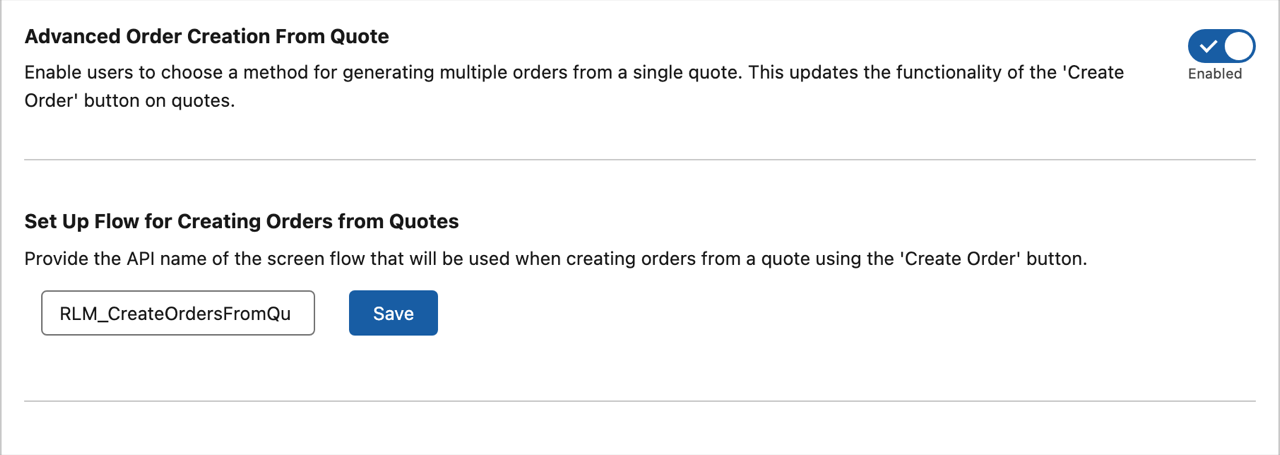
Create Order copies products, quantities, pricing and tax from the quote.5 In our example it makes one order for the QB API Management Solution line.
To split a quote into several orders:6
- Turn on Advanced Order Creation From Quote in Revenue Settings.
- Name a flow made from the Create Orders From Quote template.
- The button then offers Create Single Order, Create Order by Group (one per quote line item group) and Create Order by Field (one per value of a field such as Start Date).
Rules for split orders:
- New orders are Draft.
- At most 200 orders per quote, each priced independently.
- Bundle components, pricing-dependent lines and ramp groups can't be split.
- Header adjustments carry over but are not reapplied.
- Partial orders (some of the lines) are API only.
The action is createOrdersFromQuote; createOrderFromQuote is deprecated.78
An order created directly, without a quote, needs its own RevenueLifecycleManagement usage assignment. An Apex trigger can add it.910
Order lifecycle and object state definitions
In short: Order Status ships with two values; an object state definition adds the rest and the moves between them.
Order Status ships with Draft and Activated. A lifecycle adds states such as Submitted, Processing, Fulfilled and Rejected through an object state definition with:1112
- Reference Object Order
- Reference Field Status
- Application Usage Type
RevenueLifecycleManagement
Additional Field and Additional Field Value scope a definition. For example, two definitions on Channel__c, one for business-to-business (B2B) orders and one for business-to-consumer (B2C) orders.
Build it in this order:
- Create the picklist values.
- Create object state values named exactly as the status API names.13
- Create transitions.14
- Optionally, add custom permissions on values and transitions.15
- Set the definition Active.16
The help example runs Draft, Ready to Submit, Submitted, Processing, then Fulfilled or Rejected, with nothing out of the last two.
Activation, submission, assetization
In short: activating an order runs two flows: one makes the assets, the other sends the order to DRO.
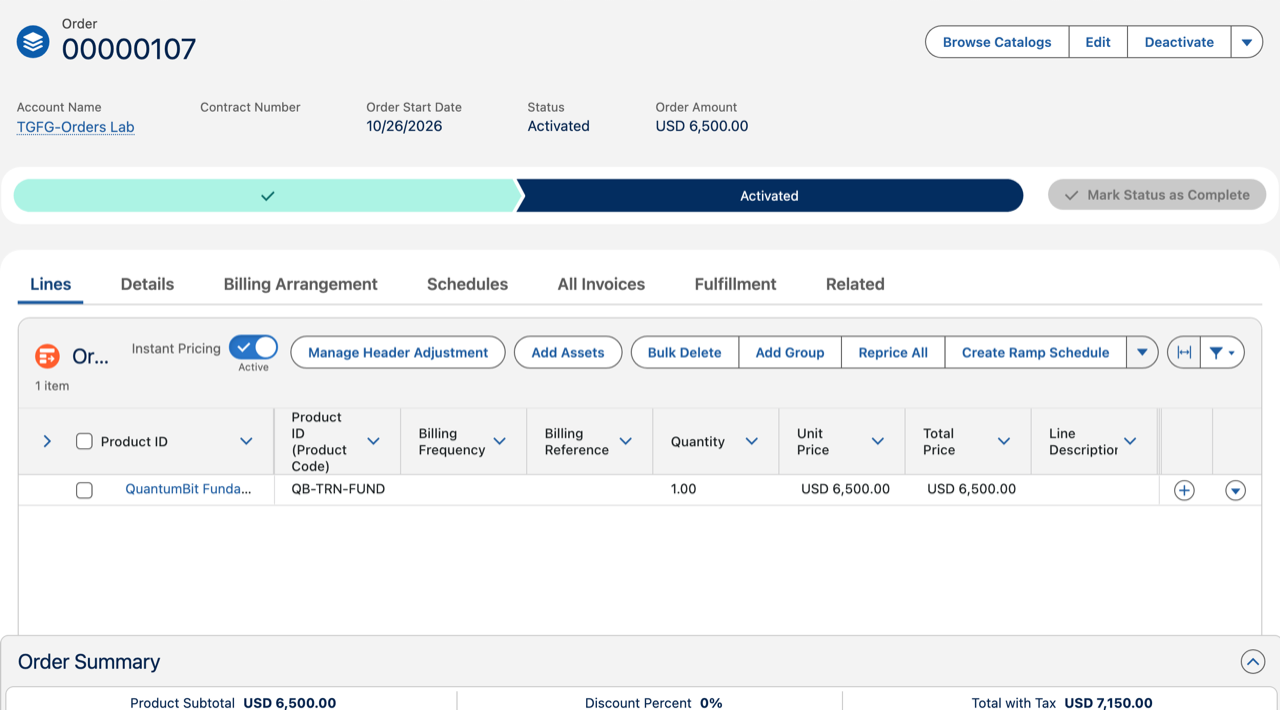
Activation needs the Activate Orders app permission.17 Two record-triggered flows on Order updated to Activated do the rest. Each checks the usage assignment first.18
| Flow calls | What it does | Permission |
|---|---|---|
| Create or Update Asset from Order | Writes the assets | Assetize Order permission set |
| Submit Order | Sends the order to DRO | Submit Transaction User |
Submit Order takes orderId and callType, Synchronous or Asynchronous (the default).19
- It returns submitStatus SUCCESS, ERROR, SUBMITTED or REJECTED.
- It returns fulfillmentPlanId only when synchronous.
Orchestration Submission Status on the order is Submitted, Decomposed, Rejected, Completed, AssetizationFailed or Superseded.2 Our example order shows Decomposed.1
The submitting user must hold Assetize Order, or nothing is assetized when the plan ends.2021
Supplemental orders and in-flight changes
In short: change an activated order with a supplemental order; DRO then adjusts the running plan.
An activated, unfulfilled order is changed with a supplemental order:22
- Add a Superseded status and the Change button.
- Click Change. Salesforce copies the order to Draft.
- Lines get Supplemental Change Type Amend, Add or No Change.
- Activating it sets the original to Superseded. If the original went to DRO, the existing plan is updated.
In DRO terms this is an in-flight change, turned on in Dynamic Revenue Orchestrator Settings.2324
- A step definition names an Amend Step Group and a Cancel Step Group to compensate for or roll back completed work.25
- A completed step with neither group stays as it is: DRO doesn't rerun it.25
- A step flagged Point of No Return (PONR) locks its whole bundle once In Progress. Other lines stay changeable. allowOverrideOfPointOfNoReturn is the exception.26
- The plan must be Frozen (all steps completed or pending). Freezing means a step is still running.
- Completed steps become Amended or Canceled. Incomplete ones become Discarded.
DRO: decomposition
In short: decomposition turns what the customer bought into the technical pieces each back-office system delivers.
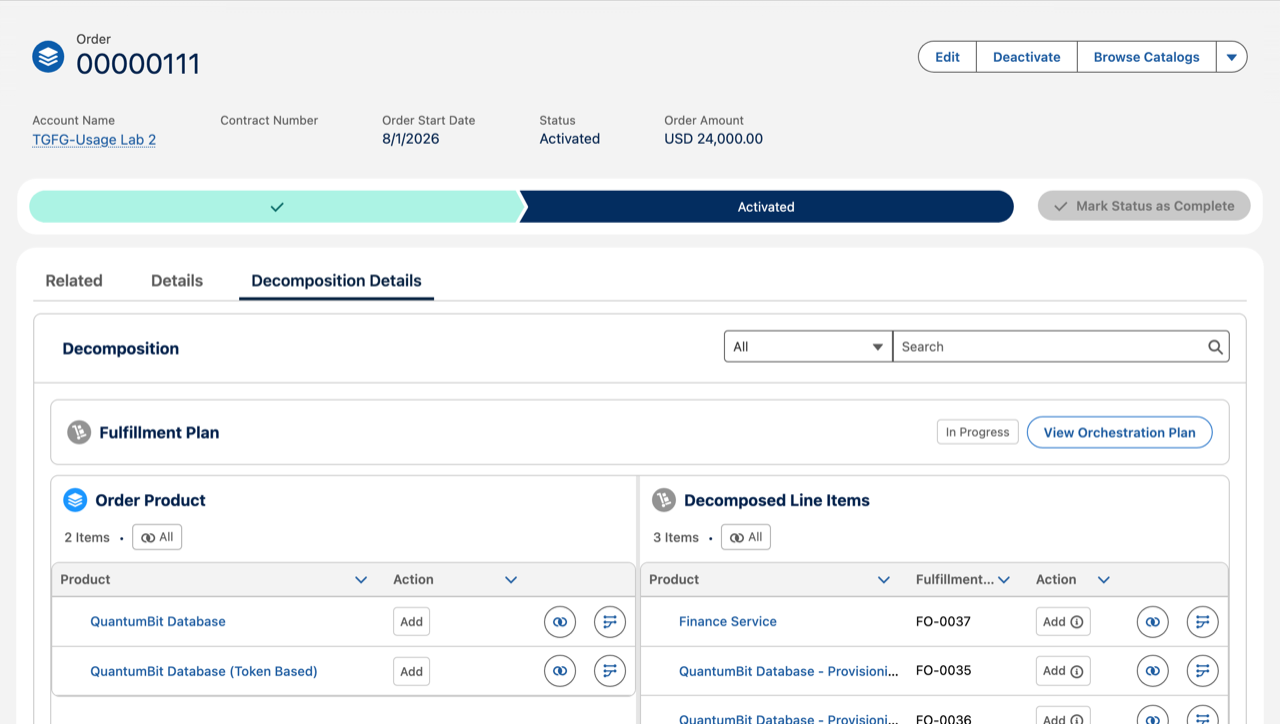
DRO breaks a commercial order into the technical products and tasks needed to fulfill it, then runs a plan.27
The roles:28
- DRO admin: settings, fallout, SLA.
- Fulfillment designer: design.
- Fulfillment operator: queues and manual tasks.
Commercial products are what the customer sees. Technical products are in the catalog but generally invisible, and shaped by downstream systems.2930
- Simple orders skip decomposition.
- It pays off with a large catalog and a decoupled back office.
- Technical products carry Record Type Technical, Decomposition Scope and Is Assetizable.
Decomposition Scope fixes how many instances an order generates, however many commercial lines map to the product:
| Scope | Instances |
|---|---|
| Bundle | One per bundle |
| Order Line Item | One per line |
| Account | One per account |
| Order, Custom | Also on the picklist (Winter '26, release 258)31 |
Fulfillment Quantity Calculation Method is Always One or Aggregate, reconciled on fulfillment assets every 24 hours.32
A Product Fulfillment Decomposition Rule maps a source product or classification to a destination technical product.33
- One source can feed several rules. In our example, QB API Management Solution feeds three.1
- Classification rules are inherited.
- Rules live on the product's Decomposition tab, with a priority. The lower number wins; a tie goes to the most recently modified rule.
- By default every product decomposes. Execution rules (Resource, Operator, Value, such as an Annual Subscription attribute Equals True) restrict when a rule runs: the rule is skipped only when its execution rule evaluates to false.34
- Field and attribute mapping enriches the technical line As Is, by List Mapping or by Expression Set.
Each order line gets an action, Add, Amend, Renew, NoChange or Cancel, which its fulfillment order line items inherit.3536
DRO: orchestration
In short: you design lanes of steps once; each submitted order gets a plan built from them.
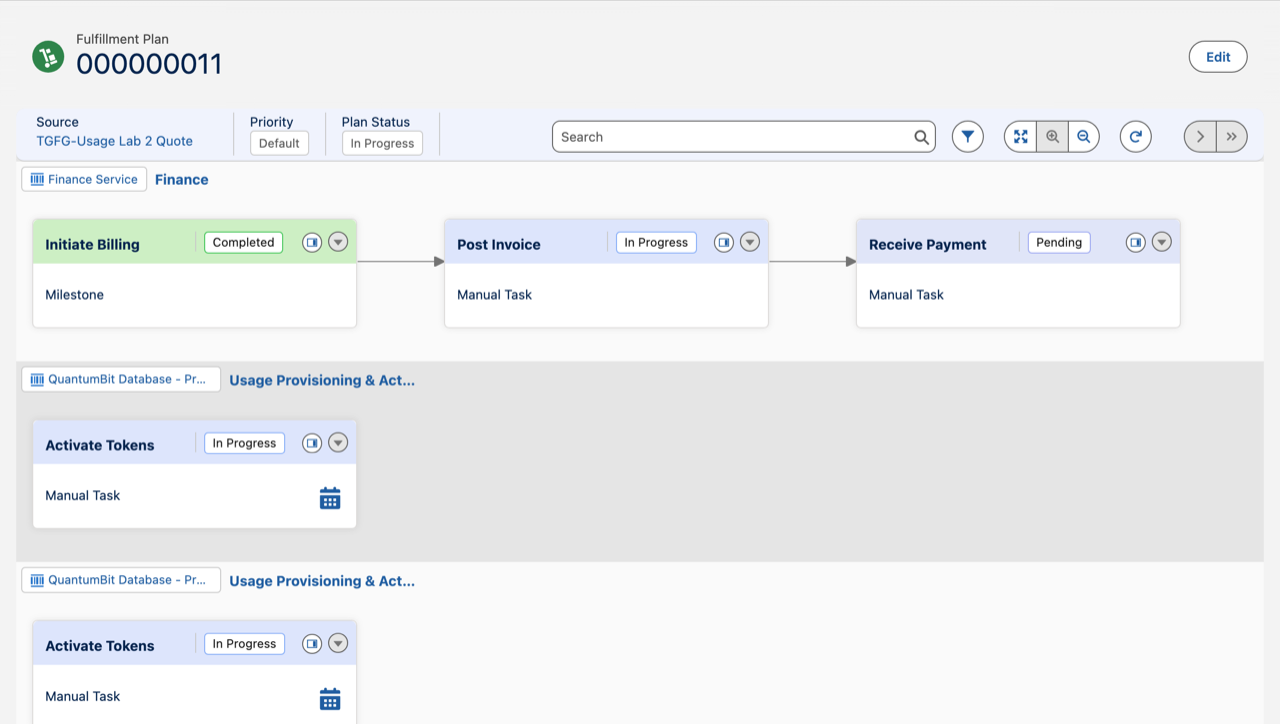
Orchestration design has five steps:3738
- Create a Fulfillment Workspace.
- Create step groups (Fulfillment Step Definition Groups, the swimlanes, usually one per fulfillment system).
- Define steps.
- Set dependencies.
- Define product fulfillment scenarios.
A step definition has a type, a scope and an optional Run As User. The types:39
| Type | What it does |
|---|---|
| Auto Task | Runs a flow |
| Callout | Calls an integration definition |
| Manual Task | Completed by an operator |
| Milestone | Marks a phase boundary or a dependency anchor |
| Pause | Waits, for example until a work order closes |
The org picklist adds StagedAssetize for ramp segments.2 Winter '27 documents it as the Staged Assetize step: it creates assets for ramp segments while the plan runs, instead of at the end, and only for time-aware fulfillment assets.40
The scope decides how many instances of a step there are:41
- Plan: one.
- Bundle
- Line Item
- Cross Plan: for a dependency on another order's plan.
- Custom
Dependencies link steps within or across lanes. A loop breaks the plan.42 A scenario ties a step group to a commercial or technical product. A lane whose technical product was never created is absent. Our example's plan has six steps across the Platform, Provisioning & Activation and Finance lanes, and no Services steps, because nothing on the order decomposes to Project Service.1
Plan states: Not Started, In Progress, Freezing, Frozen, Completed.
Step states:43
| State | Meaning |
|---|---|
| Pending, Ready, In Progress, Completed | The normal path |
| Failed | Retries remain |
| Fatally Failed | Retries exhausted |
| Skipped | Execute On rule not met |
| Amended, Canceled, Discarded | Results of an in-flight change |
| Scheduled | A future-dated step (Winter '26, release 258) |
| On Hold | A callout whose integration definition is offline (Spring '26, release 260) |
When the plan completes, order lines become assets, and fulfillment order lines become fulfillment assets if the technical product is assetizable.44
SLA jeopardy, fallout, permissions
In short: jeopardy rules warn before a step is late; fallout rules decide what happens when it fails.
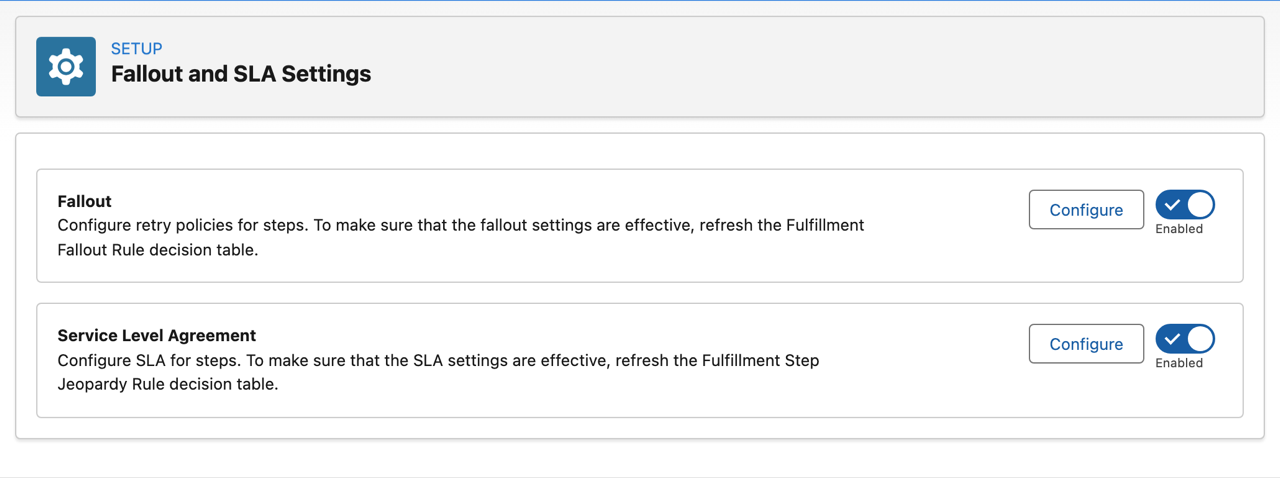
Fallout and SLA Settings turns both on: fallout handling for failed steps and service level agreement (SLA) jeopardy for late ones.45
A jeopardy rule has an Estimated Duration and a Jeopardy Threshold that counts back from it. 24 hours and 1 hour flags the step at 23 hours.46
A fallout rule sets:47
- Retry Policy: Immediate, Monotonous or Staggered (intervals such as 10,15,40).
- Retries Allowed.
- A queue that supports Fulfillment Step.48
Editing either rule needs a decision table refresh.49 In our org, the example's first step, a callout, is Fatally Failed because the named credential it calls doesn't exist, so nothing after it has started.1
- DRO Admin User: settings and entities. It can't submit.
- Fulfillment Designer
- Submit Transactions User
- Submit Transactions and Fulfillment User
- Submit Transactions and Orchestrate User
- Fulfillment Manager/Operator: for queue members. Winter '27 adds that it gives read access to all DRO objects.
The limits are under Watch out.
Amend, renew, cancel at the order level
In short: changes to what a customer owns start from assets, then flow through an order like a new sale.
- Amendments, renewals and cancellations start from the Managed Asset viewer on the account or contract.
- They produce a quote or order, and reach the assets through Create or Update Asset from Order on activation.51
- Swaps, upgrades and downgrades (Spring '26, release 260) are not compatible with DRO.
The Assets page covers the rest.
The data model
The chain to remember:
- A quote becomes one or more orders (Create Order, 1 to 200).
- A contract, when there is one, links back to the quote (
SourceQuoteId) and to the order through Order.ContractId. The Contracts page has its model. - Orders carry an application usage assignment of
RevenueLifecycleManagement. - An order has order items. A supplemental order points at the order it changes through
RelatedOrderId. - Lifecycles are object state definitions with object state values, object state transitions, and Apex or
OmniScriptobject state action definitions. - On the fulfillment side, product fulfillment decomposition rules map a source product or classification to a technical product. An order decomposes into fulfillment orders, whose fulfillment order line items each come from an order item and are assetized to fulfillment assets.
- At design time, a fulfillment workspace holds fulfillment step definition groups (the swimlanes) of fulfillment step definitions, linked by step dependency definitions. Product fulfillment scenarios add a group when its product is ordered.
- At run time, the order's fulfillment plan runs fulfillment steps, each an instance of a step definition.
| Object | Fields worth remembering |
|---|---|
ObjectStateDefinition, ObjectStateValue, ObjectStateTransition, ObjectStateActionDefinition |
ReferenceObject, ReferenceField, AppUsageType, IsActive; value Name equals the status API name; FromStateId, ToStateId, CustomPermissionId; ActionType Apex or OmniScript |
AppUsageAssignment |
RecordId, AppUsageType RevenueLifecycleManagement |
Order |
Status (Draft, Activated), ContractId, QuoteId, RelatedOrderId, RelatedOrderType (ChangeOrder, SupplementalOrder, TransferOrder), OriginalActionType (Add, Amend, Cancel, No Change, Renew, Transfer), FulfillmentPlanId, OrchestrationSbmsStatus, CalculationStatus, ValidationResult |
Product2 (technical) |
DecompositionScope (OrderLineItem, Order, Bundle, Account, Custom), FulfillmentQtyCalcMethod (Aggregate, AlwaysOne), IsAssetizable, CustomDecompositionScope |
ProductFulfillmentDecompRule |
SourceProductId or SourceProductClassificationId, DestinationProductId, Priority |
ProductFulfillmentScenario |
ProductId or ProductClassificationId, FulfillmentStepDefnGroupId, Action (Add, Amend, Renew, No Change, Cancel) |
FulfillmentStepDefinition |
StepType (AutoTask, Callout, ManualTask, Milestone, Pause, StagedAssetize), Scope (Plan, Bundle, LineItem, CrossPlan, Custom), RunAsUserId, FlowDefinitionName, IntegrationDefinitionNameId, PointOfNoReturn, AmendGroupId, CancelledGroupId, ExecuteOn, ForcePlanFreezeDuringExecution |
FulfillmentStepDependencyDef |
FulfillmentStepDefinitionId, DependsOnStepDefinitionId, DependencyScope, IsCompensateInReverse, PropagateStateToDependentStep |
FulfillmentPlan, FulfillmentStep |
State (NotStarted, InProgress, Freezing, Frozen, Completed); step State (Pending, Ready, InProgress, Completed, Skipped, Failed, FatallyFailed, Amended, Cancelled, Discarded, Scheduled, OnHold), JeopardyStatus, RetryAttempts, FalloutQueueId |
FulfillmentOrderLineItem, FulfillmentAsset |
Action (ADD, AMEND, NOCHANGE, CANCEL, RENEW), SupplementalAction, FulfillmentAssetId; asset Quantity, Status, ScopeIdentifierText |
FulfillmentFalloutRule, FulfillmentStepJeopardyRule |
RetryPolicy, RetriesAllowed, RetryIntervals, StepType; EstimatedDuration and unit, JeopardyThreshold and unit, FlowDefinition, IntegrationDefinitionId |
Field names and picklist values in this table were read from a QuantumBit scratch org's object describes.2
Which action when
How should the order be created?
| Requirement | Choice |
|---|---|
| One order from the accepted quote | Create Order, Create Single Order |
| One order per shipping location or start date | Advanced Order Creation From Quote, Create Order by Field |
| One order per quote line item group | Create Order by Group |
| Only some of the quote lines now, the rest later | createOrdersFromQuote API with quoteLineItemIds; the UI doesn't support partial orders |
| No quote at all, fulfill immediately | New Order, plus an Application Usage Assignment of RevenueLifecycleManagement |
| A contract for the order as well | Create it while the order is still Draft, with the New Contract button |
Which order lifecycle setup?
| Requirement | Setup |
|---|---|
| Orders must pass through Submitted, Processing, Fulfilled | Picklist values first, then an object state definition on Order and Status with values named after the API names, then transitions, then Active |
B2B and B2C orders follow different paths |
Two object state definitions with Additional Field and Additional Field Value |
| Only fulfillment agents can mark an order Fulfilled | A custom permission on the transition, assigned through a permission set |
| Change an activated order before fulfillment | Superseded status, Change button, supplemental order |
Decomposition or not, and which scope?
| Situation | Choice |
|---|---|
| Fulfillment is the same whatever the configuration (pick, pack, ship) | Orchestration plan only, no decomposition |
| Different teams or systems fulfill different parts, on different timelines or SLAs | Technical products, decomposition rules, one lane per technical product |
| One provisioning task per bundle sold | Technical product with Decomposition Scope Bundle |
| One activation per line item | Decomposition Scope Order Line Item |
| One account-level service, however many lines | Decomposition Scope Account, Fulfillment Quantity Calculation Method Always One |
| Every product of a type decomposes the same way | A decomposition rule on the product classification |
| A rule should fire only when an attribute is set | An execution rule on the decomposition rule |
| The fulfillment system needs the commercial attribute values | Field and attribute mapping: As Is, list or expression set |
Which step type and scope?
| Need | Step |
|---|---|
| Run a flow, no human | Auto Task with a Flow Definition Name |
| Call the shipping or provisioning system | Callout with an Integration Definition |
| A person installs, activates or checks | Manual Task with Assigned To, completed by an operator |
| Mark a phase boundary or a dependency anchor | Milestone |
| Wait until a work order closes | Pause |
| One invoice for the whole plan | Scope Plan |
| One step per bundle or per line | Scope Bundle or Line Item |
| Wait for a step in another order's plan | Scope Cross Plan with an Orchestration Group Key |
Failed or late steps?
| Requirement | Setting |
|---|---|
| Retry a flaky callout three times right away | Fallout rule, Retry Policy Immediate, Retries Allowed 3 |
| Retry after 10, then 15, then 40 minutes | Retry Policy Staggered, Retry Intervals 10,15,40 |
| Send exhausted failures to the billing team | A fallout rule queue that supports Fulfillment Step |
| Warn an hour before a 24-hour task is late | Jeopardy rule, Estimated Duration 24 hours, Jeopardy Threshold 1 hour |
| An external system is down for maintenance | Set its integration definition offline; callouts go On Hold (Spring '26) |
| The billing system is down, but shipping must continue | An operator marks the step complete manually |
Watch out
The order lifecycle is an object state definition with Reference Object Order. The same mechanism is the contract state model, so the term comes up for contracts and orders alike; custom actions are object state action definitions of type Apex or OmniScript.
Object state value names must exactly match the API names of the status picklist values, and the picklist values must exist first. A definition does nothing until it's Active.
You link contracts only to draft orders. A contract can't be created for an activated order, so contract the deal before you activate.
The Create Order button on a quote does one thing until Advanced Order Creation From Quote is on and a flow from the Create Orders From Quote template is named in Revenue Settings. Partial orders (a subset of lines) are API only.
Split orders are priced independently. Header adjustments are carried over but not reapplied. Bundle components, pricing-dependent lines and ramp groups can't be split. Repricing a split order can double-apply the header discount.
Commercial products are what the customer sees; technical products are what DRO executes. Decomposition Scope sits on the technical product and decides the instance count, however many commercial lines map to it.
By default every product decomposes into fulfillment line items. Execution rules narrow when a rule runs; they don't turn decomposition on.
When two decomposition rules write the same target, the lower priority number wins. A tie goes to the most recently modified rule.
Submit Order is asynchronous by default, so fulfillmentPlanId comes back only when callType is Synchronous. The submitting user needs Assetize Order, or nothing is assetized at the end of the plan. DRO Admin User alone can't submit an order.
A plan accepts an in-flight change only when Frozen. Freezing means a step is still running. PONR is per bundle: once a PONR step is In Progress, the whole bundle is locked, but other lines on the order are not.
Jeopardy Threshold counts back from Estimated Duration and must be smaller than it. Failed means retries remain; Fatally Failed means they're exhausted and the step went to the fallout queue. Skipped means the Execute On rule wasn't met, not that the step failed.
Swaps, upgrades and downgrades are not compatible with DRO. A design that combines a swap with an orchestration plan is unsupported.
Numbers worth knowing: 200 orders from one quote; 2,000 order products per order (1,000 through Summer '26, so 1,000 is what the exam knows)52; 3,000 line attributes per order; 200 lines per bundle; 200 order items per synchronous DRO submission and 1,000 asynchronous; 50 or 100 attributes per line; 400 or 2,000 decomposition rules and scenarios per order; 200 or 2,000 steps per plan; 2,400 high-priority fulfillment orders per hour; 100 step groups per workspace; 100 steps and 100 dependencies per group53; fulfillment assets reconciled every 24 hours; Revenue Settings changes take about 10 minutes.
The Trailhead hands-on says technical products use Record Type Technical. The QuantumBit org has only the Master record type on Product2, and marks its technical products by Decomposition Scope and a QB-DRO- product code.2 The exam follows Trailhead and expects the record type; on a project, check the org.
If you know Salesforce CPQ
| Salesforce CPQ term | Revenue Cloud term | What changed |
|---|---|---|
Contract Amendment (Amend button on Contract) and Renewal Quoting (SBQQ__RenewalQuoted__c) |
Managed Asset viewer on the account or contract: Amend, Renew, Cancel | Actions start from assets, not from the CPQ contract; the contract number is added to the resulting quote |
Subscription (SBQQ__Subscription__c) |
Asset with asset state periods, linked by Asset Contract Relationship | The standard Asset object replaces the CPQ subscription; see the Assets page |
Ordered checkbox (SBQQ__Ordered__c) and Order By on the quote |
Create Order with Create Single Order, by Group or by Field | Same idea of splitting orders, now a flow chooser with a 200-order cap |
Order Product (OrderItem) written by CPQ |
Order Product with attributes (OrderItemAttribute) and an order lifecycle |
Standard object either way; the lifecycle is an object state definition |
| Advanced Order Management (Salesforce Order Management, a separate product) | Dynamic Revenue Orchestrator | DRO decomposes and orchestrates inside the Revenue Cloud org. Order Management System interoperability arrived after the exam as a beta (Summer '26); Winter '27 Help describes DRO and Order Management fulfilling one order together, with no beta label27 |
| CPQ orders with no fulfillment tracking | Fulfillment orders, fulfillment order line items, fulfillment plans, fulfillment assets | No legacy equivalent |
Newer than the exam
The Rev-Con-201 exam is written against Summer '25. These arrived later. They matter on real projects, but the exam won't ask about them yet.
- Custom fulfillment scopes, technical product attribute opt-out scopes, and future-dated steps with the Scheduled step state and Execute On dates (Winter '26, 258).
- Header adjustments, deep clone of quotes and orders, and asset transfer between accounts (Winter '26, 258).
- Decomposition Workspace enhancements that show inherited classification rules and full technical bundle hierarchies (Spring '26, 260).
- On Hold step state: callouts pause while an integration definition is offline, instead of retrying to failure (Spring '26, 260).
- Decompose Sales Transaction and Orchestrate Sales Transaction invocable actions, to run custom logic between decomposition and plan generation (Spring '26, 260).
- Orchestration of non-sales-transaction business processes (collection plans, obligations), with a Generic orchestration type and DRORuleLibrary naming conventions (Spring '26, 260).54
- Industries CPQ (CME) to DRO interoperability GA, and Move and Change of Plan orchestration as a pilot (Spring '26, 260).
- Swaps, upgrades and downgrades as amendment subtypes, amendments before an existing future-dated change, and rollback of future-dated changes (Spring '26, 260).
- Salesforce Go guided setup covering DRO, along with Contracts and document generation (Spring '26, 260).
- DRO Templates and DRO to Order Management System interoperability, both beta (Summer '26, 262). Winter '27 Help describes the Order Management coordination without a beta label (264).
- Order products per order raised from 1,000 to 2,000 (Winter '27, 264).
- The Staged Assetize step, which creates ramp-segment assets during the plan, for time-aware fulfillment assets only (Winter '27, 264).
Sources
Every numbered note above links to the Salesforce article it comes from. This page is current to Winter '27 (release 264): each note was checked against the Winter '27 version of its article.
- Screenshots from our lab org (built with Salesforce's launchpad), Winter '27 (264), taken 2026-11-08
- Salesforce Help and the Revenue Lifecycle Management Developer Guide, Winter '27 (264), as published 2026-09-04 to 2026-09-07; checked by Taggalong 2026-10-25
- Trailhead: Dynamic Revenue Orchestrator Foundations, read 2026-09-22
- Trailhead: Simple Order Orchestration with Agentforce Revenue Management, read 2026-09-22
- Trailhead: Complex Order Decomposition and Orchestration with Agentforce Revenue Management, read 2026-09-22
-
Checked by Taggalong in a Revenue Cloud org, 2026-10-25 ↩↩↩↩↩
-
Checked by Taggalong in a Revenue Cloud org, 2026-09-22 ↩↩↩↩
-
Map a Flow to Capture Quote Line Pricing on Contracts; Developer Guide: Create Contract Action ↩
-
Split Quotes into Multiple Orders; Considerations for Creating Multiple Orders from a Quote ↩
-
Checked by Taggalong in a Revenue Cloud org, 2026-09-21 ↩
-
Add an Order Application Usage Type Automatically in Revenue Management ↩
-
Order Lifecycle Management; Order Lifecycle States and Transitions ↩
-
Implement an Object State Definition for Order Lifecycle Management ↩
-
Create Object State Transitions for Order Lifecycle Management ↩
-
Automate Asset Creation from Orders; Example: Automate Order Submission for Fulfillment ↩
-
Developer Guide: Create or Update Asset From Order Action; Asset Lifecycle Management Principles and Permissions ↩
-
Modify Activated Orders Before Fulfillment in Revenue Management ↩
-
Turn On Dynamic Revenue Orchestrator; Turn On In-Flight Amendments ↩
-
Considerations for Changing In-Flight Orders; Point of No Return State Propagation ↩↩
-
Considerations for Changing In-Flight Orders; Configure Inflight Plan Settings for a Fulfillment Step ↩
-
Trailhead: Dynamic Revenue Orchestrator Foundations, Meet Dynamic Revenue Orchestrator ↩
-
Trailhead: Complex Order Decomposition and Orchestration with Agentforce Revenue Management, Define an Order Decomposition ↩
-
Define How a Product Decomposes; Define Field and Attribute Mapping ↩
-
Define How a Product Decomposes; Define Execution Rules for a Decomposition Rule ↩
-
Trailhead: Simple Order Orchestration with Agentforce Revenue Management, Design a Simple Order Orchestration ↩
-
Design Your Order Orchestration; Import a Fulfillment Step Definition Group ↩
-
Trailhead: Dynamic Revenue Orchestrator Foundations, Explore Order Orchestration ↩
-
Fulfillment Step States; Monitor Fulfillment During Order Orchestration ↩
-
Trailhead: Complex Order Decomposition and Orchestration with Agentforce Revenue Management, Execute an Orchestration Plan ↩
-
Configure Fallout Rules; Configure Fulfillment Step Retries ↩
-
Fallout Design and Management; Configure Fulfillment Step Jeopardy Rules ↩