
A quote in Revenue Cloud is the work of several products at once. (On the name: Salesforce's Winter '27 help says Revenue Management, while its release notes and Trailhead also say Agentforce Revenue Management. It's one product. We say Revenue Cloud.) The Product Configurator makes sure the product is valid. Salesforce Pricing runs a pricing procedure to price it. Usage Management adds rates for anything sold by consumption. Transaction Management turns the result into a quote, then an order, and, with Agentforce, a conversation. This page explains how each piece works, which rule, pricing element or quote feature fits which requirement, and the traps we see people fall into.
The example we use throughout: a QuantumBit rep quotes QB-API Additional API, sold Term Annual, inside the QuantumBit Complete Solution bundle (QB-COMPLETE), with the API's Type attribute set to Prod. The list price is 15,000 USD, and the line nets 14,250 after the bundle discount. The Catalog lab's step 16 prices this same Additional API by its Type; the Quote lab quotes a bundle you build in the Catalog lab.
How it works
Every quote goes through the same three stages: configure the product, price it, then build and close the quote. The subsections below follow that order.
Configure: what the Product Configurator is
In short: the Product Configurator lets a rep set up a product's components and attributes, and checks and prices the result as they go.
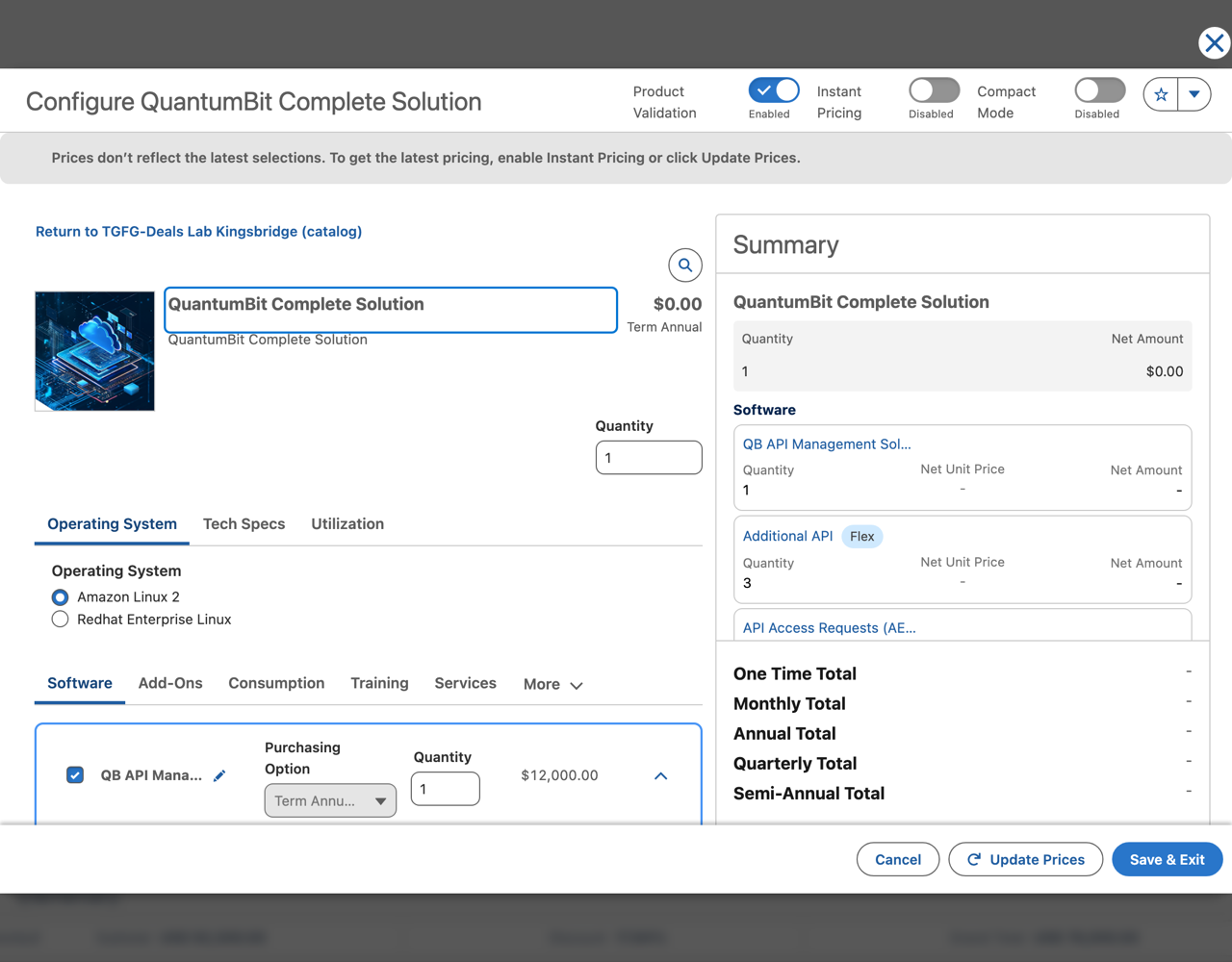
- Salesforce's help describes the job like this: customize the components and attributes of a product so that the final configured product meets the business requirement.1
- It configures bundles and the attributes of single products. It validates selections instantly and reprices in real time.
- Reps reach it from Product Discovery, or from the Configure action on a quote or order line.2
The runtime page shows attributes, quantity, a Summary with price and specifications, and two toggles:
- Product Validation runs qualification, Product Catalog Management (PCM) validation and configuration rules on every change. The Validate button runs them on demand.3
- Instant Pricing reprices the Summary on every change. With it off, the rep clicks Update Price.4
- Save & Exit writes the configured product to the quote.
In our example, the rep opens the bundle in the configurator and sets Type to Prod on QB-API. A rep can also save a configuration to reuse later, up to 80 per user per product.5
Configure: the configurator flow
In short: the configurator screen is a flow. You copy the template, customize it and assign it to products.
- The Default Product Configurator Flow is a read-only template. Open it in Flow Builder and click Save As New Flow.
- Its components include Product Attributes, Option Groups, Pricing Summary, and the Data Manager, which maps context data between the screen and the records.6
- Create a Product Configuration Flow record with the Flow Identifier, Status Active and, if it's the org default, Default.
- Assign it to products or classifications with a Product Configuration Flow Assignment.7
Two rules:
- A product gets one flow.
- In a bundle, the root product's flow applies at every level.
Winter '27 adds an assignment type when you assign a classification. Primary Configurator Flow follows the root rule above. Dynamic Addition Flow is used only for the dynamic components inside a bundle.7
A third-party configurator is assigned the same way. Salesforce keeps the product data, pricing and quoting.8
Configure: two rules engines
In short: the Business Rules Engine handles simple point-and-click rules; the Constraint Rules Engine handles large, complex configurations.
| Business Rules Engine | Constraint Rules Engine | |
|---|---|---|
| Name in Setup | Standard Configurator | Advanced Configurator |
RuleEngine value |
StandardConfigurator |
AdvancedConfigurator |
| Built for | Simple rules, point and click | Large and complex configurations |
| Government Cloud and the EU Operating Zone | Available | Not available |
How a quote gets its engine:
- A Transaction Processing Type record sets the
RuleEngine. - Revenue Settings names the default type.
- The Transaction Type field on the quote overrides the default.91011
Configure: Business Rules Engine rules
In short: configuration rules are if-then rules that require items, exclude items, filter options or warn the rep.
- A configuration rule can require items, exclude incompatible ones, filter options or show alerts.
- There are three core types: Validation, Exclusion and Requirement.12
- A Validate button on the rule catches drift between the rule and the catalog.13
Each rule has a scope:
| Scope | What the rule sees |
|---|---|
| Product | One product's attributes |
| Bundle | The children of one root |
| Transaction | Every line on the quote |
Configure: constraint models
In short: the Constraint Rules Engine works from a model of products and constraints, and computes only the valid combinations.
- A constraint model is a blueprint of products, bundles, attributes and constraints. The engine evaluates every combination and leaves only the valid ones.14
- You build it in the Constraint Builder, then activate it. Two ways to write it: the Visual Builder, which needs no code and generates CML (the Constraint Modeling Language), or the CML Editor.1516
The Trailhead module names these constraint and rule types:1517
- Basic Logic Constraint
- Conditional Logic Constraint
- Require Rule
- Dynamic Message Rule
- Preference Rule: a default the engine may override
- Table Constraint: valid combinations from a table
- Transaction Scope Rules
- Hide/Disable Rule
The words CML uses:
- A type stands for a product, bundle or classification.
- Variables are its properties.
- Relationships make one type a child of another, with cardinality.
- Associations are mandatory and bind a type to a catalog record.18
In the org, the model is an ExpressionSetDefinition. Its tags are of type Type (a component kind) or Port (the slot it fills).
Limits: 6 MB per model, 10,000 rows per table constraint, 10 seconds of execution.19
The short contrast: rules are explicit if-then statements, and as they pile up they overlap and slow down. Constraints are declarative, you need fewer of them, and they scale.
Constraint rules also run inside Product Discovery. Scope rules cover quote groups and ramp segments (Summer '26, release 262).
Price: price books, entries and selling models
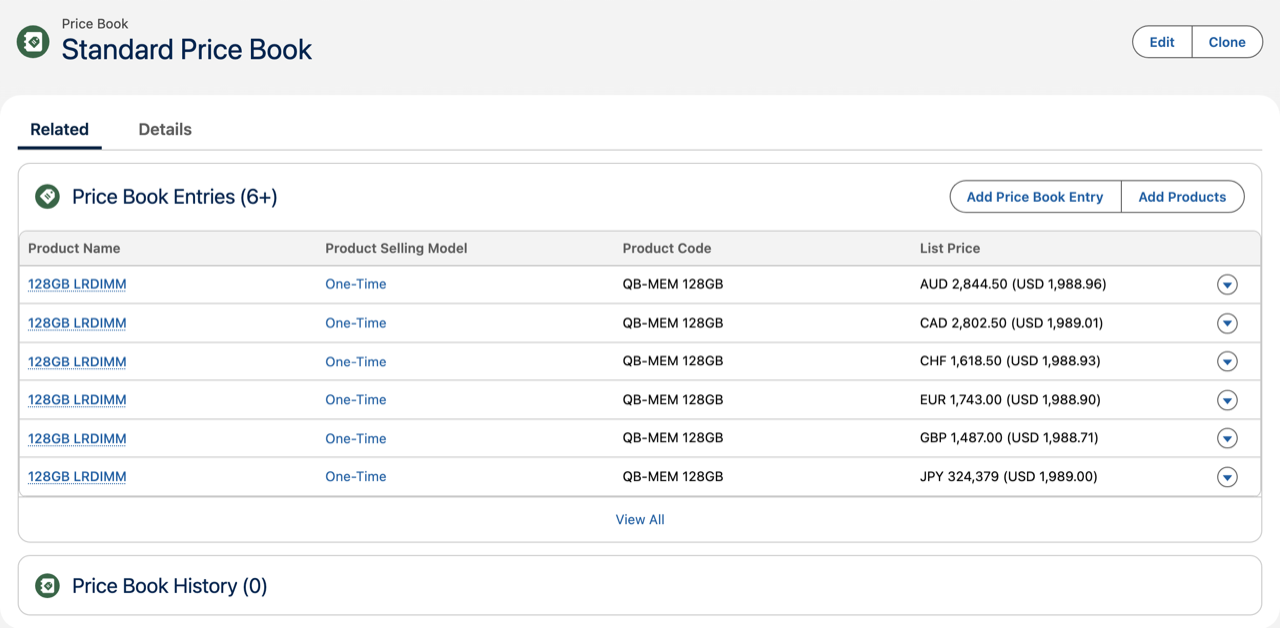
In short: every price starts as a price book entry for one product, one selling model and one currency.
Salesforce Pricing has two halves, and lives in the Price Management app:
- Price management defines prices and discount strategies.
- Price execution applies them for reps.20
The rules for price books:
- Every product must be in the standard price book before it goes in any custom one.
- A price book entry is one product, one selling model and one currency.
- The selling model can't change after you save the entry.
- Every product in a bundle must share the quote's price book.21
In our example, QB-API's Term Annual entry in the Standard Price Book is 15,000 USD.
Price: pricing procedures and elements
In short: a pricing procedure is an ordered list of pricing elements. Each element reads its decision table and passes the price to the next.
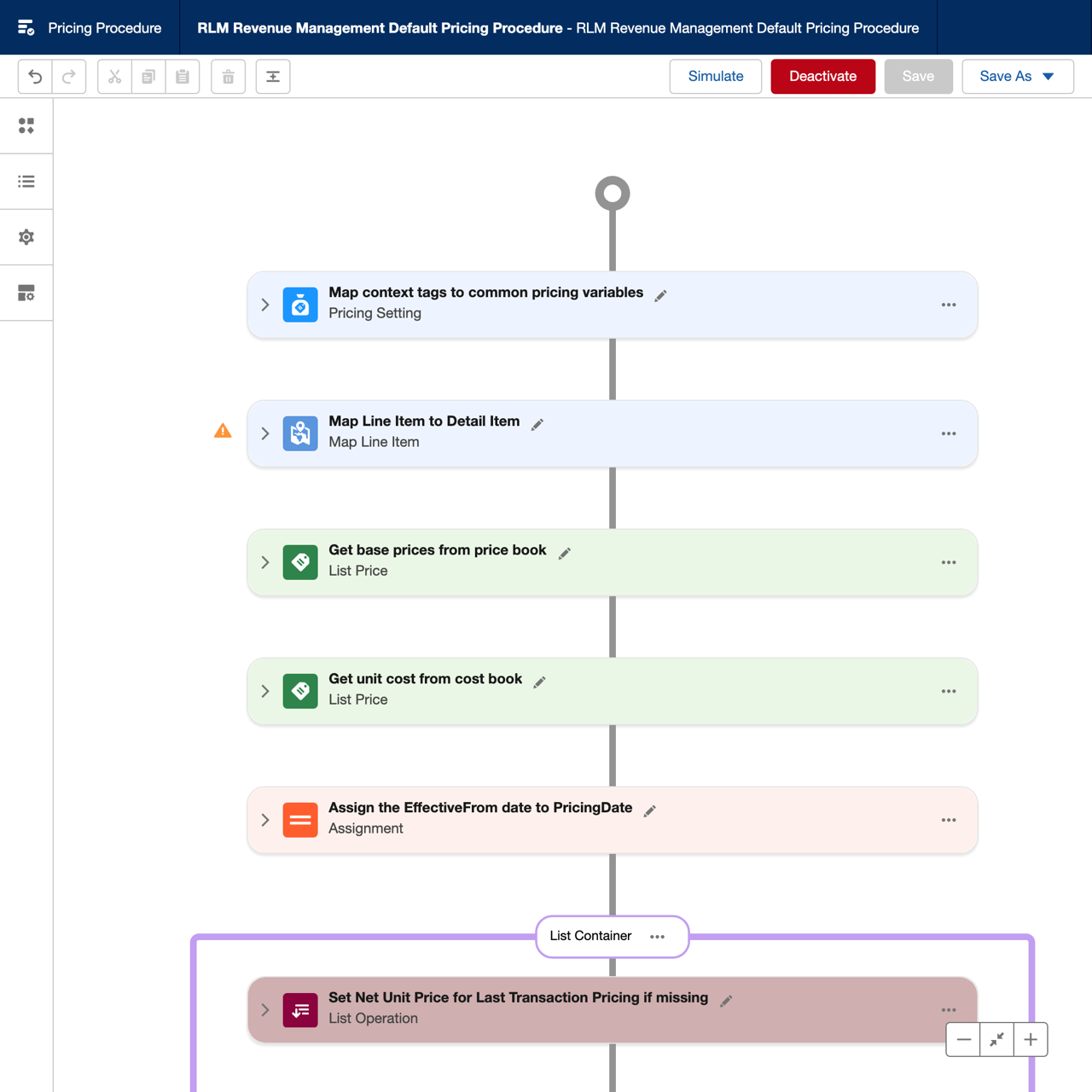
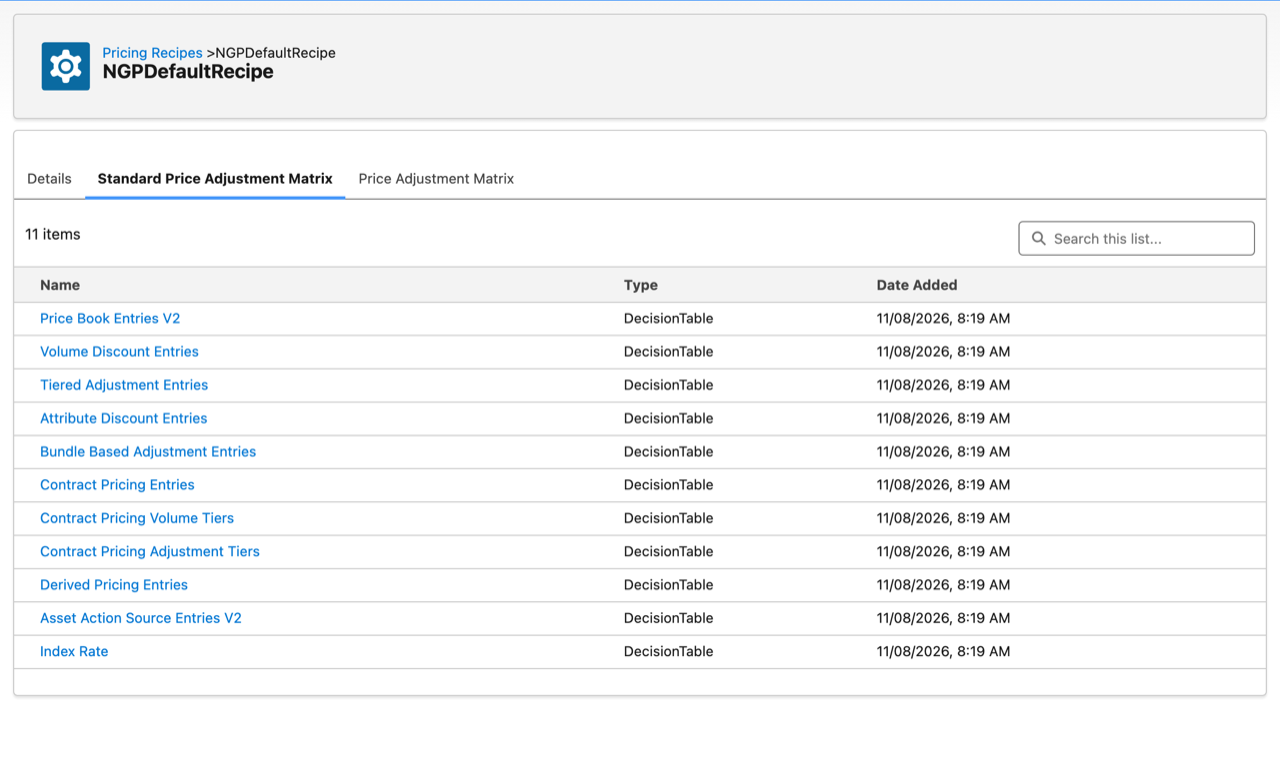
- A pricing procedure is an ordered sequence of pricing elements. Their variables map to context tags.
- The output goes back to the context definition, which fills in the transaction.
- A pricing recipe is the set of decision tables a procedure uses.
The Trailhead module builds six elements, in this order:2223
| Order | Element | Decision table it reads |
|---|---|---|
| 1 | Pricing Setting (always first) | None |
| 2 | List Price (product, price book, selling model; usually second) | Price Book Entries |
| 3 | Volume Discount | Volume Discount Entries |
| 4 | Manual Discount | None |
| 5 | Attribute-Based Price | Attribute Discount Entries |
| 6 | Bundle-Based Price | Bundle Based Adjustment Entries |
Working with a procedure:
- Simulate shows the waterfall, in Simplified or Advanced (JSON) mode.
- Activate the procedure to use it. Deactivate it before you edit.
- Sync Pricing Data (Setup, Salesforce Pricing Setup) refreshes the decision tables whose usage type is Pricing. Run it after any price or discount change. It's a manual step, though Winter '27's help also shows how to run it from a scheduled flow on a regular cadence.24
Three settings pick which procedure runs:
| Where the price shows | Setting that picks the procedure |
|---|---|
| Browse prices in Product Discovery | Product Discovery Settings |
| Headless calls | Salesforce Pricing Setup |
| Quotes and orders | Revenue Settings |
Source for this table.25
Salesforce ships templates, not procedures you can run. Open Expression Set Templates, open Revenue Management Default Pricing Procedure, and click Save As.26
Proration and Subscription Pricing. The Proration Multiplier equals the actual duration over the standard term. It's mapped to PricingTermCount and works in months or days only.27
Default limits:28
- 2,000 pricing procedures.
- 200 elements per pricing procedure. Winter '27 raised the default from 130.
- 50 elements per discovery procedure.
- 25 price impacting attributes per product.
- 40 contributing products.
Price: price adjustment schedules
In short: discounts that depend on quantity, configuration or bundle membership are rows in price adjustment schedules.
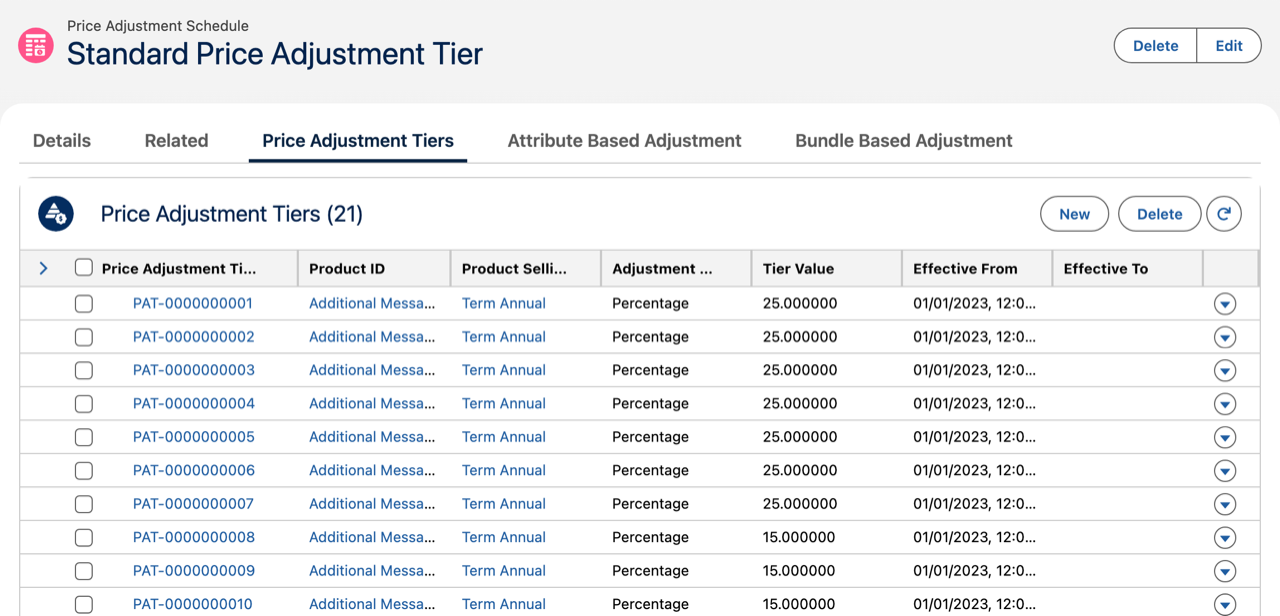
There are three schedule types, each with a predefined record:29
| Schedule type | Predefined record |
|---|---|
| Price Adjustment Tiers (volume) | Standard Price Adjustment Tier |
| Attribute Based Adjustments | Standard Attribute Based Adjustment |
| Bundle Based Adjustments | Standard Bundle Based Adjustment |
Deactivate a schedule before you add rows.
A tier row has Product, Product Selling Model, Tier Type (Percentage, Amount, Override), Tier Value, Lower Bound, Upper Bound and Effective From. The bounds follow four rules:
- They're inclusive.
- Tiers can't overlap.
- Tiers can't leave gaps.
- The last tier's upper bound is blank.30
Price: Range or Slab
In short: the schedule's Adjustment Method decides the math. Range prices every unit at the tier reached; Slab prices each range's units separately.
| Range | Slab | |
|---|---|---|
| Also called | Volume discount | Tiered discount |
| How it prices | Reaching a tier prices every unit at that tier | Each range prices its own units |
| Element | Volume Discount | Tier Discount, reading the Tiered Adjustment Entries table |
| Help example | 60 units against a tier starting at 40: all 60 get the lower price | 25 laptops at 200 (below) |
The help's Slab example: 25 laptops at 200, no discount under 10, 10% off units 10 to 19, 15% off units 20 to 29. The total is (9 x 200) + (10 x 180) + (6 x 170) = 4,620.3111
Tiers read the line's quantity, unless cumulative pricing is on.32
Price: attribute and bundle adjustments
In short: an attribute adjustment changes the price with a configuration choice; a bundle adjustment changes it only inside one bundle.
Attribute-based pricing:
- The attribute needs Is Price Impacting.
- Three records chain together:
AttributeBasedAdjRule, thenAttributeAdjustmentCondition(attribute equals value), thenAttributeBasedAdjustment(product, selling model, and Override, Percentage or Amount).33
Bundle-based pricing:
- A bundle-based adjustment keys on Root Bundle, Parent Product and Product, each with a selling model.
- So it fires only inside that bundle.3435
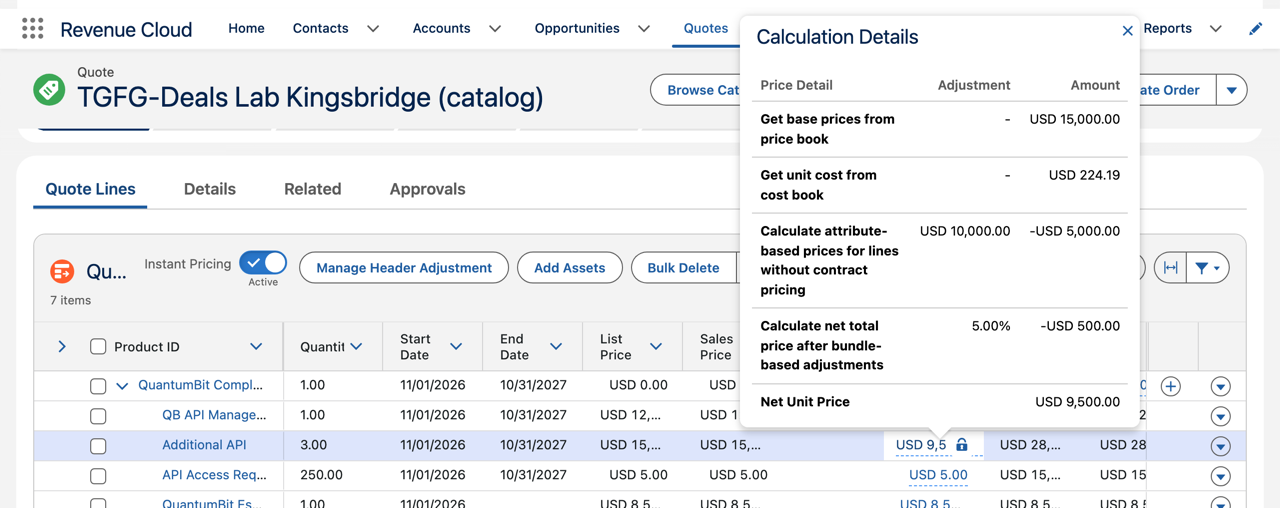
In our example, QB-API's Type attribute carries Override rows: Flex 10,000, Pre-Prod 12,000, Prod 15,000, Gov 8,500. Prod keeps the line at 15,000. A 5 percent bundle-based adjustment keyed on QB-COMPLETE then brings it to 14,250. Quote QB-API on its own and the bundle row doesn't fire.
Price: derived pricing
In short: derived pricing prices one product from another product, an asset, or the quote header.
You need four things:
- A discovery procedure: a separate procedure with Fetch Pricing Rules, Map Products and Asset Discovery.
- An Is Derived price book entry at zero.
- A Derived Price record with a scope (Transactional, Non-transactional, Both), a source (Product or Header) and a formula, such as
ListPrice* 0.10. - The Derived Price element in the pricing procedure, with List Price reading Price Book Entries V2.3637
The result is always the net unit price. Both procedures share one context definition.38
Price: contract, manual and header pricing
In short: contract pricing holds one customer's negotiated prices; manual and header discounts are the rep's own call.
How the contract itself is created from the quote, and how much price it captures, is on the Contracts page.
Contract-based pricing, step by step:
- Store the negotiated prices on the contract as Contract Item Price (item, selling model, price, dates, Adjustment Method Range), plus Contract Item Price Adjustment Tier for volume.
- Activate the contract.
- Refresh the Contract Pricing Entries and Contract Pricing Volume Tiers decision tables.
- Add a List Price element with Use contract-based pricing. It outputs
IsContracted. - Put the contract-only elements in a List Group, and end with Stop Pricing.
- The rep sets the Contract lookup, or starts the quote from the contract.394041
Manual discounts are discretionary and need no decision table. They take Percentage, Amount or Override on the line's Discount fields.42
Header adjustments discount the whole quote:
- Manage Header Adjustment takes Amount, Percentage or Amount Override.
- The Discount Distribution Service element spreads it across lines, Equal or Proportionate.
- That element can't share a procedure with Derived Price.
- The header action is new in Winter '26 (release 258).4344
Explainability: hover over Net Unit Price to see the price waterfall. Decision Explainer adds custom messages to it.45
Price: usage products
In short: usage products are priced by rate cards, and several records must be linked and active before any rate shows on a quote.
Usage Management has five components: Usage Modelling, Rate Management, Usage Selling, Wallet Management and Consumption Management.
Usage Modelling defines, all Active:
- a usage resource, with its unit of measure and unit of measure class
- a Product Usage Resource
- a Product Usage Grant, the entitlement
- policies such as overage and grant binding.46
Each usage product has a Usage Model Type:
| Usage Model Type | What it is |
|---|---|
| Anchor | The main product |
| Pack | Add-on units bound to an anchor, never sold alone |
| Commit | Token commitment |
CommitmentQuantity |
Quantity commitment |
CommitmentSpend |
Monetary commitment |
Source for this table.46474811
Rate Management prices the consumption:
- A rate card is Base (a flat rate) or Tier (adjustments by quantity).
- A rate card entry has the rate, a rate unit of measure (currency or token), Negotiable or Non-negotiable, and a Status. Only Active entries are fetched.4950
For rates to appear on a quote, two links must exist:
- A Price Book Rate Card links the quote's price book to the rate card.
- A Rating Discovery Procedure is selected in Revenue Settings.49
On the quote line, Manage Usage Resources shows grants and rates, the binding (Self, or a Target: Product, Account, Contract, Custom), and Override Rate. A commitment product can't bind to a target.5152
Overage math: 102 GB used against a 2 GB grant leaves 100 GB over, at 1.25 each, so 100 x 1.25 = 125.
Usage products can't be sold in a bundle, neither as a child nor as the parent. Winter '27's help says to sell them as separate lines on the same quote instead.53
Quote: quotes and the line editor
In short: a quote is the offer; the line editor is the grid where reps build it.
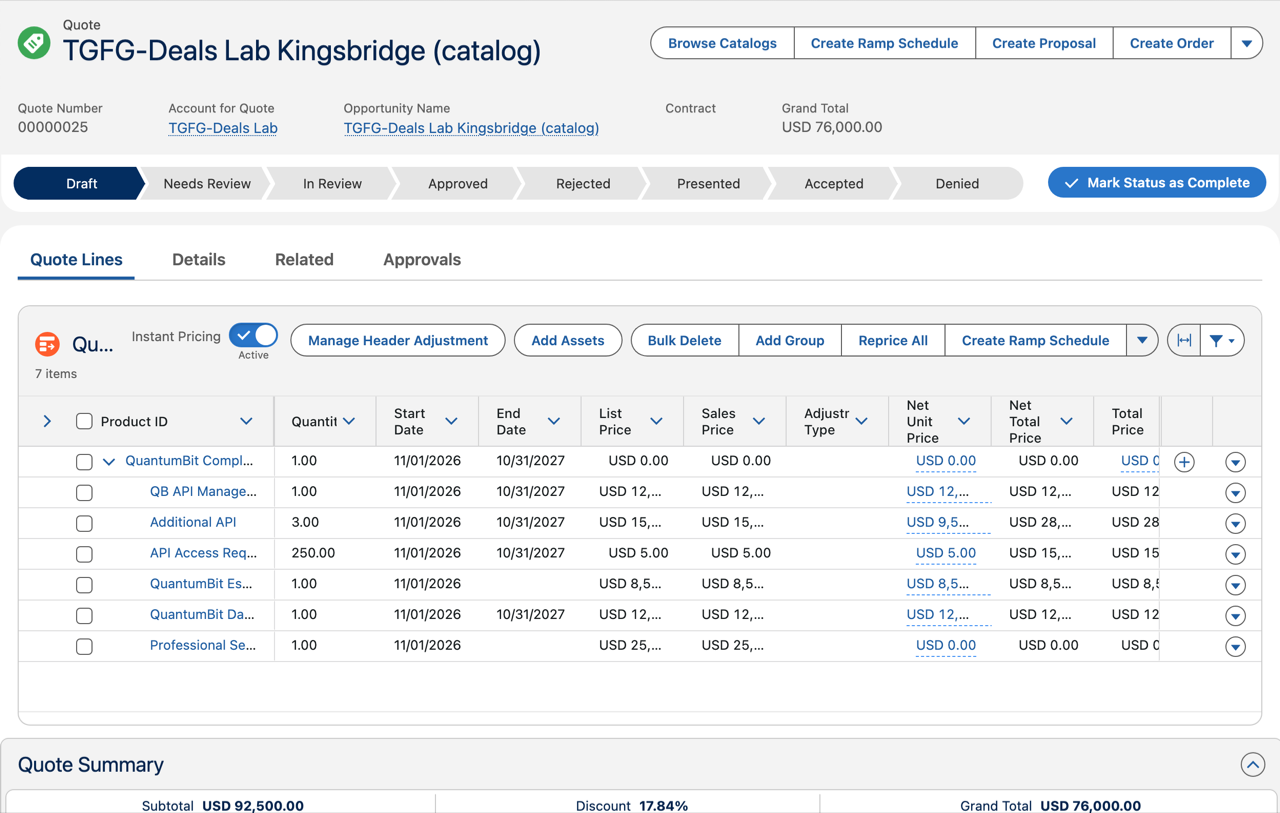
- Transaction Management holds CPQ (configure, price, quote) and Asset Lifecycle Management.
- A quote is a preliminary offer. An order is the formal commitment that triggers fulfillment and invoicing.
To build a quote:54
- Start from an opportunity or the Quotes tab, with a Quote Name and an Account for Quote.
- Click Browse Catalogs and Choose Price Book.
- Add products to the New Quote Line Items list. It's transient until you save.
- Click Save Quote.
The Transaction Line Editor, also called the Transaction Line Table, is the spreadsheet grid:5556
- inline and multi-edit, frozen columns and a filter row
- Add Product for quick adds
- a side panel with up to 200 attributes
- unsaved edits are lost on refresh
- pricing runs on Save when Instant Pricing is off.
Its successor, the Sales Transaction Line Editor, adds nested groups and group ramps.
Groups:57
- Turn on Enable Groups in quotes and orders.
- Add Group is manual. Group By is automatic, and exists only in the older editor.
- Nesting goes five levels deep and carries to the order.
Quote: ramp deals
In short: a ramp deal splits a subscription into segments, each with its own quantity, price and discount.
| Ramp deals for lines | Ramp deals for groups | |
|---|---|---|
| What ramps | One term-defined line, never a bundle | A quote line group, which becomes a segment of a group ramp schedule |
| Segments | Up to 10, of type Yearly, Custom or Trial | Built by cloning segments, or generated by a flow |
| What you get | One line divided into segments | Uplifts, and one asset per ramped product |
How ramp deals for groups grew:585960
- Ramp deals for groups arrived in Winter '26 (release 258).
- Multiple schedules per transaction followed in Spring '26 (release 260).
- The Create Ramp Schedule flow adds trial and prorated segments, at most 12 segments (Summer '26, release 262).
Quote: opportunity sync and documents
In short: sync copies quote lines to the opportunity, one way, and loses what an opportunity can't hold.
- Start Sync and Stop Sync are quick actions. Sync runs one way, from quote lines to opportunity products.
- While it runs, the opportunity products are locked. You can't edit them, and your own automation can't update them either (Winter '27).
- Opportunities support neither bundles nor attributes. Bundles flatten and attributes are dropped.
- A quote created from an opportunity brings only one-time products.6111
- Create PDF uses the org's one default quote template.6211
Quote: approvals
In short: Advanced Approvals route a quote through approval chains built on Flow Orchestration.
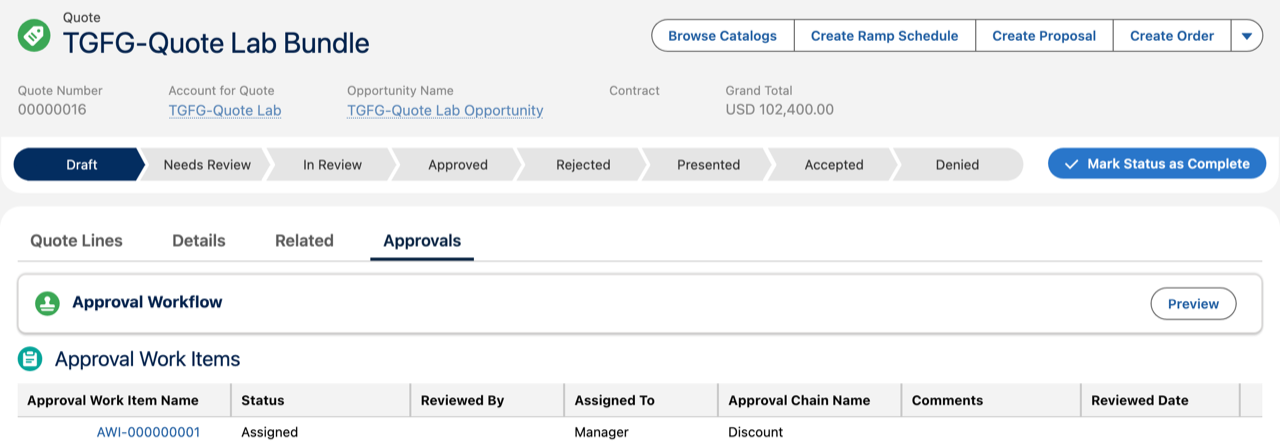
- Chains can be sequential or parallel, on quotes, orders or custom objects.
- The Approvals app serves submitters, approvers and approval admins. The admin adds a Submit for Approval button.
- The help's example routes discounts of 25% or more to a Sales Manager, and over 50% to an SVP.6364
- Preview Approvals simulates the chain.
- Smart Approvals skips re-review of data that hasn't changed (Spring '26, release 260). Approvals in Slack followed (Summer '26, release 262).65
Quote: from quote to order
In short: an accepted quote becomes an order. Activating the order locks it, and a flow creates the assets.
- Set the quote to Accepted with Mark as Current Status.
- Click Create Order, then Create Single Order.
- The order copies product, quantity, pricing and tax.
- Activation locks the order, and a flow creates assets.66
Advanced Order Creation From Quote adds Create Order by Group and Create Order by Field. It makes up to 200 orders and never splits a bundle or a ramp group.6768
Quote: the Place Sales Transaction API
In short: one API creates or updates a whole quote, lines and all, from code or a flow.
Three ways to call it:
- a REST POST to /connect/rev/sales-transaction/actions/place
- an invocable action in Flow. Winter '27 limits this action to Agentforce Quoting flows, and says it doesn't support ramp deals or automated processes. From any other flow, call the API from a custom Apex action.
- the
RevSalesTrxnApex namespace.69
It takes a graph of Quote, QuoteLineItem, QuoteLineItemAttribute and QuoteLineRelationship records, plus these options:
| Option | Values |
|---|---|
| pricingPref | System, Force, Skip |
| configurationMethod, with its options | validateProductCatalog, addDefaultConfiguration, executeConfigurationRules, validateAmendRenewCancel |
| catalogRatesPref (usage rates) | Fetch, Skip |
It returns salesTransactionId, isSuccess and errors.
Two behaviors to remember:
- The quote header commits even when lines fail.
- Pricing runs between the pre and post Apex hooks.7011
Quote: Agentforce quoting
In short: an Agentforce employee agent can find products and build quotes from a chat.
- Agentforce for Revenue Management ships the Revenue Quote Management template, an Agentforce Employee Agent.
- It needs the Advanced license plus the Agentforce Employee Agent add-on.71
| Topic | What it does |
|---|---|
| Product Selection | Find Products, Get Product Details, Get Rule-Based Product Recommendations |
| Quote Management | Add lines, apply discounts, create initial, amendment and renewal quotes, get account assets and selling models, update quote and line details |
| Consumption Management | Needs Rate and Usage Management (Spring '26, release 260) |
Limits:74
- English (US) only.
- Authenticated Lightning Experience users only.
- One currency, unless you modify the Add
QuoteLineItemto Quote flow. - 10 quote line items per request.
The data model
The chain to remember, in four parts:
- Pricing. A product is priced by a price book entry for each product selling model. A pricing procedure (an expression set) runs elements that read decision tables. Those tables are built from price adjustment schedules and their volume tiers, attribute adjustments and bundle adjustments, plus price book entry derived prices and a contract's contract item prices.
- Usage. Usage products add a usage resource, product usage grants, and a rate card whose entries reach the quote through a price book rate card.
- The quote. A quote holds quote line items, optionally inside quote line groups. Quote line item attributes hold configuration values and quote line relationships hold bundles. The quote syncs to an opportunity and becomes an order.
- Constraints. Constraint models are expression sets too, tagged by expression set constraint objects.
| Object | Fields worth remembering |
|---|---|
Pricebook2, PricebookEntry |
IsStandard; Product2Id, ProductSellingModelId, UnitPrice, CurrencyIsoCode, IsActive, IsDerived |
ProductSellingModel |
SellingModelType (OneTime, TermDefined, Evergreen), PricingTerm, PricingTermUnit, Status |
PriceAdjustmentSchedule |
ScheduleType (Volume, Attribute, Bundle, Custom), AdjustmentMethod (Range, Slab), IsActive, EffectiveFrom, EffectiveTo |
PriceAdjustmentTier |
Product2Id, ProductSellingModelId, LowerBound, UpperBound, TierType (AdjustmentPercentage, AdjustmentAmount, OverrideAmount), TierValue, AdjustmentType, EffectiveFrom |
AttributeBasedAdjRule, AttributeAdjustmentCondition, AttributeBasedAdjustment |
UsageType (Pricing, Rating); AttributeDefinitionId, Operator, StringValue; ProductId, ProductSellingModelId, AdjustmentType (Override, Percentage, Amount), AdjustmentValue |
BundleBasedAdjustment |
RootBundleId, ParentProductId, ProductId, each with a selling model, AdjustmentType, AdjustmentValue, PriceAdjustmentScheduleId |
PricebookEntryDerivedPrice |
PricebookEntryId, ContributingProductId, Formula, PricingSource (Product, Header), DerivedPricingScope (Transactional, NonTransactional, Both) |
ContractItemPrice, ContractItemPriceAdjTier |
Price, ProductSellingModelId, StartDate, EndDate, AdjustmentMethod; LowerBound, TierType, TierValue |
ExpressionSetDefinition, ExpressionSetVersion |
DeveloperName, UsageType (DefaultPricing, PricingDiscovery, DefaultRating, RatingDiscovery, Constraint); IsActive, VersionNumber, Rank |
ExpressionSetConstraintObj |
ExpressionSetId, ReferenceObjectId, ConstraintModelTag, ConstraintModelTagType (Type, Port) |
DecisionTable |
DeveloperName, Status, UsageType, SourceObject, RefreshStatus, Type (Standard, Advanced, CSV) |
Product2 (usage) |
UsageModelType (Anchor, Pack, Commit, CommitmentQuantity, CommitmentSpend) |
UsageResource, ProductUsageResource, ProductUsageGrant |
Code, Category (Usage, Currency, Token), UnitOfMeasureClassId, DefaultUnitOfMeasureId; IsOptional, Status; Type (Grant, Commit), Quantity, UnitOfMeasureId |
RateCard, RateCardEntry, RateAdjustmentByTier, PriceBookRateCard |
Type (Base, Tier); Rate, RateUnitOfMeasureId, RateNegotiation, Status (Draft, Active, Inactive); LowerBound, UpperBound, AdjustmentType; PriceBookId, RateCardId |
Quote, QuoteLineItem |
QuoteAccountId, OpportunityId, Pricebook2Id, Status, IsSyncing, ContractId; Product2Id, PricebookEntryId, Quantity, StartDate, EndDate, ListPrice, NetUnitPrice, Discount, OpportunityLineItemId |
QuoteLineGroup, QuoteLineRelationship, QuoteLineItemAttribute, QuoteLineRateCardEntry |
IsRamped, SegmentType; MainQuoteLineId, AssociatedQuoteLineId, AssociatedQuoteLinePricing; AttributeDefinitionId, AttributeValue; NegotiatedRate |
Two objects behave differently from the rest:
- Transaction Processing Type is a Tooling API entity, not a data object. Its fields are
RuleEngine,PricingPreference,RatingPreferenceandTaxPreference.7576 QuoteLineItemAttributetakes no custom fields, validation rules or triggers, and you can't filter onAttributeValuein SOQL (the Salesforce Object Query Language).11
Which action when
Which rules engine?
| Customer says | Choose |
|---|---|
| "A few if-then rules, point and click, one bundle at a time" | Business Rules Engine (Standard Configurator): configuration rules with Validation, Exclusion or Requirement |
| "Hundreds of interdependent options, valid combinations must be computed, rules keep overlapping" | Constraint Rules Engine (Advanced Configurator): a constraint model in CML or the Visual Builder |
| "Valid combinations come from a spreadsheet of allowed pairs" | Table Constraint in the constraint model |
| "Suggest a default but let the rep change it" | Preference Rule |
| "No more than five monitors on the whole quote" | Transaction scope rule (either engine) |
| "Our 3D configurator must stay, Salesforce prices and quotes" | Third-party configurator assigned through a Product Configuration Flow, results posted with Place Sales Transaction |
| "Government Cloud" | Business Rules Engine only |
Which pricing element or record?
| Requirement | Build |
|---|---|
| Base price by product, price book, selling model | List Price element over Price Book Entries |
| Every unit gets the reached tier's price | Volume Discount element, schedule Adjustment Method Range |
| Each range priced separately, graduated | Tier Discount element, schedule Adjustment Method Slab |
| Price changes with a configuration choice | Is Price Impacting attribute, Attribute Based Adjustment, Attribute-Based Price element |
| Cheaper only inside a specific bundle | Bundle Based Adjustment with root, parent and product, Bundle-Based Price element |
| A percentage of another product or of the quote total | Derived pricing: discovery procedure, Is Derived entry, Derived Price element |
| Negotiated price for one customer, valid for a period | Contract Item Price, List Price with Use contract-based pricing, List Group on IsContracted |
| Rep discretion per line | Manual Discount element, Discount fields on the line |
| One discount across the whole quote | Manage Header Adjustment, Discount Distribution Service element |
| Partial first month on a subscription | Proration policy, Proration and Subscription Pricing elements |
| Subtotals by selling model or family on lines | Aggregate Price element |
| Pay per GB with an included allowance | Usage resource, product usage grant, rate card entry, Price Book Rate Card |
Volume or tier math
| Scenario | Answer |
|---|---|
| 60 units, discount starts at 40, method Range | All 60 units at the discounted price |
| 25 laptops at 200, tiers 10 to 19 at 10% and 20 to 29 at 15%, method Slab | 9 x 200 + 10 x 180 + 6 x 170 = 4,620 |
| Two lines of 8 each, tier starts at 11 | Neither line qualifies, unless cumulative pricing is on and the contract's aggregation strategy is Cumulative |
| Tier rows 1 to 10 and 10 to 20 | Rejected: bounds are inclusive and must not overlap |
Quote features
| Requirement | Choose |
|---|---|
| Year 1 at 100 seats, year 2 at 150, one subscription line | Ramp deal for lines: up to 10 segments, term-defined product only |
| Phased rollout of several products with uplifts, one asset per product | Ramp deals for groups (Winter '26) |
| Keep the opportunity's products current while the quote changes | Start Sync; expect bundles flattened and attributes dropped |
| Separate orders per shipping location | Advanced Order Creation From Quote, Create Order by Field |
| Discounts over a threshold need a manager | Advanced Approvals workflow, Submit for Approval button |
| Rep asks in chat to add products and discount a line | Revenue Quote Management agent, Quote Management topic, 10 lines per request |
| Integration must create priced quotes | Place Sales Transaction API with pricingPref Force |
| Quotes in EUR and USD | Multiple currencies, a price book per currency, PricingCurrencyCode mapped |
Watch out
Range versus Slab is the calculation to get right. Range (the Volume Discount element) prices every unit at the tier reached. Slab (the Tier Discount element) prices each range separately. The help's 25-laptop example totals 4,620.
Tier bounds are inclusive, can't overlap and can't leave gaps. Deactivate a schedule before you add rows. Then refresh the decision table, or run Sync Pricing Data, before the rows price anything.
Three settings choose a pricing procedure: Product Discovery Settings (browse prices), Salesforce Pricing Setup (headless) and Revenue Settings (quotes and orders). The usual mistake is setting one of them while the prices show on a different surface.
Salesforce ships pricing procedure templates, not procedures you can run. Clone Revenue Management Default Pricing Procedure from Expression Set Templates with Save As; you can't activate the template itself.
Pricing Setting is always the first element, and List Price is usually the second. Derived pricing switches the List Price lookup to Price Book Entries V2, and needs a discovery procedure on the same context definition.
Derived Price can't share a procedure with Discount Distribution Service, Aggregate Price or Formula-Based Pricing on the same lines. Header adjustments with derived pricing need a procedure plan with two sections.
Attribute-based pricing needs Is Price Impacting on the attribute, and the value on the line as a QuoteLineItemAttribute. Numeric values must carry .0, and the attribute must sit directly on the product's classification. Inside a bundle, define the attribute once: Winter '27's help says an attribute overridden in the bundle context stops the adjustment from applying.33
Quote to opportunity sync is one way. It flattens bundles and drops attributes and custom line fields. A quote created from an opportunity brings only one-time products.
Quote documents and the line editor read Quote Visibility differently. Transaction Line Editor Only hides a child from the PDF; Quote Document Only hides it from the grid.6257
The Constraint Rules Engine isn't available in Government Cloud or the EU Operating Zone. Syncing from PCM into CML doesn't bring newly added components or component groups; re-import those by hand.77
Usage selling needs three things: a Price Book Rate Card linking the quote's price book to the rate card, Active rate card entries, and a Rating Discovery Procedure selected in Revenue Settings. Miss any one and no rates appear. A pack can't be sold on its own, and a commitment can't bind to a target.
The Revenue Quote Management agent is Lightning Experience only, English (US) only, one currency by default, and handles at most 10 quote line items per request. It runs on the Agentforce Employee Agent add-on, not on the base license.
Only the Place Sales Transaction API supports multi-currency transactions, and its quote header commits even when the lines fail.78
Numbers worth knowing: 80 saved configurations per user per product; 6 MB constraint model; 10,000 rows in a table constraint; 10 seconds of constraint execution; 2,000 pricing procedures; 200 elements per procedure (130 before Winter '27); 50 per discovery procedure; 25 price impacting attributes per product; 40 contributing products; 2,000 quote lines (1,000 before Winter '27); 3,000 line attributes; 5,000 related records; 200 lines per bundle; 200 orders per split quote; 10 ramp segments per line; 12 segments per generated ramp schedule; 200 attributes in the side panel; 200 lines per usage quote or order; 1,200 rate card entries; 3,000 rate tier adjustments; 10 agent line items per request; 6,000 cloned related records.79808182
If you know Salesforce CPQ
| Salesforce CPQ term | Revenue Cloud term | What changed |
|---|---|---|
Price Rule with Price Conditions and Price Actions (SBQQ__PriceRule__c) |
Pricing procedure made of pricing elements over decision tables | Declarative steps in a builder with a simulated waterfall, not lookup and inject rules |
Discount Schedule (SBQQ__DiscountSchedule__c), Range or Slab type |
Price adjustment schedule with Adjustment Method Range or Slab, and Price Adjustment Tier rows | Same two methods, now keyed by product and selling model and read through a decision table |
Block Prices (SBQQ__BlockPrice__c) |
Price adjustment tier with Tier Type Override | An override tier fixes the unit price for a quantity range; there's no separate block object |
Percent of Total (SBQQ__PricingMethod__c) |
Derived pricing with pricing source Header or Product | A formula on a Derived Price record, computed by a discovery procedure plus the Derived Price element |
Contracted Prices (SBQQ__ContractedPrice__c) |
Contract Item Price and Contract Item Price Adjustment Tier | Lives on the Contract, applied through Use contract-based pricing on elements |
Multi-Dimensional Quoting (SBQQ__Dimension__c, segmented quote lines) |
Ramp deals for lines, ramp deals for groups | Segments with Yearly, Custom or Trial types; group ramps produce one asset per product |
Quote Line Group (SBQQ__QuoteLineGroup__c) |
Quote line group (QuoteLineGroup) |
Nests five levels, carries to the order, can become a ramp segment |
| Quote Calculator Plugin (JavaScript QCP) | Apex pricing hooks in a procedure plan, Formula-Based Pricing element | Server-side pre and post hooks and formulas, no browser script |
Advanced Approvals (sbaa__ApprovalRule__c, approval chains) |
Advanced Approvals on Flow Orchestration with the Approvals app | Flow approval processes, Smart Approvals, Slack |
Product Rule (SBQQ__ProductRule__c: validation, alert, selection, filter) |
Configuration rules in the Business Rules Engine, or constraint models in CML | Split into a point-and-click engine and a solver engine, chosen per Transaction Processing Type |
Option Constraint (SBQQ__OptionConstraint__c) |
Exclude and Require rules | Same intent, expressed in the rules engine, not on the option |
Configuration Attribute (SBQQ__ConfigurationAttribute__c) |
Dynamic attribute with Is Price Impacting | Values live on QuoteLineItemAttribute, priced by Attribute Based Adjustment |
| Quote Line Editor (SBQQ line editor) | Transaction Line Editor, now the Sales Transaction Line Editor | Spreadsheet grid on the record page, side panel for attributes, Instant Pricing toggle |
Quote Template (SBQQ__QuoteTemplate__c) |
Document Builder quote template, or the default quote PDF template | One active default template per org83 |
Consumption Schedule (SBQQ__ConsumptionSchedule__c) |
Rate card, rate card entry, Rate Adjustment By Tier, usage grant | Usage priced by Rate Management and metered through wallets |
| Twin fields between quote line and order product | Context definition mapping for custom fields | Custom line fields reach pricing only when mapped in the Sales Transaction Context |
| Special Price Type Custom | Manual Discount with Adjustment Type Override | Same effect, applied as a pricing element |
Guided Selling (SBQQ__QuoteProcess__c) |
Guided Product Selection, or the agent's Product Selection topic | A question flow in Product Discovery, or natural language through Agentforce |
| Subscription proration on the product | Proration policy plus Proration and Subscription Pricing elements | A policy record and elements in the procedure, months or days only |
Newer than the exam
The Rev-Con-201 exam is written against Summer '25. These arrived later. They matter on real projects, but the exam won't ask about them yet.
- Configurator: non-blocking UI, product component groups in CML, CML sync with product definitions, rule-based product recommendations, and the Exclude, Hide Attribute Values and Disable Components templates in the Visual Builder (Winter '26, 258).
- Configurator: compact layout, sticky severity-tiered error messages, inline attribute configuration on option cards, editable transaction line context fields, multi-instance creation and cloning, configuration logs (Spring '26, 260).
- Configurator: group and ramp segment scope rules, product loader with the @productField annotation and default component inclusion (Summer '26, 262).84
- Configurator: Dynamic Addition Flow as an assignment type for product configuration flows, used for a bundle's dynamic components (Winter '27, 264).7
- Product Discovery with constraint rules, auto save, and transaction preview (Summer '26, 262).
- Pricing: header adjustments at the quote and order header with Manage Header Adjustment, enhanced formula element, Price Revision element and policies for Consumer Price Index (CPI) uplifts (Winter '26, 258).
- Pricing: Promotions and the Promotion Execution element (beta), Price Propagation for nested groups up to five levels, If-Else formulas, auto-numbered element names, advanced price logs, procedure plan packaging, Revenue Cloud Operations Console rename (Spring '26, 260).
- Pricing: CSV-based decision tables, up to 100,000 rows each and 500 per org, not usable with Attribute-Based Price (Summer '26, 262).85
- Pricing: 200 pricing elements per procedure by default, up from 130, and a scheduled flow to run Sync Pricing Data automatically (Winter '27, 264).2824
- Quotes: ramp deals for groups, deep clone, quote line item import from CSV, asset transfer (Winter '26, 258).
- Quotes: multiple ramp schedules per transaction, Always On Instant Pricing, advanced and preset filters, enhanced price waterfall hover, elevated data access for pricing, 15,000-line transactions (beta), CSV import with default children preloaded (Spring '26, 260).
- Quotes: Create Ramp Schedule flow with trial and prorated segments, product ramp selection in discovery, early renewal of ramped assets, product variants in quotes, six-decimal unit price display (Summer '26, 262).
- Quotes: 2,000 quote lines per quote and 2,000 order products per order, up from 1,000; the Place Sales Transaction invocable action limited to Agentforce Quoting flows (Winter '27, 264).7969
- Approvals: email templates, Smart Approvals, Override Approval Work Item, Stage Exit Condition (Spring '26, 260); Approvals in Slack, preview enhancements, Advanced Approvals for contracts (Summer '26, 262).
- Usage: quantity and monetary commitments (Winter '26, 258); Usage Product Validator, save quote and order rates against later catalog changes, Consumption Agent, Salesforce Go setup (Spring '26, 260).
Building on these goes past the exam: the Advanced section covers Apex pricing hooks and Constraint Modeling Language.
Sources
Every numbered note above links to the Salesforce article it comes from. This page is current to Winter '27 (release 264): each note was checked against the Winter '27 version of its article.
- Screenshots from our lab org (built with Salesforce's launchpad), Winter '27 (264), taken 2026-11-08
- Salesforce Help and the Revenue Lifecycle Management Developer Guide, Winter '27 (264), as published 2026-09-04 to 2026-09-07; checked by Taggalong 2026-10-25
- Trailhead: Product Configuration with Agentforce Revenue Management, read 2026-09-22
- Trailhead: Salesforce Pricing: Quick Look, read 2026-09-22
- Trailhead: Price Management with Agentforce Revenue Management, read 2026-09-22
- Trailhead: Advanced Price Management with Agentforce Revenue Management, read 2026-09-22
- Trailhead: Efficient Sales with Agentforce Revenue Management, read 2026-09-22
- Trailhead: Usage Management Foundations, read 2026-09-22
-
Trailhead: Product Configuration with Agentforce Revenue Management, Get Started with Product Configurator ↩
-
Save and Reuse Configurations; Product Configurator Limits ↩
-
Trailhead: Product Configuration with Agentforce Revenue Management, Create and Configure a Product Configurator Flow ↩
-
Enable Constraint Rules Engine and Create Transaction Processing Types ↩
-
Checked by Taggalong in a Revenue Cloud org, 2026-09-21 ↩↩↩↩↩↩↩
-
Trailhead: Product Configuration with Agentforce Revenue Management, Use Product Configurator with Business Rules Engine ↩
-
Trailhead: Product Configuration with Agentforce Revenue Management, Explore Product Configurator with Constraint Rules Engine ↩↩
-
Use Code to Define Constraints and Rules in the CML Editor ↩
-
Variables, Relationships, and Associations in Constraint Models ↩
-
Trailhead: Salesforce Pricing: Quick Look, Discover Salesforce Pricing ↩
-
Trailhead: Price Management with Agentforce Revenue Management, Create a Pricing Procedure with the List Price Element ↩
-
Trailhead: Price Management with Agentforce Revenue Management, Add Volume and Manual Discounts ↩
-
Trailhead: Advanced Price Management with Agentforce Revenue Management, Set Up Subscription Pricing with Proration ↩
-
Understand the Difference Between Volume and Tier Discounts ↩
-
Calculate Volume or Tiered Discounts with Cumulative Pricing ↩
-
Trailhead: Price Management with Agentforce Revenue Management, Set Up Bundle-Based Pricing ↩
-
Trailhead: Advanced Price Management with Agentforce Revenue Management, Explore Derived Pricing and Discovery Procedures ↩
-
Trailhead: Advanced Price Management with Agentforce Revenue Management, Implement Derived Pricing ↩
-
Trailhead: Advanced Price Management with Agentforce Revenue Management, Configure Contract-Based Pricing ↩
-
Trailhead: Usage Management Foundations, Set Up and Sell Products ↩↩
-
Trailhead: Efficient Sales with Agentforce Revenue Management, Discover and Configure Products ↩
-
Trailhead: Efficient Sales with Agentforce Revenue Management, Work with Quotes ↩
-
Add and Customize the Transaction Line Editor or Sales Transaction Line Editor ↩
-
Trailhead: Efficient Sales with Agentforce Revenue Management, Create Orders ↩
-
Understand the Order of Execution for Place Sales Transaction ↩
-
Set Up the Transaction Processing Type for Quotes and Orders ↩
-
Checked by Taggalong in a Revenue Cloud org, 2026-09-22 ↩
-
Transaction Management Limits; Considerations for Creating Multiple Orders from a Quote; Considerations for Ramp Deals; Use the Create Ramp Schedule Guided Flow; Usage Management Limits; Considerations for Agentforce in Revenue Management ↩↩
-
Set Up Transaction Processing for Complex Product Configurations ↩