
Between an accepted quote and an order sits the contract: what was agreed, in a document both sides signed, with the prices later quotes and amendments reuse. Revenue Cloud handles it with Salesforce Contracts, a contract lifecycle management (CLM) application, and with Document Generation, the engine that turns records into Word and PDF documents. This page explains how a contract is typed, drafted from a quote, built from approved clauses, generated, negotiated, signed and activated, and the traps we see people fall into. On the Rev-Con-201 exam, contract questions sit inside the Contracts and Orders section.
The example we use throughout: Kingsbridge Digital accepts its quote for the QuantumBit Complete Solution (the Kingsbridge deal). Before the order, QuantumBit's legal team wants a signed contract built from its approved payment and warranty clauses, with the negotiated prices captured so the renewal quotes them again. The Orders page takes the deal from there.
How it works
What Salesforce Contracts is
In short: a CLM application in your Revenue Cloud org, licensed by add-on and built on Document Generation; not the older Industries CLM managed package.
Salesforce Contracts covers authoring, negotiation, approval, e-signature, activation, renewals, amendments and obligations.1 It groups its features in three:2
| Group | What's in it |
|---|---|
| Contract authoring | Document templates, template-based generation, a clause library, the Microsoft 365 Word add-in, generative AI |
| Contract APIs | Create and update contracts from any object, without a UI |
| Lifecycle management | Versions, dynamic contract actions, contract types, a state model, DocuSign, obligations, Contracts Analytics |
The stages run authoring, negotiation, approvals, execution (e-signature), activation. Sales wants speed, Legal wants pre-approved language, Operations wants an audit trail and Finance wants controlled discounting.3
Licences and personas. Salesforce Contracts comes with Revenue Cloud Advanced and is also sold as its own Salesforce Contracts licence; the Implementation page compares the editions.27 Two platform licences switch the products on: ContractManagement for Salesforce Contracts and DocGen for Document Generation. Users then get permission set licences, each with its permission sets:4
| Persona | Permission set licence | Permission sets |
|---|---|---|
| Admin and runtime users | Contract Lifecycle Management User | CLM Admin User, CLM Runtime User |
| Clause designers and users | Clause Management User | Clause Designer User, Clause User |
| Word add-in designers and users | Microsoft Word 365 | Microsoft 365 Word Designer, Microsoft 365 Word User |
| Obligation managers, assignees and viewers | Obligation Management User | Obligation Manager, Obligation Assignee, Obligation User |
All four come from the ContractManagementAddOn licence. Partner and Customer Community Plus users have their own Digital Experience versions; from Winter '26, new customers get Contract Management access in those base licences without a separate add-on. Salesforce Contracts depends on DocGen and Omnistudio licences, which aren't bundled with it, although Context Service support removes the hard dependency on Omnistudio for document generation.4
Contract types and the state model
In short: a contract type gives one line of business its own lifecycle and settings; the state model lists the states and the moves between them.
DocuSign reminders.A contract type references the intended users, defines stages and approvals, and supplies templates.5
- It's derived from the Contract Record Type field.
- A contract record belongs to one type.
- New types are clones of the default.
- One type per line of business means one lifecycle per line of business.
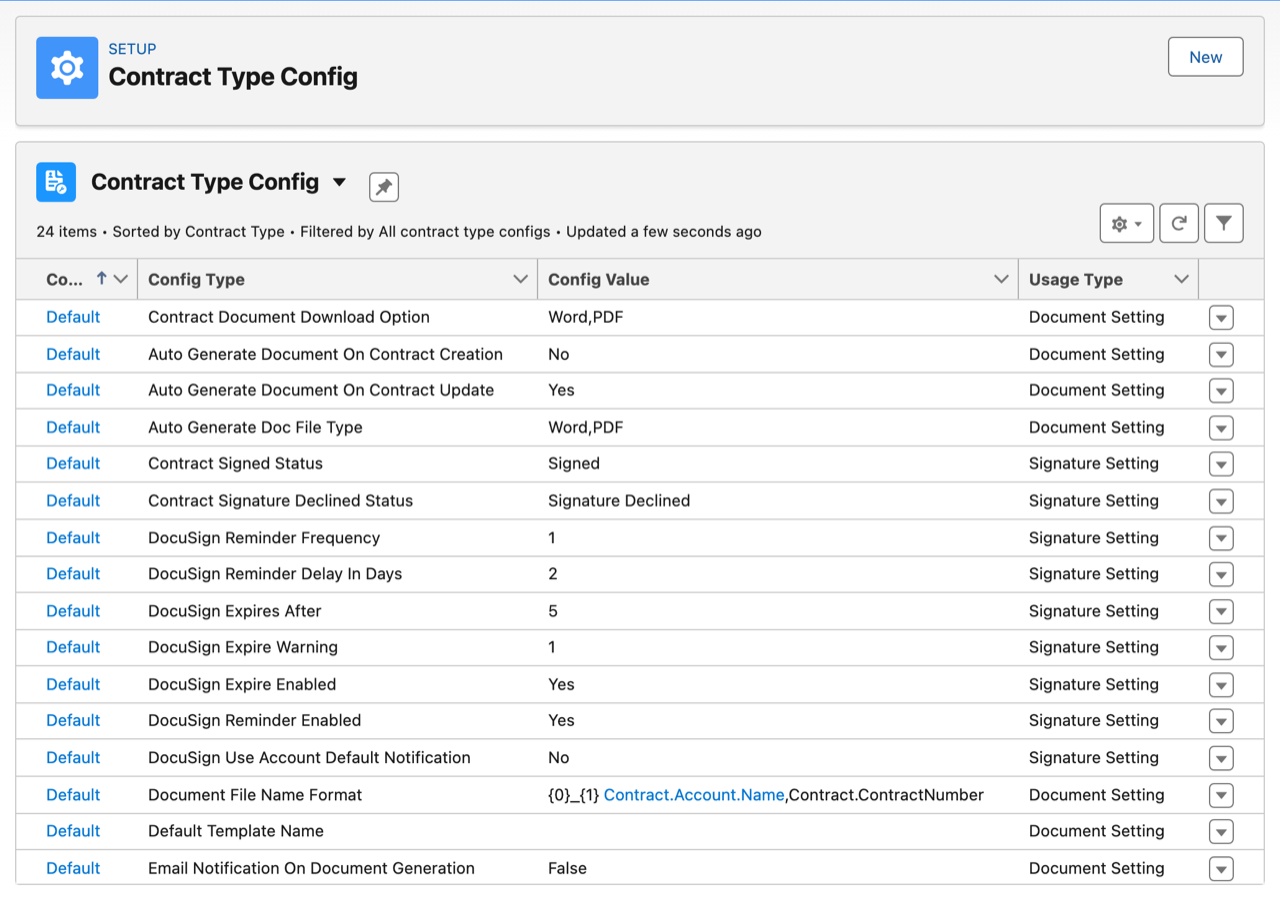
Each type carries contract type config settings, in Setup under Contract Type Config. They decide what happens to documents when a contract is created or updated from another object:6
| Setting | Default | What it does |
|---|---|---|
| Auto Generate Document On Contract Creation | No | Yes creates a contract document version from the default template when Create Contract runs; No creates the contract without one |
| Auto Generate Document On Contract Update | Yes | Updates the document version when the contract is updated from its source object |
| Auto Generate Doc File Type | Word, PDF | The formats attached: Word, PDF, or both |
Auto-generation needs the file type, the document file name format and the default template name set as well.6 Our lab org has the Default contract type and 24 config rows.7
The lifecycle itself is an object state definition, also called the contract state model. It lists the valid states and the transitions between them, and you customize it per type.
- Dynamic contract actions are the operations valid in each state.
- Custom actions are Apex or
OmniScriptobject state action definitions.
Typical statuses, in order:
- Draft
- In Approval. A rejection returns it or ends it.
- Negotiating
- Awaiting Signature. Signature Declined ends it; a revoked signature returns it to negotiation.
- Activated, then expired or terminated.
A QuantumBit org (built from Salesforce's QuantumBit sample catalog) ships one definition, Contract LifeCycle Management. It has 11 state values, 20 transitions and 9 Apex actions, such as submitForApproval.8
From quote to contract
In short: in Revenue Cloud, New Contract on the quote creates a contract that carries the deal; how much of the price it captures is your choice.
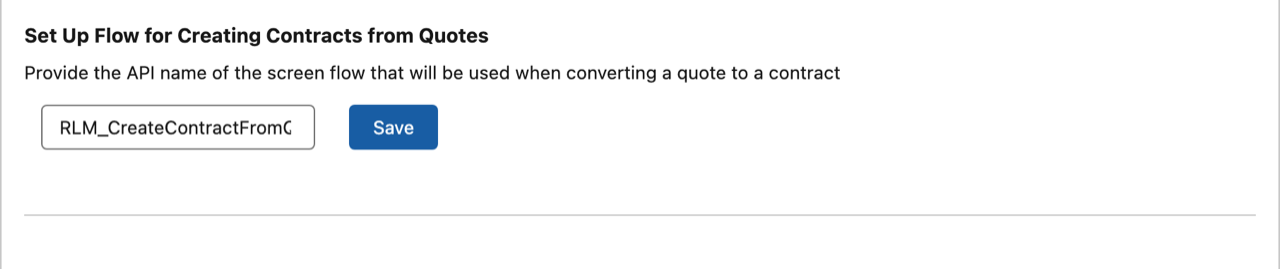
RLM_CreateContractFromQuote.In Revenue Cloud the contract usually starts from the accepted quote: the New Contract button on the Quote or Order layout, or a record-triggered flow on status Accepted that calls the Create Contract action.9
- New Contract and the standard Create Contract button do different things. New Contract creates a contract that inherits details from the source record. The standard Create Contract action creates a basic contract without the transaction details. For a contract with Revenue Cloud data, use New Contract.10
- The action's contractPriceOption is
CONTRACT_HEADER_ONLY(the default),NET_UNIT_PRICE_ONLYorDISCOUNT_ONLY.11 - Contract item prices come from quote lines only, never from order products.12
- Contracts link to draft orders only.10
In the CLM app itself, Create Contract on a quote, order or opportunity opens a Draft contract linked to its source; standalone contracts start from the Contract object. Every contract gets a contract document as version 1, and each later change creates a new version.13 To change an activated contract, set it back to Draft, then click Update Contracts on the source record. That only works on a Draft contract created with the Create Contract button.
The clause library
In short: approved language lives in clause sets, one main clause and its alternates, each with a status; templates and, from Winter '27, quotes draw on it.
A document clause set groups related clauses by variation and version. A set has one main clause, the usual language for a kind of document, and any number of alternate clauses, language a user may pick instead.14 You create sets from the Document Clause Sets tab with a name, default language, usage type and clause set category; the categories are a picklist you configure.14
Each document clause carries the text (plain or rich), a language, a version, and whether it's an alternate.15
- Statuses are Draft, In Approval, Active and Archived, plus Review Requested and, for Contracts AI drafts, AI Drafted. New clauses start in Draft.15
- To edit an active clause, return it to Draft. You can only do that while it's unused.
- The three clause objects deploy in order: clause category configuration, document clause set, document clause. Migrated clauses land in Draft.1617
- Users need Clause User, Clause Designer User or Clause Digital Experience User to work with clause sets.14
Winter '27 takes clauses further:1819
- Clause tokens in templates. Paste a clause's
ClauseTmplVersionIdentifierinto a template to always insert that exact version, or itsLatestClauseTmplIdentifierto insert whatever version is active when the document is generated.20 - Tokens inside clauses. Merge tokens pull record data through a Data Mapper or Context Service; placeholder tokens hold default values.
- Quote Special Terms. Reps add approved clauses to a quote before generating its document, from the Quote Special Terms component. Quote clauses support placeholder tokens only.
Document templates and generation
In short: a Word template with tokens, a data source that fills them, and a choice of generating in the browser or on the server.
Document Generation (formerly Omnistudio Document Generation) merges record data into a document template and saves Word or PDF output to Salesforce Files. Contract documents, quote proposals and invoices all run on it. The parts:
- The template. A Microsoft Word document with tokens where data goes, managed as a
DocumentTemplaterecord with a usage type and a status. Templates are designed in the Document Template Designer or in Word through the Microsoft 365 add-in, and only active templates generate. - The data source. An Omnistudio Data Mapper (Omni Data Transform) pair that extracts and shapes the record, or, newer, a Context Service mapping.4
- Where it runs. Client-side or server-side:21
| Client-side | Server-side | |
|---|---|---|
| Started by | A rep, on demand, in the UI | A schedule or automation |
| Best for | Lightweight documents under about 200 lines | Heavy token processing, more than 200 lines, large batches |
| Fonts | Default, extended and custom | Specific default fonts only |
| Community users | Client-side Omniscripts | The server-side generation Omniscript |
Server-side generation is throttled: by default 1,000 requests an hour and 24,000 a day per org. Requests over the limit are blocked and recorded as Document Generation Process records.22 Both kinds count against the org's daily Content Version limit and its file storage.21
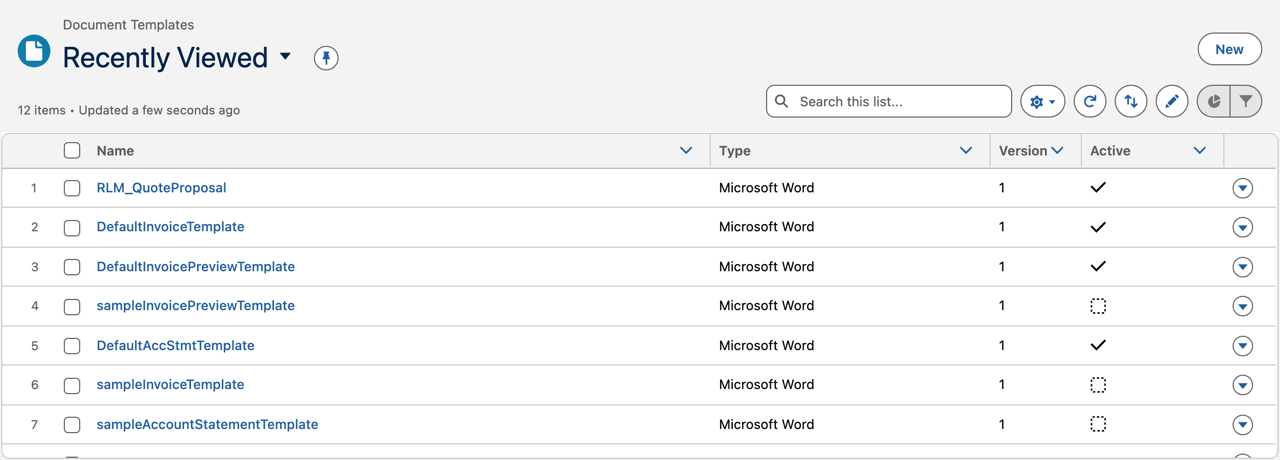
Quote documents have two paths. Document Builder is a drag-and-drop template builder in Setup (Company Details, Quote Line Items, Grid, Related Record Table and other components); Create PDF uses the org's one default quote template and saves to the Quote PDFs list.23 The Document Generation quick action uses Word templates instead, and from Winter '27 handles quotes of up to 15,000 lines, 1,000 bundles and 5 levels of nested grouping.24 Our lab org has both kinds of template; its active proposal templates are RLM_QuoteProposal (Data Mapper) and RLM_QuoteProposal_CS (Context Service).7
The code side, deploying templates and calling generation from Apex, is on the Advanced page Document Generation as code.
Versions, review and redlining
In short: every document change is a new contract document version; review happens in Word, internally or with the other side, and redlines are tracked.
A contract document version records each document: its version number, status (Active, Inactive or Draft), the template it came from, whether it's locked and by whom, and whether it has redlined sections and how many. How it was created is recorded too: Generate, Checkout, Import, Create Contract, Update Contract, Microsoft 365, or one of the external review types.25 A version also flags when its template has a newer version than the one it was generated from.25
Review runs in Microsoft Word through the Salesforce Contracts add-in, which needs Microsoft 365 Word User:26
- Internal review: authorized colleagues check the document.
- External review: the author sends the document to the other party, takes in their comments and suggested changes, and checks in the final version.
- Redlines record who changed what and when. Don't switch Word's document mode by hand: the add-in manages it, and a manual switch can break the review workflow.26
Winter '27 adds document playbooks, versioned governance rules uploaded as PDF, DOCX or XLSX and assigned to a contract type, and AI redline risk analysis in the Word add-in, which compares each redlined change with the playbook, rates the risk and suggests mitigations. Risk analysis needs the Data 360 and Einstein Foundations licences.27
Signing, activation and obligations
In short: DocuSign signs it, the state model moves it, and obligations track what was promised.
E-signature for Salesforce Contracts uses DocuSign, which needs a DocuSign account on top of the Contracts licence. Each e-signature action is available in one contract state and moves the contract to the next: Send Envelope, Update Envelope Status and Revoke Envelope Status, each a flow.28 Winter '27 shows each recipient's signing progress after Update Envelope Status.27
After signing, the contract is activated. Advanced Approvals can route contracts from Summer '26, and obligations can be activated based on the contract's status.
Obligations track commitments in signed agreements: delivery schedules, payment terms, compliance.29
- They live on the contract's Obligations tab.
- Each has an Assignee and a Party (First Party or Other Party).
- Statuses are Compliant, Non-Compliant and At Risk.
Contracts Analytics ships a Contract Admin Dashboard and a Sales User Dashboard. Obligation analytics are not out of the box.
Contracts AI
In short: Einstein generative AI that drafts clauses and reads old contracts into records.
Contracts AI needs Einstein on. It has four capabilities:30
- Clause generation
- Clause library management
- Legacy contract digitization: extract fields and clauses from an uploaded document, then create a contract record
- Clause drafting inside Microsoft 365
Drafting a clause starts from a document clause set, with Draft with Contracts AI, and ends with Save to Clause Library. The result is a draft and must be activated before use. Bulk extraction from PDFs came in Summer '26.
Contracts in Revenue Cloud
In short: a Revenue Cloud contract groups a customer's assets and holds negotiated prices that later transactions inherit.
A Revenue Cloud contract needs two things:31
- An Application Usage Assignment of type
RevenueLifecycleManagement. - Status Activated.
Assets attach through Asset Contract Relationships. They're created by hand (same account), or automatically when an order linked to such a contract is assetized. The Managed Assets viewer on the contract amends, renews or cancels, and stamps the contract number on the resulting transaction.32 The Assets page covers those actions.
Negotiated pricing is a Contract Item Price:33
- It has an item, a product selling model, dates, and a price or a discount.
- It can have adjustment tiers with a method. Range: the whole quantity gets the tier reached. Slab: each band is priced separately.
- You manage it in the Contract Pricing Schedule component.
- The same product and selling model can't be added twice.
- After activating a contract with prices, refresh the contract pricing decision table.
Transactions created from the contract inherit the prices.34 With Aggregation Strategy Cumulative, quantities are added up across lines and active assets before a tier is chosen. How the pricing procedure reads them is in the quote guide's contract, manual and header pricing.
The data model
The chain to remember:
- A contract links back to the quote (
SourceQuoteId) and the order (Order.ContractId), and carries an application usage assignment ofRevenueLifecycleManagement. - Its type comes from its record type; its contract type config rows decide document behaviour; its lifecycle is an object state definition.
- Each document is a contract document version with sections, generated from a document template.
- Approved language is a document clause set of document clauses, grouped by clause category configuration.
- Promises are obligations; assets are attached by asset contract relationships; negotiated prices are contract item prices with Range or Slab tiers.
| Object | Fields worth remembering |
|---|---|
Contract |
Status (Draft, Signed, Activated in a stock org; the CLM state model adds more), StatusCode, StartDate, ContractTerm, EndDate, RecordTypeId, SourceQuoteId, SourceOrderId, ContractDocumentVersionId, IsAssociatedWithClm, RenewalTerm2, RenewalTermUnit, PricingSource (PriceBookListPrice, LastTransaction), IsPricingContract |
ContractType |
DeveloperName, MasterLabel, IsDefault, SubTypes (Contract Lifecycle Management) |
ContractTypeConfig |
Settings per contract type: auto-generate on creation and update, file type, default template, file name format, e-signature defaults |
ObjectStateDefinition, ObjectStateValue, ObjectStateTransition, ObjectStateActionDefinition |
ReferenceObject, ReferenceField, AppUsageType, IsActive; value Name equals the status API name; FromStateId, ToStateId, CustomPermissionId; ActionType Apex or OmniScript |
ContractDocumentVersion |
ContractId, VersionNumber, Status (Active, Inactive, Draft), CreationProcessType, DocumentTemplateId, HasNewTemplateVersionAvl, IsDocumentVersionLocked, LockType (Generate, SuperUser, User), HasRedlinedSection, RedlinedSectionCount25 |
DocumentClauseSet, DocumentClause |
Clause: DocumentClauseSetId, IsAlternateClause, Status (Draft, In Approval, Review Requested, AI Drafted, Active, Archived), Format, Language, Version, ClauseTmplVersionIdentifier, LatestClauseTmplIdentifier, IsEligibleForTerms15 |
ClauseCatgConfiguration |
The clause categories; deploys first, before sets and clauses |
DocumentTemplate |
Name, Type (MicrosoftWord), UsageType (Revenue_Lifecycle_Management, Invoice, Account_Statement), Status (Draft, Active), IsActive7 |
DocumentGenerationProcess |
One generation request; blocked server-side requests are recorded here22 |
Obligation |
Assignee, Party (First Party, Other Party), status Compliant, Non-Compliant, At Risk |
AssetContractRelationship |
AssetId, ContractId, StartDate, EndDate |
ContractItemPrice, ContractItemPriceAdjTier |
ItemId (Product2 or ProductCategory), ProductSellingModelId, Price, DiscountType, DiscountValue, AdjustmentMethod Range or Slab, StartDate, EndDate, ListPrice |
| Winter '27 | QuoteClause (a clause on a quote), DocumentClauseContentToken, DocumentPlaybook, DocumentPlaybookVersion, DocumentPlaybookAssignment, and the CntrDocRisk objects for risk analysis20 |
Contract, contract type and state model fields were read from a QuantumBit scratch org's object describes;835 document and clause fields come from the CLM developer guide.
Which action when
Which contract feature carries the requirement?
| Customer says | Answer |
|---|---|
| "Sales contracts and NDAs follow different approval paths" | One contract type per line of business, each with its own object state definition |
| "Only legal can move a contract from negotiation to signature" | A custom permission on the object state transition |
| "Reps must use pre-approved language" | Clause library: document clause sets and active document clauses in templates |
| "Reps add our standard payment terms to the quote" | Quote Special Terms with clauses eligible for terms (Winter '27) |
| "When legal updates the warranty clause, new documents use it" | A LatestClauseTmplIdentifier clause token in the template; a ClauseTmplVersionIdentifier pins one version instead |
| "Draft a force majeure clause for manufacturing" | Contracts AI clause generation from a document clause set, then activate the clause |
| "We have 3,000 signed PDFs from the old system" | Contracts AI legacy contract extraction, then create digital contract records |
| "Track that the customer pays within 30 days" | An obligation, with a status of Compliant, Non-Compliant or At Risk |
| "Reps edit the contract in Word and send it to the customer for redlines" | The Microsoft 365 Word add-in with external review |
| "Lock the negotiated price for this customer's next orders" | A Revenue Cloud contract with contract item prices and adjustment tiers, then refresh the decision table |
Which document generation setup?
| Requirement | Choice |
|---|---|
| A rep generates a short proposal on demand | Client-side generation |
| Generate when a status changes, or in batches, or for quotes over 200 lines | Server-side generation, inside its hourly and daily limits |
| A simple branded quote PDF, built by an admin with drag and drop | Document Builder, with one default quote template |
| A Word template with clauses, sections and complex layout | Document Generation with a Word template |
| The data is spread across objects a Data Mapper reaches awkwardly | A Context Service mapping instead of a Data Mapper pair |
| The contract document appears as soon as the contract is created | Auto Generate Document On Contract Creation set to Yes, with a default template |
Watch out
Update Contracts on a quote, order or opportunity works only when the contract is in Draft and was created with the Create Contract button. To change an activated contract, set it back to Draft first.
A contract record belongs to one contract type, and the type comes from the Contract Record Type. Different lifecycles per line of business means different contract types, not different validation rules.
The contract state model is an object state definition. Custom contract actions are object state action definitions of type Apex or OmniScript. The same mechanism, with Reference Object Order, is the order lifecycle, so the term comes up for contracts and orders alike.
In Revenue Cloud, New Contract and Create Contract are different buttons. New Contract copies the source record's details; the standard Create Contract action makes a basic contract without them.
Contract item prices are created from quote lines only. A contract created from an order gets the header and no prices. After activating a contract with prices or schedules, refresh the contract pricing decision table, or the quote won't see them.
You link contracts only to draft orders. A contract can't be created for an activated order.
Generated and migrated document clauses both start in Draft. An active clause can't be edited: move it to Draft, which you can do only if it isn't in use.
Auto Generate Document On Contract Creation is No by default, so Create Contract makes a contract with no document until someone generates one. Turning it on also needs the file type, file name format and default template.
Server-side generation stops at 1,000 requests an hour and 24,000 a day per org. A batch that goes over is blocked, not queued for later: the blocked requests are left as Document Generation Process records.
Only active templates generate, and a template stays in Draft until someone activates it. Our lab org has draft templates next to active ones with similar names.
Salesforce Contracts needs DocGen and Omnistudio licences that aren't bundled with it. Price the add-ons with the Contracts licence, not after.
E-signature is DocuSign, with its own account. A customer standardised on another signing tool needs that vendor's own integration.
If you know Salesforce CPQ
| Salesforce CPQ term | Revenue Cloud term | What changed |
|---|---|---|
Quote Template (SBQQ__QuoteTemplate__c) with Template Content used as the contract |
Document templates (Word) with Document Generation, the clause library, contract document versions, DocuSign |
A real CLM with versions, redlines and a state model; CPQ had no lifecycle after the document |
| Template Sections and Template Content | Document clause sets with main and alternate clauses, and clause tokens | Approved language is versioned, approved and reusable across templates |
Contracted Price (SBQQ__ContractedPrice__c) on the account |
Contract Item Price with adjustment tiers, on a contract with a RevenueLifecycleManagement usage assignment |
Negotiated prices hang off the contract and need a decision table refresh; Range and Slab tiers replace price rule tricks |
Contracted checkbox (SBQQ__Contracted__c) on the order or opportunity |
New Contract button or Create Contract flow action with contractPriceOption | Contract creation is a button or an invocable action, with an option that decides whether prices are captured |
| Contract Amendment and Renewal Quoting from the CPQ contract | Managed Asset viewer on the contract or account | Amend and renew start from assets; see the Assets page |
| No legacy equivalent for contract types, state models, obligations or Contracts AI | Contract types, object state definitions, Obligation records, Contracts AI | New in kind |
Newer than the exam
The Rev-Con-201 exam is written against Summer '25. These arrived later. They matter on real projects, but the exam won't ask about them yet.
- Partner Community and Customer Community Plus base licences include Contract Management access for new customers, without a separate add-on (Winter '26, 258).4
- Salesforce Contracts: profile-based section locking, data true-up for line items, and Microsoft 365 template migration (Spring '26, 260).
- AI-supported bulk contract extraction from PDFs, and Advanced Approvals for contracts (Summer '26, 262).
- Document playbooks and AI redline risk analysis in the Word add-in; recipient signing progress; runtime users no longer need View Setup and Configuration; Salesforce Contracts on Lightning Platform licences and in Government Cloud (Winter '27, 264).27
- Clauses on quotes through Quote Special Terms, merge and placeholder tokens in clauses, clause tokens in templates that resolve at generation time, and rich text tables kept in generated Word documents (Winter '27, 264).1819
- Document Generation for quotes of up to 15,000 lines (Winter '27, 264).24
- New Connect REST APIs to start a contract risk analysis, read its findings, and manage playbook versions (Winter '27, 264).36
Sources
Every numbered note above links to the Salesforce article it comes from. This page is current to Winter '27 (release 264).
- Screenshots from our lab org (built with Salesforce's launchpad), Winter '27 (264), taken 2026-11-08
- Salesforce Help and the Revenue Lifecycle Management Developer Guide, Winter '27 (264), as published 2026-09-04 to 2026-09-07; checked by Taggalong 2026-10-25
- Salesforce Help for Salesforce Contracts and Document Generation, the CLM Developer Guide, and the Winter '27 release notes for Salesforce Contracts and Document Generation (fetched 2026-09-30), read by Taggalong 2026-11-08
- Trailhead: Salesforce Contracts Foundations, read 2026-09-22
- Trailhead: Deep Dive into Salesforce Contracts, read 2026-09-22
- Trailhead: Generative AI for Salesforce Contracts, read 2026-09-22
- Tokens for Document Clauses and Document Templates, read 2026-11-24
- Create a Document Clause, read 2026-11-24
- Contract Pricing Agreements, read 2026-11-24
-
Trailhead: Salesforce Contracts Foundations, Meet Salesforce Contracts ↩
-
Trailhead: Salesforce Contracts Foundations, Dive into Salesforce Contracts Capabilities ↩
-
Trailhead: Salesforce Contracts Foundations, Collaborate with Salesforce Contracts ↩
-
Personas and Permission Set Licenses for Salesforce Contracts ↩↩↩↩
-
Trailhead: Deep Dive into Salesforce Contracts, Explore Contract Types, Actions, and Lifecycle States ↩
-
Set Up Contract Features in Revenue Management; Automate Contract Creation from Quotes and Orders ↩
-
Map a Flow to Capture Quote Line Pricing on Contracts; Developer Guide: Create Contract Action ↩
-
Trailhead: Deep Dive into Salesforce Contracts, Create and Submit Contracts ↩
-
Developer Guide: Salesforce Contracts Objects; Developer Guide: Salesforce Contracts Additional Information ↩
-
Winter '27 Release Notes: Add Clauses to Quotes from Your Clause Library ↩↩
-
Winter '27 Release Notes: New and Changed Objects in Document Generation and Contracts ↩↩
-
Client-Side and Server-Side Omnistudio Document Generation Compared ↩↩
-
Maintain the Consistency and Resilience of Server-Side Document Generation ↩↩
-
Document Builder for Quotes; Create a Document from a Quote ↩
-
Winter '27 Release Notes: Generate Documents for Quotes with 15,000 Line Items ↩↩
-
Trailhead: Deep Dive into Salesforce Contracts, Track and Manage Obligations and Analyze and Visualize Contract Data ↩
-
Trailhead: Generative AI for Salesforce Contracts, Explore Smart Clause Generation and Digitize Legacy Contracts ↩
-
Create a Contract and Application Usage Assignment; Create Asset Contract Relationships; Contracts in Revenue Management; Contract Management Essentials ↩
-
Manage Contract Prices or Discounts Manually; Calculate Cumulative Quantity Pricing for Contractual Discounts ↩
-
Generate a Quote or Order from a Contract; Apply Contract Pricing When Amending or Renewing ↩
-
Developer Guide: ContractItemPrice; Developer Guide: ContractItemPriceAdjTier; Developer Guide: AssetContractRelationship ↩
-
Winter '27 Release Notes: New Connect REST APIs in Salesforce Contracts ↩