
Everything a company sells is defined in the product catalog before anyone can price it, quote it, order it or bill it. In Revenue Cloud that catalog is called Product Catalog Management, and every later step reads from it. This page explains how catalogs, attributes, classifications, bundles, selling models, qualification rules and search fit together, which structure fits which requirement, and the traps we see people fall into.
The example we use throughout: the QuantumBit Q-Rack 750 (QB-QRack-750), a configurable server bundle. It's shown in the Server category of the QuantumBit Hardware catalog, takes its attributes from its own classification, Q-Rack PC, and is built from groups of processors, memory, storage and power supplies.1 The Catalog lab has you build a small bundle of your own the same way.
How it works
What Product Catalog Management is
In short: Product Catalog Management is the one place where everything you sell is defined.
- Product Catalog Management (PCM) is the single source of truth for catalogs, categories, products, bundles, attributes, classifications, selling models, and the qualification rules that decide who can buy what.2
- It has its own app, the Product Catalog Management app. Its home page has tiles for products, catalogs, attributes, rules, and Index and Search Configuration.3
- Pricing, configuration, quoting, orders, assets and billing all read from it. If a product isn't in PCM, nothing downstream can sell it.
- On the name: Salesforce's Winter '27 help says Revenue Management, while its release notes and Trailhead also say Agentforce Revenue Management. It's one product. We say Revenue Cloud.
Who gets access
In short: two prebuilt permission sets, one for the people who build the catalog and one for the people who use it.
| Permission set | Who gets it |
|---|---|
| Product Catalog Management Designer | The people who set up the catalog: Salesforce admins, catalog admins, product designers, and Product Discovery admins |
| Product Catalog Management Viewer | The people who use it: sales reps who browse, quote and order |
| Customer Community User and Partner Community User versions | Customer and partner community users |
Source for this table.4
Inside the Designer group, the Trailhead module separates two personas worth remembering:53
- The catalog admin owns the reusable metadata layer: attributes, attribute categories, classifications, catalogs and categories.
- The product designer owns products, components, relationships, category assignments and qualification rules.
How to assign them:
- Assign the prebuilt permission sets inside permission set groups. Don't clone them.
- To remove permissions, use a muting permission set.4
- The older Product Discovery permission sets were deprecated in Winter '25. Their permissions now live in the PCM permission sets.6
Design order: attributes first, catalog last
In short: the help and Trailhead describe the build in opposite orders, and both are right because the dependencies are the same.
- The help documentation works top-down: catalogs, then categories, then attributes assigned through classifications, then products.7
- The Trailhead module works bottom-up: attributes, then classifications, then products and bundles, then categories and catalogs.3
What matters is the dependency chain:
- A catalog must exist before its categories.
- Products must exist before they're assigned to categories.
- Picklists must exist before picklist attributes.
- Attributes reach products through classifications.7
Catalogs and categories
In short: a catalog is the top-level container; categories group products inside it.
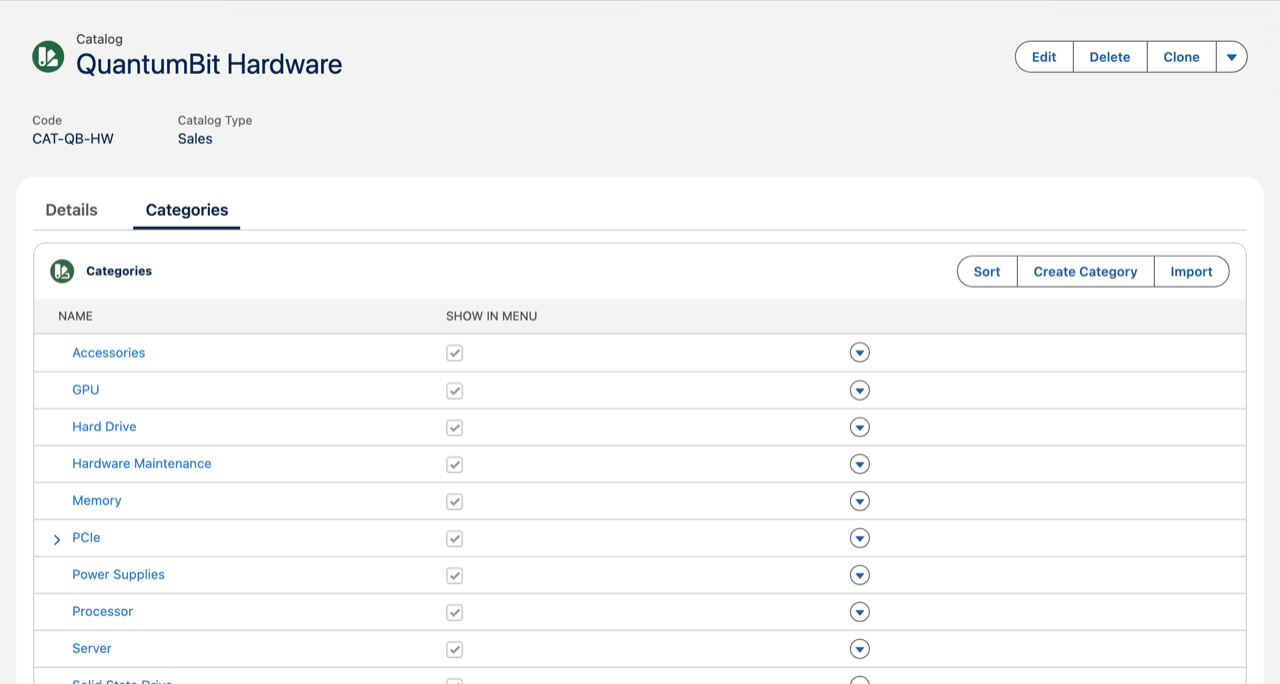
- A catalog is the top-level container. You need at least one. Many companies use several: by product line, by business unit, by territory.8
- A category is a hierarchical grouping inside one catalog, up to 5 levels deep, not counting the root.
- A product can sit in more than one category and more than one catalog.
- Each category holds up to 100,000 products.9
- Since Summer '25 you can set a default catalog, so reps land somewhere sensible in Product Discovery.
- You can fix the display order of categories at design time (Winter '26, release 258).8
In our example, QuantumBit Hardware has ten top-level categories, one of them Server, and one subcategory. That's two levels, well inside the limit of five.1
Dynamic attributes
In short: attributes describe a product, and a product designer creates them in the app without new custom fields.
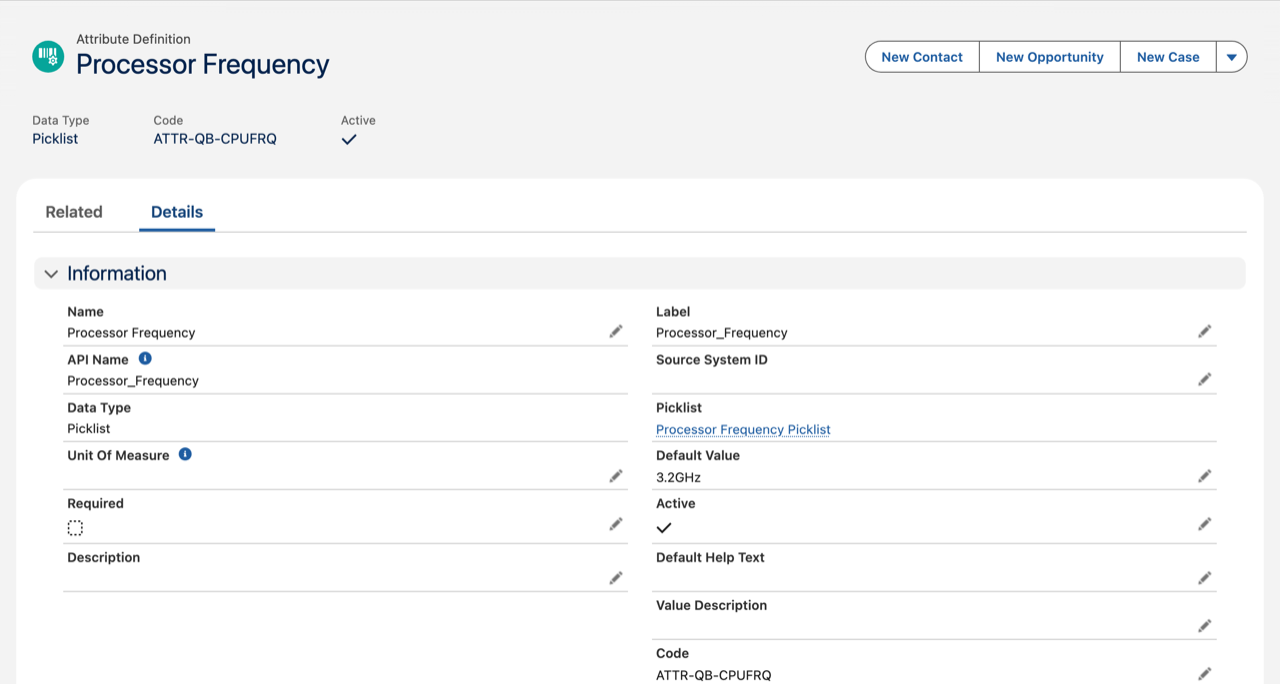
Attributes are the characteristics of a product: color, storage, term, seat count. They're called dynamic because a product designer creates them in the app; no admin has to add custom fields.10
- There are eight data types: text, number, date, datetime, checkbox, picklist, currency and percent.
- A picklist attribute needs an attribute picklist created first. Each picklist value has a code that's unique across the whole org.
- Attribute categories group attributes so they're easier to find when you build classifications.10
Some attribute fields only describe the attribute. These change how it behaves on quotes and orders:11
- Is Required, Is Hidden, Is Read Only and Default Value.
- Minimum and Maximum Value.
- Display Type: a checkbox can show as a toggle, a number as a slider with a Step Value.
- Is Price Impacting: flags the attribute as one that pricing rules read.
A hidden attribute with a default value is how you carry a value the rep never sees.11
An attribute's value can be set and overridden at four levels, each narrowing the last:
- The attribute definition.
- The classification attribute.
- The product attribute.
- The bundle component attribute override. It changes the attribute only inside that bundle, never on the product itself.
A product can carry up to 200 dynamic attributes, and a bundle hierarchy up to 600 attribute overrides in total.9
Product classifications
In short: a classification is a template, a named set of attributes, and products based on it inherit those attributes.
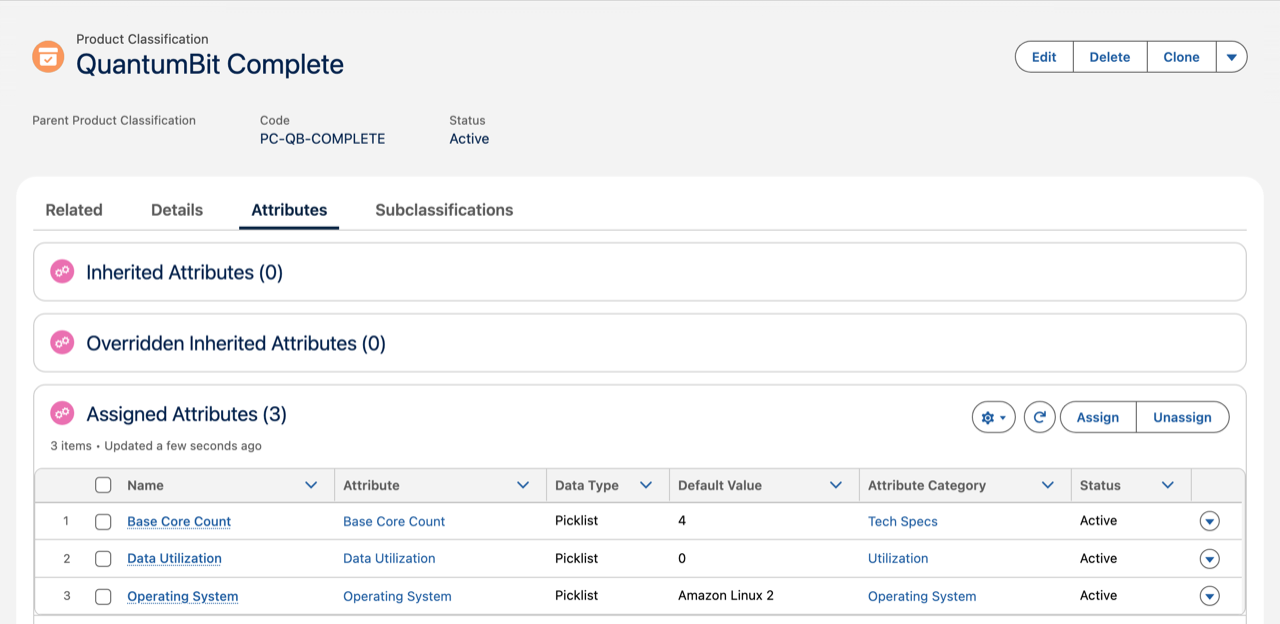
- A classification is the primary way to give a product attributes.12
- The Trailhead module goes further: it says every product in PCM is based on a classification.3 In a real org a product with no attributes can leave Based On empty; the QuantumBit Starter bundle does.13 So read the Trailhead statement as "attributes reach products through classifications".
What happens when a product is created from a classification (the Based On field):12
- The product inherits every classification attribute.
- The designer can configure or override each one on the product, as long as the attribute isn't required on the classification.
- Overriding includes changing the default value and excluding picklist values for that product.
Limits and hierarchies:
- One classification can create up to 10,000 products.9
- Classifications can form hierarchies up to three levels, with up to five children per parent (Winter '26, release 258). A subclassification inherits its parent's attributes and adds its own.12
- The help example: a Cars classification with Engine and Wheels, a Sedan subclassification that adds Music System, and an SUV subclassification that adds 4 Wheel Drive.12
Category and classification are separate. A category decides where a product is shown. A classification decides where its attributes come from. The two don't have to line up:1
- The Q-Rack 750 sits in the Server category, but it's based on its own classification, Q-Rack PC, which gives it 16 attributes.
- The Server classification has exactly one attribute, Server Configuration. Only products based on Server inherit it; in QuantumBit those are the
PowerSwerveR750 andOmniRackDC42 bundles. - Being shown in the Server category gives a product no attributes at all.
Classifications also appear inside bundles. A group can hold a single classification component instead of specific products, so the rep can pick any product of that classification at runtime.18
The four product kinds
In short: two fields on the product decide what kind it is.
- Product Type is None or Bundle.
- Configure During Sale is Allowed or Not Allowed.
| Product Type | Configure During Sale | What you get | Allowed children |
|---|---|---|---|
| None | Not Allowed | Static simple product (a coffee grinder) | None |
| None | Allowed | Configurable simple product (a T-shirt with a size attribute) | None |
| Bundle | Not Allowed | Static bundle (a travel kit, a fixed support plan) | Static simple, static bundle |
| Bundle | Allowed | Configurable bundle (a laptop with optional warranty and headphones) | Any of the four kinds |
Source for this table.15
The Q-Rack 750 is the fourth kind: Product Type Bundle, Configure During Sale Allowed.1
Converting between kinds:
- A static bundle can become configurable, and back.
- A simple product can't become a bundle, and a bundle can't become a simple product.16
Bundle structure
In short: a bundle is a root product with groups under it, and products or classifications inside the groups.
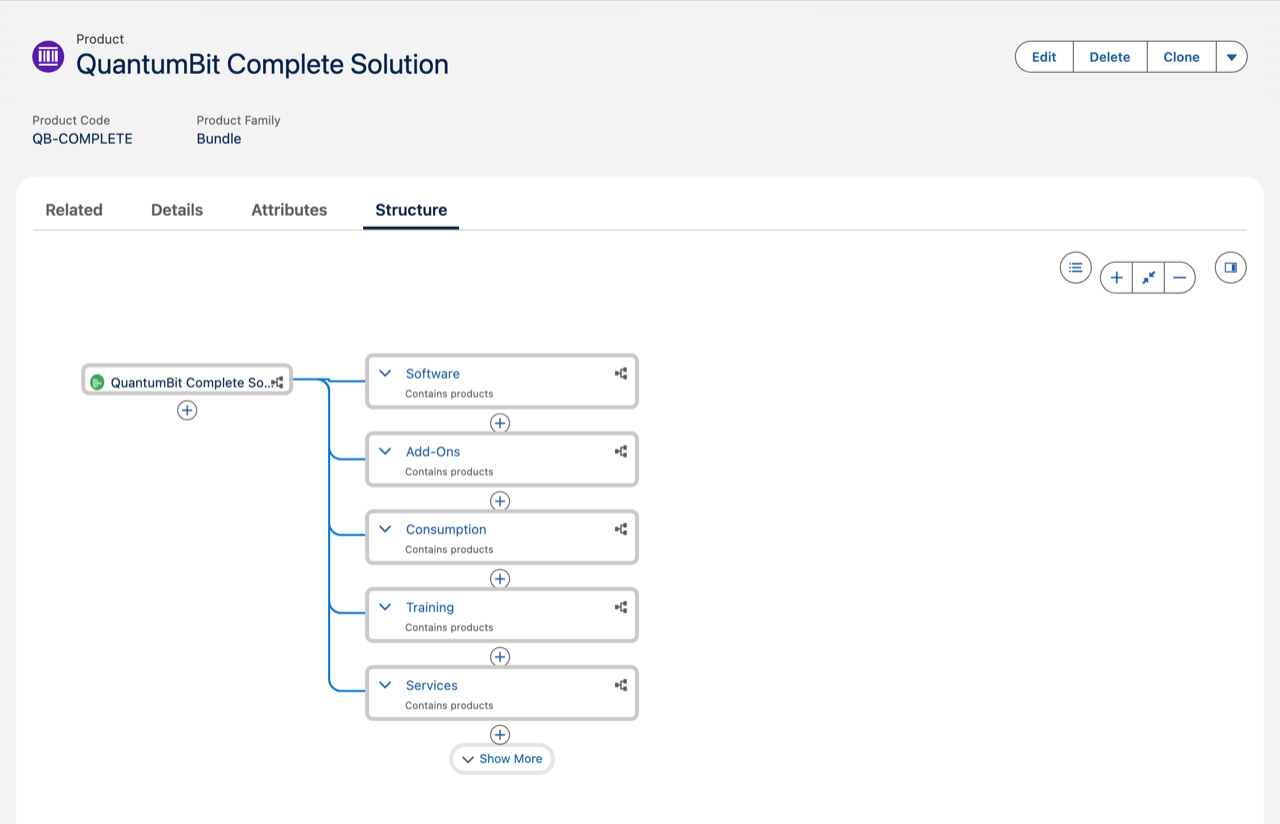
- A bundle starts with a root product.
- Its children are groups, products or classification components.
- They're linked by product relationships of two relationship types: Bundle to Bundle Component Relationship for products, and Bundle to Product Classification Component Relationship for classifications.14
The rules differ by bundle kind:
| Static bundle | Configurable bundle | |
|---|---|---|
| Groups | Optional | Required. Every component sits under a group, never directly under the root |
| Children | Static only, included by default, quantity changes off | Any of the four kinds |
A static bundle keeps every component, at a fixed quantity, and every attribute must have a default value.17
How groups nest in a configurable bundle:18
- A root group can hold child groups, or products, or one classification. It can't mix them at the same level.
- Child groups can't nest further.
Winter '27 states the bundle limits this way:9
- Up to 3 levels of nesting: root product, child group, nested child group.
- Up to 200 bundle components in total, across all groups and levels.
- Up to 200 lines including the root product, so one quote line or order line for a bundle supports up to 199 child items.
The Q-Rack 750 uses all three levels. Under the root are five groups: Computing, Memory, Storage, PCIe and Power Supply. Computing holds two child groups, Processor and Cooling, and the processors sit inside Processor.1
Quantity rules: cardinality and scaling
In short: cardinality limits how many components and how much of each; scaling decides how a child's quantity follows the parent.
Each component relationship carries the fields that shape the runtime cart: Sequence, Quantity, Require this component, Include component by default, Allow Quantity Changes with Min and Max Quantity, Quantity Scaling Method, and Quote Visibility.14
Two kinds of cardinality cover quantity limits:19
| Local cardinality | Group cardinality | |
|---|---|---|
| Applies to | One component | One group |
| Sets | Required or not, default or not, default, minimum and maximum quantity | The minimum and maximum number of components a rep can pick from the group |
| Help example | Up to two double beds | A group of four bed types, min 1 and max 3 |
| Q-Rack 750 | Xeon Gold 6354: quantity 1, max 2 | Processor group: min 1, max 2 |
Source for this table, apart from the Q-Rack row.19 The Q-Rack values come from our org.1
Quantity Scaling Method has three values:14
| Value | What the child quantity does |
|---|---|
| None | Independent of the parent. Editable if Allow Quantity Changes is on |
| Constant | Fixed at design time, whatever the parent quantity |
| Proportional | Multiplied by the parent quantity: parent 3, child 2, gives 6 children in the cart |
All six Q-Rack power supplies are Proportional: their quantity follows the bundle's quantity instead of being typed.1
Quote Visibility controls whether a child shows in the Transaction Line Editor, in quote documents, both, or neither. Hiding a bundle hides its children.14
Bundle overrides and validation
In short: one bundle can change a component without touching the product, and a quick action checks the bundle before it goes live.
Bundle overrides change a component only in the context of that bundle:209
- Attribute overrides.
- Component overrides, up to 10.
- Group overrides, up to 10.
- Runtime exclusions, which hide a product, group or classification in this bundle only.
The Validate Product Definition quick action on the product record checks a bundle's integrity before it goes live.20 The two errors the Trailhead module calls out:3
- A group minimum higher than the number of products in the group.
- More required products than the group maximum.
Selling models
In short: a selling model says how a product is sold, and the price book entry on the line fixes which one applies.
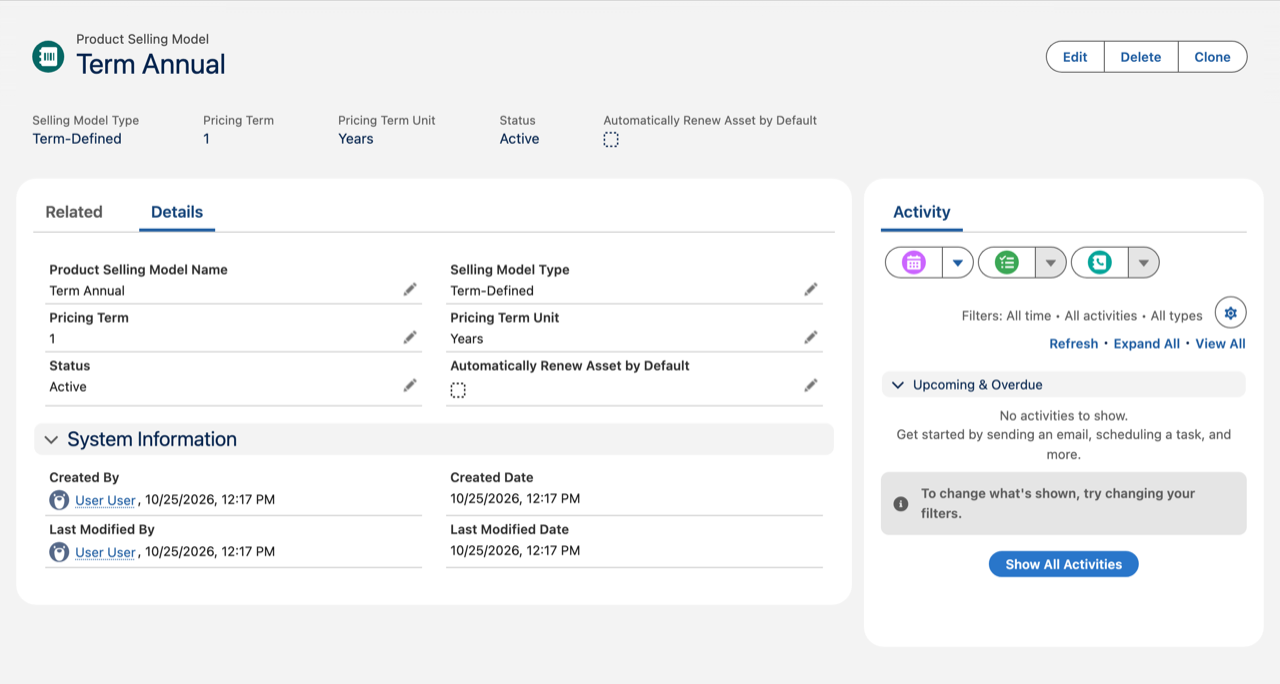
A product selling model is one of three types:
- One time.
- Term defined: a fixed term, such as 12 months.
- Evergreen: renews until cancelled.
How it connects to the product:21
- Selling models are optional.
- A product is linked to its allowed models through product selling model options. One of them is the default.
- Each combination of product and selling model needs its own price book entry.
- The price book entry chosen on a quote line is what binds the selling model to that line.
Qualification rules
In short: every product is available by default; rules narrow that down.
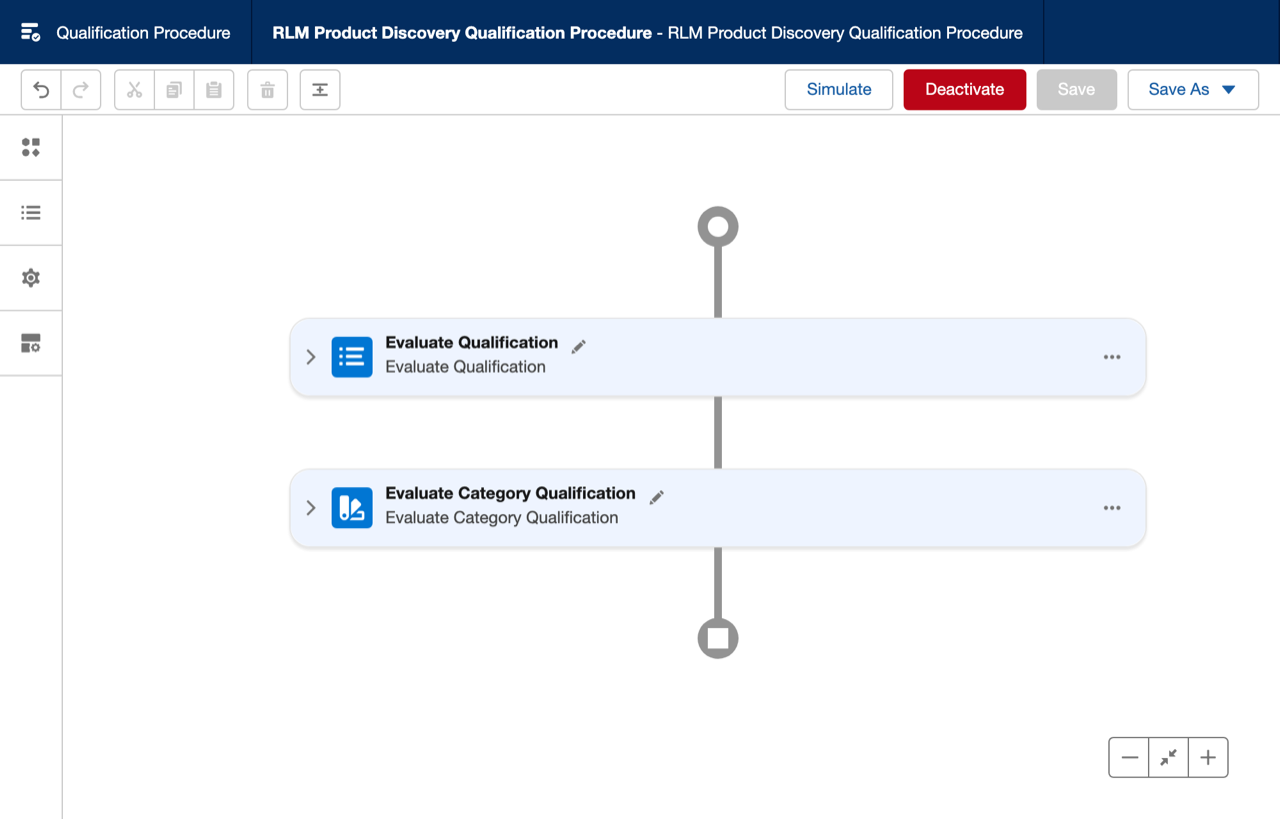
Every product and category is qualified by default. Two kinds of rule change that:22
| Rule | What it does | Help example |
|---|---|---|
| Qualification | Keeps a product available only when the criteria match | A premium table only for accounts with enough reward points |
| Disqualification | Removes a product when the criteria match | A new category unavailable in New York |
- Qualification takes precedence over disqualification. A category qualified by one rule stays qualified even if another rule would disqualify it.
- Disqualified products don't appear in Browse Catalogs and can't be added to quotes or orders.22
Four pieces make a rule work:22
- A Salesforce object that stores the criteria rows: a custom one, or the included qualification objects.
- A context definition that passes product and category data to the procedure.
- A decision table that looks up the criteria.
- A qualification rule procedure: an expression set with
EvaluateQualificationandEvaluateDisqualificationelements.
Simulate the procedure, then activate it.
The Trailhead module adds rebuild-and-refresh steps: Sync Pricing Data, rebuild the index, and refresh the Product Qualification and Product Disqualification decision tables. They exist because a new org has none of these caches warm.3
Product Discovery and search
In short: Product Discovery is how reps and customers browse the catalog, and three search options suit different catalog sizes.
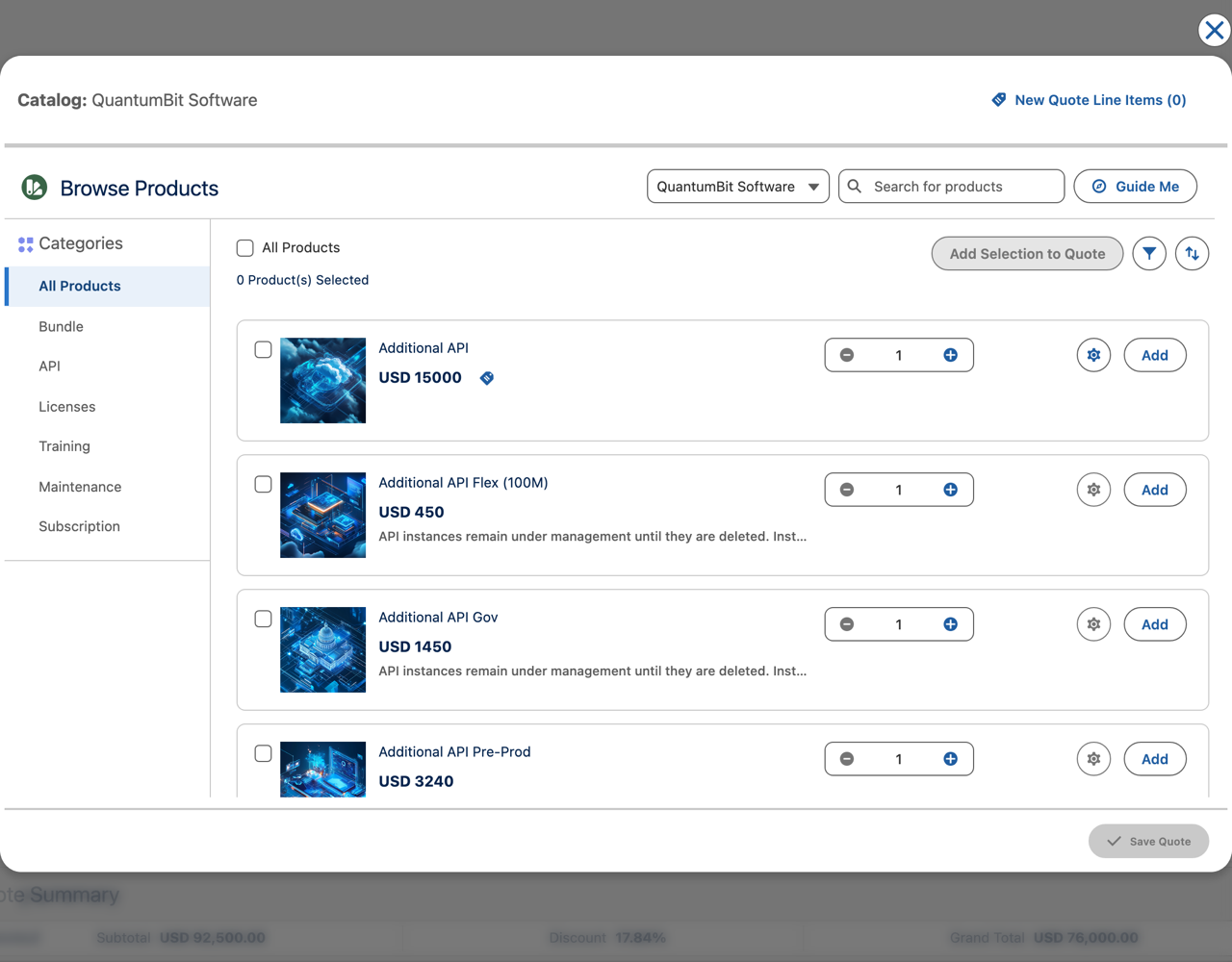
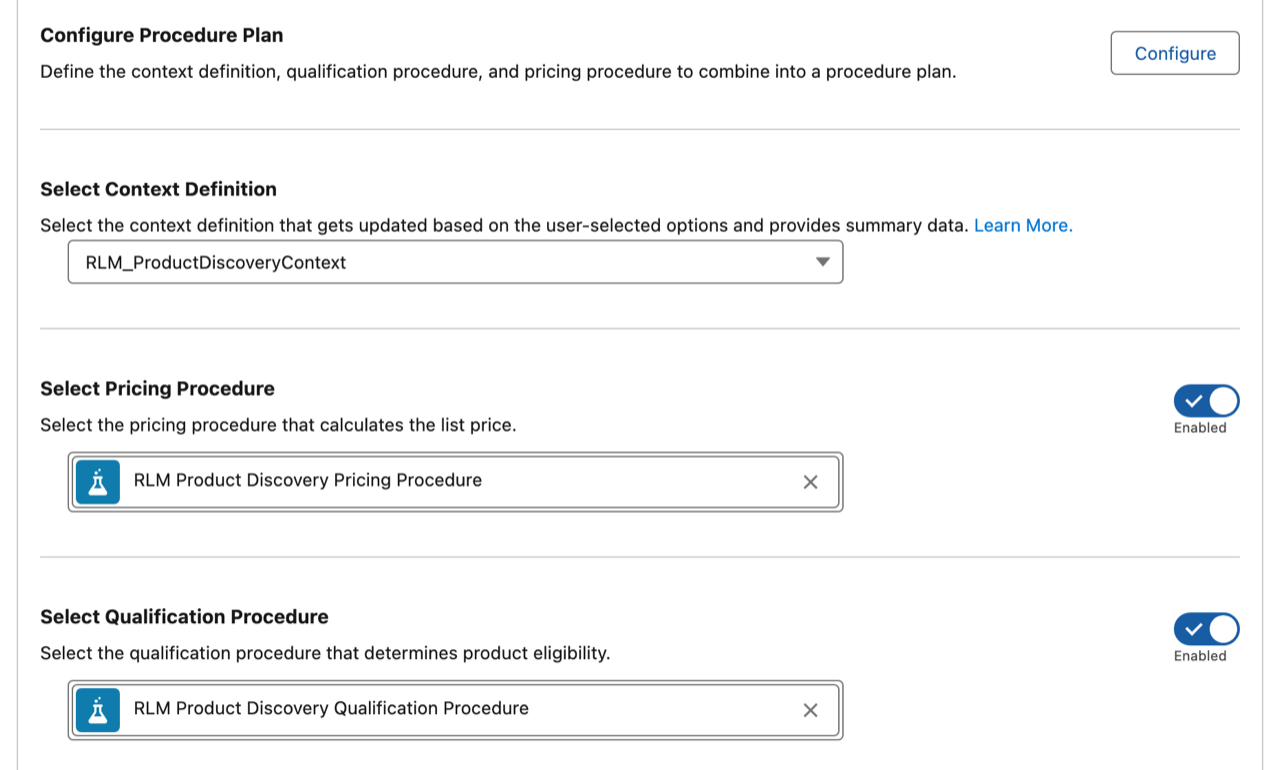
Product Discovery is made of:6
- A Product List page and a Product Details page.
- Bundle and attribute detail components.
- A Browse Catalogs button on quotes and orders.
- Guided Product Selection: a Guide Me button asks questions and returns matching products. It works in the Lightning Service Console only.
The components can be placed with Lightning App Builder or on Experience Cloud sites, and the browsing flow can be overridden with a custom flow.6
Picking the search option is a common design decision. SOQL is Salesforce Object Query Language, SOSL is Salesforce Object Search Language, and SKU is the stock keeping unit.
| Option | Catalog size | Setup | Supports | Doesn't support |
|---|---|---|---|---|
| SOQL search | Up to 250,000 products | None | Term search by product name, filtering by standard and custom Product2 fields | Facets, attribute search, guided selection, translated names |
| Indexed search | Up to 4 million products | Required | Term search across fields and attributes, faceted search, guided product selection, full and partial indexing | Search by translated searchable field values |
| Product field search (SOSL) | 4 million to 20 million products | Required | Term search by name, description, product code, SKU | Facets, attribute search, guided selection, translated names and descriptions |
Source for this table.23
The product index
In short: indexed search needs an index, and what you changed decides whether to rebuild all of it or part.
- A full rebuild is required after structural changes: search field configuration, index localization settings, specification types, attribute picklist values, and translation settings.
- A partial rebuild, up to 2,000 products, covers product field values, attribute values, category assignments and translated values.
- The index holds up to 1,000,000 products by default.
- You can rebuild up to 60 times an hour.
- The old index keeps serving until the rebuild finishes.24
Setup details that come up in practice
In short: a few product fields and housekeeping steps matter later, in pricing, orders and assets.
Commercial and technical catalogs. Product specification types and record types are optional.25
- They let an industry use its own product terminology.
- They drive record types on Product, which also decide whether a product is sold commercially.
- This is how a commercial catalog (what customers buy) is separated from a technical catalog (what fulfillment provisions), which matters for order decomposition later.
- Technical products exist in the catalog but generally aren't visible to the customer.7
After any catalog or pricing change, the Trailhead module repeats two steps:3
- Sync Pricing Data in Salesforce Pricing Setup, so the pricing decision tables see the new product data.
- A partial index rebuild, so Product Discovery sees it.
The Rules tile on the Product Catalog Management home page holds both product qualification rules (who can see what) and product configuration rules (which combinations are valid). Configuration rules belong with product configuration rather than the catalog, and are covered there.3
Product fields worth knowing:20
- Is Assetizable defaults to true. Set on a bundle root, it applies to every child, whatever the child's own value.
- Availability Date, End Of Life Date and Discontinued Date control when a product can be sold.
- The bundle's decomposition scope and Fulfillment Quantity Calculation Method (Always One or Aggregate) belong to order orchestration, but they're set on the product.
- Usage Model Type marks a product as an Anchor subscription or a Pack add-on for usage selling.
The data model
The chain to remember: a product catalog contains product categories, nested up to 5 levels, and products are placed in categories through product category product records. A product classification collects attribute definitions as classification attributes, and a product based on it carries them as product attribute definitions. Picklist attributes take their values from an attribute picklist, and attribute categories group attributes. Bundles are built from product component groups and product related components, each typed by a product relationship type. A product is offered through product selling model options that point at product selling models, with a price book entry for each selling model.
| Object | Fields worth remembering |
|---|---|
ProductCatalog |
Code, CatalogType (Sales), EffectiveStartDate, EffectiveEndDate |
ProductCategory |
Code, CatalogId, ParentCategoryId, IsNavigational, SortOrder |
ProductCategoryProduct |
ProductId, ProductCategoryId, CatalogId, IsPrimaryCategory |
Product2 |
Type (Base, Bundle, Set), ProductClass (Simple, VariationParent, Variation, Bundle, Set), ConfigureDuringSale, BasedOnId, IsAssetizable, IsSoldOnlyWithOtherProds, CanRamp, UsageModelType, StockKeepingUnit, DisplayUrl |
AttributeDefinition |
Code, DeveloperName, DataType, PicklistId, DefaultValue, IsRequired, IsActive |
AttributePicklistValue |
Code (unique org-wide), Value, DisplayValue, Sequence, IsDefault |
ProductClassification |
Code, Status, ParentProductClassificationId |
ProductClassificationAttr and ProductAttributeDefinition |
AttributeDefinitionId, AttributeCategoryId, DefaultValue, IsRequired, IsHidden, IsReadOnly, IsPriceImpacting, DisplayType, Sequence |
ProductComponentGroup |
Code, ParentProductId, ParentGroupId, MinBundleComponents, MaxBundleComponents, Sequence |
ProductRelatedComponent |
ParentProductId, ChildProductId, ChildProductClassificationId, ProductComponentGroupId, ProductRelationshipTypeId, Quantity, MinQuantity, MaxQuantity, IsComponentRequired, IsDefaultComponent, IsQuantityEditable, DoesBundlePriceIncludeChild, QuantityScaleMethod, QuoteVisibility |
ProductSellingModel |
SellingModelType (OneTime, TermDefined, Evergreen), PricingTerm, PricingTermUnit, Status |
ProductSellingModelOption |
Product2Id, ProductSellingModelId, IsDefault, ProrationPolicyId |
On transactions, attribute values are stored on QuoteLineItemAttribute and OrderItemAttribute. These objects take no custom fields, validation rules or triggers, and AttributeValue can't be used in a SOQL WHERE clause.21
Which action when
Which product kind?
| Customer says | Build |
|---|---|
| "It's one item, nothing to choose" | Static simple product |
| "It's one item, but the rep picks size, color or term" | Configurable simple product with attributes from a classification |
| "It's a fixed kit, always the same contents" | Static bundle, children included by default, no quantity changes |
| "It's a package where the rep adds, removes or resizes parts" | Configurable bundle with groups and cardinality, like the Q-Rack 750 |
| "It's one design sold in many size and color combinations, each with its own SKU" | Product variants (Summer '26). Before that, a configurable simple product with attributes |
Where does the attribute live?
| Need | Put it on |
|---|---|
| Shared by every product of a type | The classification (products based on it inherit it) |
| Different default or visibility on one product | The product attribute (an override of the inherited one) |
| Different only when the product is inside a specific bundle | The bundle component attribute override |
| Drives price | Any of the above, with Is Price Impacting selected |
| Needed at runtime but never shown to the rep | Is Hidden with a Default Value |
Static or configurable bundle?
| Requirement | Choice |
|---|---|
| Reps must never change contents or quantities | Static. Every attribute needs a default value |
| Reps choose within limits | Configurable. Use groups, group cardinality for "pick 1 to 3", local cardinality for "up to 2 of this one" |
| Contents fixed, but the child quantity should follow the parent quantity | Configurable with Quantity Scaling Method Proportional |
| Reps may pick any product of a type, not a fixed list | A classification component inside a group |
Which search option?
| Catalog | Option |
|---|---|
| Up to 250,000 products, name search is enough | SOQL search, no setup |
| Up to 4 million products, or you need facets, attribute search or Guided Product Selection | Indexed search; build the index |
| More than 4 million products | Product field search (SOSL): name, description, code, SKU only |
Qualification or disqualification rule?
| Requirement | Rule type |
|---|---|
| Available only to accounts that meet a condition | Qualification |
| Available everywhere except when a condition is met | Disqualification |
| Both apply to the same category | Qualification wins |
Full or partial index rebuild?
| You changed | Rebuild |
|---|---|
| Searchable or filterable field configuration, index languages, specification types, picklist values on an attribute definition, translation settings | Full |
| Product field values, attribute values or overrides, category assignments, translated product data | Partial (up to 2,000 products) or full |
Watch out
A simple product can never become a bundle, and a bundle can never become simple. Static and configurable bundles can be converted into each other.
In a configurable bundle, components go under groups, never directly under the root. In a static bundle, groups are optional.
Static bundle children must be static, included by default, with quantity changes off, and every attribute must have a default value. A configurable simple product can't go inside a static bundle.
A product's category doesn't give it attributes. The Q-Rack 750 is shown in the Server category but takes its 16 attributes from Q-Rack PC; only products based on the Server classification inherit Server Configuration.
Qualification rules beat disqualification rules. Products and categories with no rules at all are qualified.
Is Assetizable on a bundle root overrides the children. A child marked not assetizable inside an assetizable root still becomes an asset.
The Product Discovery permission set license and permission sets are deprecated. Use the Product Catalog Management Designer or Viewer permission set instead.
With Quantity Scaling Method Constant, the rep can't edit the child quantity, even if Allow Quantity Changes is on. With Proportional, the child quantity is editable in the configurator during a new sale, but read only in the line editor, because the line shows the calculated total. In an amendment, renewal or cancellation it's read only in the configurator too: change the parent's quantity and the child follows.
Numbers worth knowing: 200 attributes per product; 10,000 products per classification; 3 levels and 5 children per parent in a classification hierarchy; 3 levels of nesting in a bundle (root product, child group, nested child group); 200 components and 200 lines per bundle; 5 category levels; 100,000 products per category; 600 attribute overrides; 10 component and 10 group overrides; 1,000,000 indexed products; 2,000 per partial index; 60 rebuilds per hour; 100 product IDs per Bulk Product Details API call.
Attribute picklist value codes are unique across the whole org, not per picklist.
The Trailhead module's quiz checks two basics: what describes the characteristics of a product (attributes), and how a catalog helps the customer experience (browsable categories, search, comparison, accurate pricing). The same ideas tend to come up framed as a customer scenario.
Bundle roots are usually priced at zero, with children priced separately. Whether the bundle price includes a child is a per-component setting, DoesBundlePriceIncludeChild, and quantities can only be adjusted on components the bundle price doesn't include.
Every combination of product and selling model needs its own price book entry, and the price book entry on the line is what fixes the selling model. Selling models are optional, so a catalog with no subscriptions never has to create them.
If you know Salesforce CPQ
| Salesforce CPQ term | Revenue Cloud term | What changed |
|---|---|---|
Product Option (SBQQ__ProductOption__c) |
Product related component under a component group | Options are relationships, and groups are mandatory in configurable bundles |
Option Feature (SBQQ__ProductFeature__c) with min and max options |
Product component group with group cardinality | Same idea, and groups can nest one level inside a root group |
| Configuration Attribute | Dynamic attribute, assigned through a product classification | No custom fields on the quote line; values live on QuoteLineItemAttribute |
| Option Constraint, Configuration Rule, Product Rule | Constraint rules written in CML (Constraint Modeling Language) on the Advanced Configurator, or qualification rules in decision tables | Product rules split into configurator constraints (covered with configuration) and catalog qualification rules (covered here) |
| Bundled checkbox on Product Option | DoesBundlePriceIncludeChild on the component |
Same effect, moved to the relationship |
| Subscription Term and Subscription Pricing on Product | Product selling model plus a price book entry per selling model | The term is a selling model record, not fields on the product |
| Product Family and Salesforce categories | Catalog, category and subcategory | A real hierarchy, with products in many categories |
Guided Selling (SBQQ__QuoteProcess__c) |
Guided Product Selection in Product Discovery | Question driven, Service Console only |
| Search Filters on the product lookup | SOQL, indexed or product field search, with facets | Indexed search adds facets and attribute search |
Newer than the exam
The Rev-Con-201 exam is written against Summer '25. These arrived later. They matter on real projects, but the exam won't ask about them yet.
- Product classification hierarchies, three levels with attribute inheritance (Winter '26, 258). Exam questions are likely to treat a classification as flat.
- Constraints tab on the product record in PCM (Winter '26, 258).
- Category faceted search, dynamic product facets, and category display order (Winter '26, 258).
- Product detail caching, with regenerate and clear cache invocable actions (Winter '26, 258, enhanced in Spring '26, 260). Winter '27 calls it Product Cache.2
- Data translation for multilingual catalogs (Winter '26, 258).
- Filterable and searchable field limit raised to 100 combined, and multi-select in the product list raised to 100 products (Spring '26, 260). The Winter '27 limits article still says 87 combined fields, so the lower number is the safe one for the exam, and the raise is unverified against the help text.9
B2BCommerce interoperability: dynamic attributes, request for quote, unified pricing, qualification rules, and self-serve amend, renew and cancel (Spring '26, 260).- Product Discovery with constraint rules (Summer '26, 262; Salesforce first called it the enhanced Product Discovery experience): constraint rules evaluated while browsing, the transaction preview panel, and auto save to the transaction when a product is added or removed.6
- Product variants: variation parent, variation attribute set (up to 5 attributes), variation products each with their own SKU (Summer '26, 262).26
- Six-decimal display precision for unit prices and adjustments (Summer '26, 262).
- Bundle limits as the Winter '27 (264) help first states them: 3 levels of nesting, and 200 components and 200 lines per bundle, where earlier releases recommended no more than 200 components.9
- Proportional child quantities read only in the configurator during amendments, renewals and cancellations, first stated in the Winter '27 (264) help.14
Sources
Every numbered note above links to the Salesforce article it comes from. This page is current to Winter '27 (release 264): each note was checked against the Winter '27 version of its article.
- Screenshots from our lab org (built with Salesforce's launchpad), Winter '27 (264), taken 2026-11-08
- Salesforce Help and the Revenue Lifecycle Management Developer Guide, Winter '27 (264), as published 2026-09-04 to 2026-09-07; checked by Taggalong 2026-10-25
- Trailhead: Product Catalog Management with Agentforce Revenue Management, read 2026-09-22
-
Checked by Taggalong in a QuantumBit org, 2026-10-25 ↩↩↩↩↩↩↩
-
Trailhead: Product Catalog Management with Agentforce Revenue Management ↩↩↩↩↩↩↩↩
-
Product Catalog Management Personas for Revenue Management ↩
-
Checked by Taggalong in a QuantumBit org, 2026-09-22 ↩
-
Manage Qualification Rules for Products in Revenue Management ↩↩↩