
Before anyone builds a catalog or a pricing procedure, a Revenue Cloud project needs its groundwork right. That means the license that covers what the customer needs, the permission sets each persona gets, the Setup switches in the order they depend on each other, and a plan for who owns what. This page covers that groundwork, then how a project moves through build, test, deployment and adoption, and the traps we see people fall into on the way.
The example we use throughout: taking QuantumBit, Salesforce's sample company, from a new org to its first priced quote. Salesforce builds its QuantumBit sample org in the same order this page describes, and the Implementation lab tours the finished org.
How it works
Three licenses, three feature sets
In short: Revenue Cloud is sold as three licenses. Growth is the base, Advanced adds to it, and Billing is a different shape.
Revenue Cloud is sold as three licenses, and the comparison table in Salesforce Help is the one to know best. (On the name: Salesforce's Winter '27 help says Revenue Management, while its release notes and Trailhead also say Agentforce Revenue Management. It's one product. We say Revenue Cloud.)1
| License | What it includes |
|---|---|
| Revenue Cloud Growth | The entry license. Catalog, pricing, rate management, configurator, transaction management with usage selling, Document Generation and Document Builder, Advanced Approvals, ramp deals, procedure plans, the Operations Console, and Salesforce Go |
| Revenue Cloud Advanced | Adds Salesforce Contracts, Dynamic Revenue Orchestrator (DRO, the order fulfillment engine), Agentforce for Revenue Management, Promotions (beta), Revenue Intelligence Management, and limited Billing |
| Revenue Cloud Billing | Full Billing, including payments, collections and usage-based invoices. No Salesforce Pricing, Product Configurator, Transaction Management, Contracts, DRO or Document Builder |
All three include Context Service, Business Rules Engine (BRE), Omnistudio, Product Catalog Management (PCM), Rate Management, Document Generation and Ramp Deals.1 What Salesforce Contracts needs on top, its permission set licences and personas, is on the Contracts page.
Two details in that table catch people out:
- Advanced has only limited Billing. It covers billing policies, schedules, tax, one-time and subscription invoices, legal entities, accounting periods and credit memos. Payments, collections, usage-based invoicing and invoice documents need the Billing license.
- Consumption and wallets need both. Consumption Management and Wallet Management ship with the Billing license, but need the Advanced license to be used.1
Applied to our example: if QuantumBit only needed to quote, Growth would do. Contracts or order orchestration would need Advanced, and taking payments would add Billing.
Licenses also meter usage
In short: Advanced and Billing customers get event credits, and some actions spend them.
- Advanced and Billing customers receive event credits when their contract is activated.
- Credits are consumed per usage type, at a rate card multiplier.
- Credits aren't given back when a posted invoice is voided.2
Who gets billed for what:
| Activity | Internal users (users with an Advanced license) | External use |
|---|---|---|
| Pricing, configuration, quote, order and contract creation | Not billed | Billed |
| DRO submissions and invoice creation | Billed | Billed |
External use means direct API use, or community and B2B Commerce users without the matching Revenue Cloud community or self-service license.2
Permission set licenses, permission sets and groups
In short: a license puts entitlements in the org, permission sets grant access on top of them, and groups bundle the sets a persona needs.
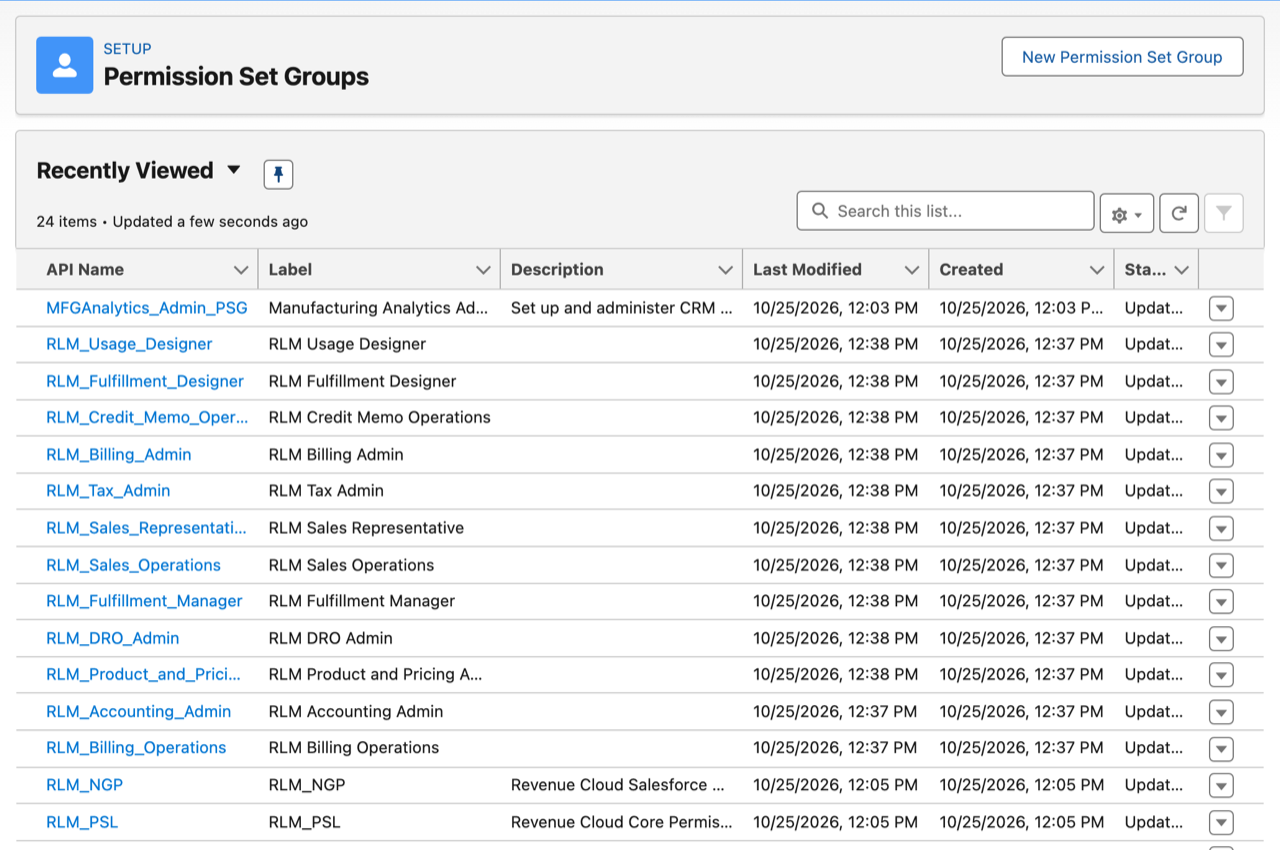
- Permission set license (PSL). The platform entitlement a license purchase drops into the org. Setup > Company Information shows each one with its total and used counts.
- Permission set. Grants object, field and user permissions, and is tied to a PSL. Assigning a prebuilt permission set also assigns its PSL and user permissions.
- Permission set group (PSG). Bundles permission sets for a persona.3
Salesforce recommends one pattern:
- Assign the prebuilt sets inside PSGs rather than cloning them, so users always get the latest default permissions.
- Add a custom set for added fields.
- Add a muting set for removals.3
Two limits:
- PSLs can only be assigned when the org edition supports them.
- Custom PSGs holding the PCM sets needed a Recalculate after the Spring '26 upgrade (release 260).4
Permission sets by functional area
In short: each area ships its own prebuilt sets, usually one for the people who design and one for the people who use.
| Area | Permission sets | Notes |
|---|---|---|
| Product Catalog Management | Designer; Viewer; Customer Community User; Partner Community User | Designer builds, Viewer browses. The Product Discovery sets are deprecated |
| Salesforce Pricing | Salesforce Pricing Admin; Design Time User; Manager; Run Time User | Design Time builds procedures and runs Sync Pricing Data |
| Product Configurator | Product Configurator; Product Configuration Rules Designer; Product Configuration Constraints Designer (Product Configuration User PSL) | One designer set per rules engine |
| Transaction Management | API sets: Create Orders from Quotes, Price and Tax Calculation for Quoting, InitiateAmendment, InitiateRenewal, InitiateCancellation, PlaceOrder, plus the Sales Rep persona |
Each lifecycle action needs its API set |
| Dynamic Revenue Orchestrator | DRO Admin User; Fulfillment Designer; Submit Transactions and Fulfillment User; Submit Transactions User; Submit Transactions and Orchestrate User; Fulfillment Manager/Operator | DRO Admin User alone can't submit an order; the submitter needs Assetize Order. Fulfillment Manager/Operator gives read access to all DRO objects (listed from Winter '27) |
| Rate and Usage Management | Rate Management Design Time PSL (Admin, Design Time User) and Run Time PSL (Manager, Run Time User); Usage Management Design Time, Run Time, Wallet Management User | Design time writes, run time reads |
| Billing | Billing Admin; Billing Operations User; Billing Customer Service User; Credit Memo Operations User; Tax Admin; Accounts Receivables Admin; Billing Experience Cloud User; API sets | The Collections, Payment Admin and Payment Operations sets need the Billing license |
| Platform | Context Service Admin and Runtime; Omnistudio Admin and User; Approval Designer and Admin | Guided Product Selection needs OmniStudio User too |
Sources for this table.356789101112131415
Setup switches, in the order they depend on each other
In short: Context Service comes first, then pricing, then Revenue Settings. Every other area has its own switch.
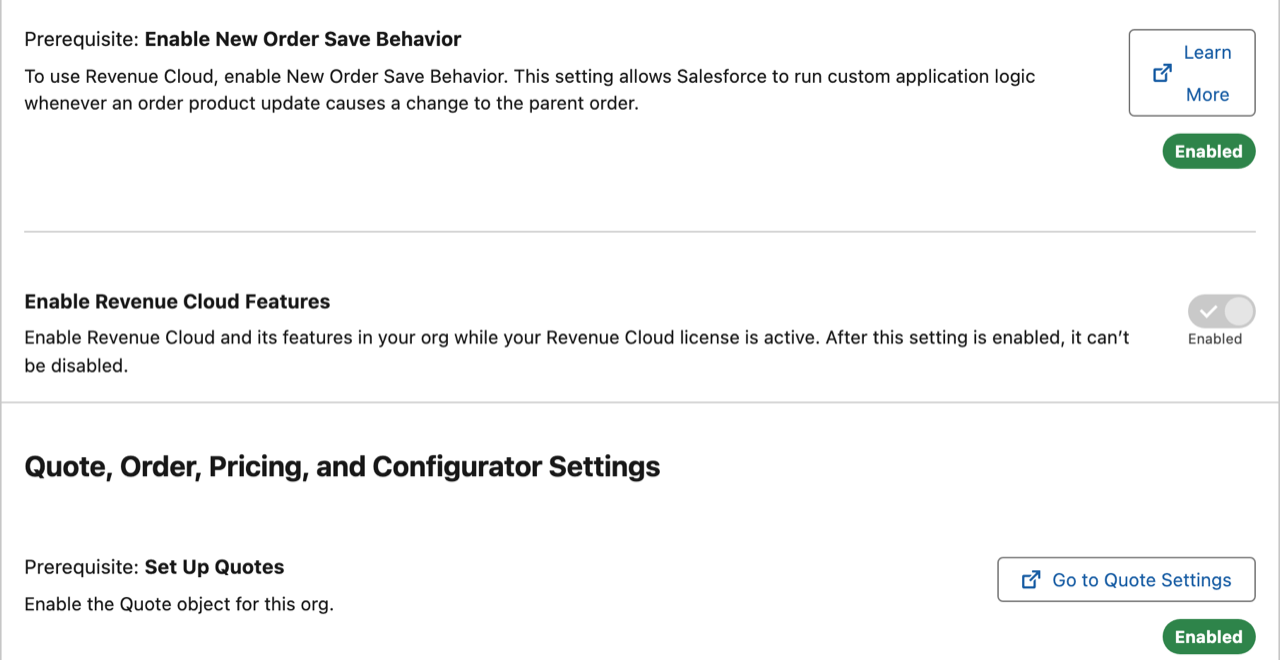
The path to a priced quote:
- Context Service Settings. The developer guide lists it as the prerequisite for Salesforce Pricing, Product Configurator, Usage Management and Billing.161718
- Salesforce Pricing Settings. Turns pricing on.19
- Salesforce Pricing Setup. A separate page. Select a recipe and a procedure, then click Sync under Sync Pricing Data.2021
- Revenue Settings. Holds the Transaction Management switches: Transaction processing for quotes and orders, Configure Products at Runtime, the Business Rules Engine and Constraints Engine switches, the default pricing procedure, the asset lifecycle flows, and the rating discovery procedure.222324
Choose with care in Revenue Settings: the default transaction processing type is irreversible once enabled.25
Sync Pricing Data keeps the decision tables that pricing reads up to date:
- It needs Salesforce Pricing Design Time, plus Assetize Order for a complete sync.
- It must run whenever pricing data changes, because pricing reads decision tables.
- It's manual. It refreshes every decision table that is mapped to a pricing recipe and has usage type Pricing.
- Winter '27's help adds a way to automate it: a scheduled flow that refreshes the pricing decision tables on a regular cadence.26
Three places pick a pricing procedure, and each drives a different behavior:
| Setting | What it prices |
|---|---|
| Product Discovery Settings | List prices while browsing |
| Salesforce Pricing Setup | Headless calls |
| Revenue Settings | Quotes and orders |
Source for this table.27
Every other area has its own switch:
- Dynamic Revenue Orchestrator Settings. Switch DRO on and select the fulfillment user. This also turns on Revenue Cloud itself if it's off.28
- Usage Management Settings. Enable Usage Management, then Rate Management.2930
- Billing Settings. Four rules: 1. Billing can't be turned on while Subscription Management is enabled. 2. Assign Billing Admin and Billing Operations User to the system administrators at once. 3. Select the default billing treatment, tax treatment and legal entity. 4. From then on, order activation fails without Bill To Contact, Billing Address and Shipping Address.313233
- Billing Guided Setup. Walks seven assistants. The last two are Billing-license only.34
Salesforce builds the QuantumBit sample org with the same checklist, in production order:35
- PSLs and PSGs.
- Context definitions.
- Decision tables.
- Expression sets, as drafts.
- Metadata.
- Catalog and pricing data.
- Billing and DRO data.
- Activation.
- Revenue Settings.
- Decision table refresh and index rebuild.
Stakeholders and who owns what
In short: Salesforce's modules name the teams and personas, we add the co-sell roles, and a responsibility table says who owns each workstream.
Salesforce's Foundations module names five teams:
- Sales drives the process.
- Service coordinates field operations.
- Operations shapes pricing and promotions.
- Finance tracks payments.
- Legal oversees contracts.36
It also names a persona per area, from catalog admin, product designer, pricing manager and pricing designer through fulfillment designer, billing admin, tax admin and accounts receivable admin.365
Two more roles come from other modules:
- The adoption module adds the executive sponsor.37
- The user acceptance testing (UAT) module adds the business analyst, the liaison between business and IT.38
On our own projects we add the co-sell roles:
- The consultant owns the brief and runs every step.
- The Salesforce account executive (AE) and solutions engineer (SE) own discovery access and the co-sell narrative.
- The prospect answers gaps and makes every scope decision.39
Who owns each workstream (Accountable signs off, Responsible does the work, Consulted gives input):
| Workstream | Accountable | Responsible | Consulted |
|---|---|---|---|
| Sponsorship, priorities, adoption mandate | Executive sponsor | Product owner | Salesforce AE |
| Licenses, PSLs, PSGs, feature toggles, sandboxes | Salesforce admin | Consultant or SI | IT |
| Catalog, attributes, classifications, bundles | Product owner | Catalog admin, product designer | Sales ops, marketing |
| Price books, adjustments, pricing procedures | Pricing manager | Pricing designer, consultant | Finance |
| Quote and order experience, approvals, documents | Sales ops | Quote and order capture admin | Sales reps |
| Fulfillment scenarios and orchestration plans | Operations | Fulfillment designer, DRO admin | Service |
| Billing treatments, tax, legal entities, accounting periods | Finance | Billing admin, tax admin, AR admin | Consultant |
| Integrations, data migration, custom code | IT and integration lead | Developer, consultant | Salesforce SE |
| UAT scripts, sign-off, go or no-go | Business analyst | End users, product owner | Consultant |
| Training, communications, feedback loop | Product owner | Peer champions, admin | Executive sponsor |
SI is the systems integrator, AR is accounts receivable.
Scope of work and project plan
In short: write the scope in six phases, size it by what drives effort, and plan the build in dependency order.
A scope is written in the six phases the Rev-Con-201 exam guide names:
- Discovery. Ours produces a sourced brief (what they sell, how they price, selling motions, billing today, systems, pain points, personas) and a gap list with owners. Nothing downstream may invent a product, price or persona the brief doesn't hold.39
- Design. Turns the brief into a capability map.
- Build.
- Test.
- Deploy.
- Adopt.
The scope inventory sizes each capability by what drives effort:
- Catalog size and bundle depth.
- Pricing complexity: list only, or volume, attribute, bundle and contract adjustments.
- Selling models and usage products.
- Approval tiers and document templates.
- Fulfillment scenarios.
- Legal entities and tax jurisdictions.
- Integrations.
- The volume of migrated products, prices, contracts and assets.
Phase the build by dependency, the order the org is built in:
- Catalog, pricing, configuration and quoting first, because nothing else can be tested without a priced quote.
- Then contracts, orders, assets and amendments.
- Then orchestration, billing, payments and usage, which need the most reference data and finance time.
For QuantumBit, that means its first priced quote comes before any amendment, fulfillment plan or invoice. Handoffs to the enterprise resource planning (ERP) system belong in the proposal's integration scope, never in the demo org.
Typical risks and how to meet them:
| Risk | Mitigation |
|---|---|
| A license that doesn't cover the requirement | Check the comparison table before design |
| An org already running Subscription Management or a managed CPQ package | Plan coexistence explicitly |
| Missing syncs and refreshes | Make them post-deployment steps |
| Catalog data quality | Migrate from a cleaned SKU list |
| A UAT run by the project team instead of end users | Have end users run it |
Build: environments, metadata and data
In short: there's no Revenue Cloud deployment tool. You move metadata first, data second, then run the same post-deployment steps every time.
- There is no built-in Revenue Cloud deployment tool.40
- A full deployment replicates a source org into a new environment.
- An incremental deployment moves only the delta, and needs version control and dependency analysis.41
The split that matters most is metadata versus data:
- Metadata, with states and versions: context definitions, decision table definitions, expression sets (pricing procedures, qualification procedures, constraint models), pricing recipes, procedure plans, flows, settings and permission sets.
- Data, loaded in a strict sequence: products, attributes, classifications, catalogs, categories, price book entries, adjustment schedules and tiers, rate cards, billing treatments, legal entities and qualification rows.424344
The order rules:
- Metadata goes first: the specification record type before products, decision tables before recipes.
- For pricing, the order is context definitions, then decision tables, then pricing procedures.
- Constants holding sandbox IDs must be replaced with production IDs.45
- Parents go before children.46
State matters:
- An active expression set version in the target can't be overwritten.
- Ranks can't collide.
- Decision tables have no versions.
- Context definitions can't be activated inside a deployment.474849
- Product configuration rules hold product IDs in a BLOB (a binary field), so they need the migration utility.
Post-deployment steps are always the same:
- Refresh decision tables.
- Sync pricing data.
- Rebuild the product index.
- Create what the API couldn't.
- Activate test users.50
After a sandbox refresh:
- Run Match Production Licenses, or sandbox users lack features production has.51
- Re-run Sync Pricing Data and refresh each decision table individually, because pricing data doesn't carry over from the source org. Winter '27's help adds this step, for cloned sandboxes too.26
Test: unit, system and user acceptance
In short: build validation first, then the technology team's QA, then end users' UAT, which decides go or no-go.
- Build-time validation is native: Validate Product Definition, pricing and rating simulation, decision table refresh status, and the usage product validator (Spring '26, release 260).
- System testing is the technology team's quality assurance (QA) pass. It must finish before UAT starts.
- User acceptance testing (UAT) is end-user testing in a sandbox or test environment. It verifies that a project or enhancement works as intended, and that what was originally requested is actually being delivered.38
What makes UAT the deciding test:
- It's the last stage before go-live.
- Its outcome is pass or fail per test case.
- That outcome is the go or no-go decision.
The business analyst runs it:
- Identifies testers.
- Writes the test scripts, with named testers and approvers.
- Gets sign-off that the scripts cover expectations.
- Validates the data.
- Tests key functionality with the key personas.
- Coordinates the run.
- Secures official written sign-off before deployment.
The preparation checklist:38
- Identify resources.
- Open a UAT channel.
- Publish a schedule with daily triage.
- Define bug reporting.
- Write test cases as scenarios plus steps.
- Validate the sandbox and test data.
- Hold a closing roundup.
| Criteria | |
|---|---|
| Entry | QA passed, sandbox validated, data ready, scripts signed |
| Exit | Every case passed or accepted, written sign-off in hand |
Problems found in a well-planned UAT are the point.
Deploy and adopt
In short: adoption means people actually use what you built, and the work starts before the build.
Adoption means someone using a solution that is available to them. There's no return until they do.37
Before the build:
- Ask executives for concrete commitments: log in a set number of days a month, forecast only from Salesforce, pay commission only on deals entered there, appear in launch communications.
- Document the current process first, so the improvement is measurable.
Three ways to learn from users:
| Method | Trade-off |
|---|---|
| Survey | Fast, shallow |
| Ride-along | Deep, slow |
| Focus group | In between, and creates peer champions |
Then pilot, launch and sustain:
- Pilot with a mixed group that includes one naysayer. Measure it with survey scores, usage statistics and tracked feedback.
- Launch communications say what is coming without jargon, what's in it for the user, and where the training is.
- Training methods: in person, train-the-trainer for very large organizations, recorded webinars reusable for new hires, documentation, a Trailmix, the Help Menu, and In-App Guidance prompts.
- After launch: recognize usage publicly, gather feedback through a defined channel, review the three yearly releases, and benchmark before and after.37
The data model
Two chains to remember.
- For access: a permission set license entitles permission sets. A permission set group bundles them through permission set group components. A user holds them through permission set assignments and permission set license assignments.
- For configuration: an expression set (a pricing procedure, qualification procedure or constraint model) runs with a context definition and looks values up in decision tables. An expression set definition carries its versions. The pricing recipe points at the default pricing procedure through
DefaultPricingProcedureId. The Price Book Entries decision table takes its rows fromPricebookEntryas its source object. The transaction processing type'sRuleEnginedecides which constraint model the configurator uses.
| Object | Fields worth remembering |
|---|---|
PermissionSetLicense |
MasterLabel, DeveloperName, TotalLicenses, UsedLicenses, Status. Shown in Setup > Company Information |
PermissionSet |
Name, Label, LicenseId (the PSL it needs). Prebuilt sets carry a namespace-free API name such as ProductCatalogManagementAdministrator |
PermissionSetGroup and PermissionSetGroupComponent |
DeveloperName, Status (Updated after recalculation). Components link the sets in the group |
PermissionSetAssignment, PermissionSetLicenseAssign |
The user-to-set and user-to-PSL rows |
ContextDefinition |
DeveloperName, MasterLabel, InheritedFrom, InheritedFromVersion (for extended standard definitions) |
DecisionTable |
DeveloperName, Status, UsageType (DefaultPricing, PricingDiscovery, ProductQualification, DefaultRating, RatingDiscovery, RevenueStandardTax), SourceObject, RefreshStatus, LastSyncDate |
ExpressionSet |
Name, ApiName, UsageType (DefaultPricing, ProductQualification, DefaultRating, PricingDiscovery, RatingDiscovery, Constraint), ExpressionSetDefinitionId |
ExpressionSetDefinition, ExpressionSetDefinitionVersion |
Setup objects reached through the Metadata API. Versions have states and ranks |
PricingRecipe |
DeveloperName, IsActive, DefaultPricingProcedureId. A System Admin can read it; a Pricing Admin can't |
TransactionProcessingType (Tooling) |
DeveloperName, RuleEngine (StandardConfigurator or AdvancedConfigurator) |
ProductConfigurationRule, ProductConfigurationFlow, ExpressionSetConstraintObj |
Configurator records with a status field. The rule BLOB references product IDs |
RuleLibrary, RuleLibraryVersion |
Business Rules Engine rule libraries. Not supported by the Metadata API |
Sources for the Metadata API rows.52
Which action when
Which license?
| Customer needs | License |
|---|---|
| Catalog, pricing, configurator, quotes and orders, approvals, documents | Growth |
| Any of the above plus contracts with redlining, order orchestration, Agentforce, promotions or simple invoicing | Advanced |
| Payments, refunds, collections, disputes, usage-based or milestone invoices, invoice PDFs and email, chart of accounts | Billing (with Advanced if they also quote) |
| Consumption and wallet management | Billing and Advanced together |
PSL, permission set or permission set group?
| Situation | Use |
|---|---|
| The feature doesn't appear in Setup at all | Check that the PSL exists and has free seats in Company Information |
| One user needs a prebuilt capability | Assign the prebuilt permission set (it brings its PSL) |
| A persona needs several prebuilt sets plus custom fields | A permission set group with the prebuilt sets, a custom set for the fields, and a muting set for removals |
| Users lost access to new fields after a release | Recalculate the custom permission set group |
What must be on before this works?
| Feature | Prerequisite toggle or setup |
|---|---|
| Any pricing, configurator, usage or billing setup | Context Service Settings enabled |
| Prices on quotes | Salesforce Pricing on, recipe and procedure selected in Salesforce Pricing Setup, default procedure in Revenue Settings, Sync Pricing Data run |
| List prices in Product Discovery | Context definition and pricing procedure selected in Product Discovery Settings, index built, decision tables refreshed |
| Constraint rules in the configurator | Configure Products at Runtime, the Constraints Engine switch, a transaction processing type with AdvancedConfigurator, context definition set up |
| BRE configuration rules | A default pricing procedure in Revenue Settings, then a rule library, then the Business Rules Engine switch, then a StandardConfigurator processing type |
| Order submission to DRO | DRO switched on with a fulfillment user; Submit Transactions and Fulfillment User on the submitter |
| Billing schedules on activation | Billing on, defaults selected, Bill To Contact and addresses on the order |
| Guided Product Selection | Omnistudio package, Discovery Framework, OmniStudio User permission set, Service Console |
Sources for this table.535423551031
Metadata or data?
| Component | Type | Deployment note |
|---|---|---|
| Context definition | Metadata | Deploy first; activate by hand in the target |
| Decision table definition | Metadata | Deploy before recipes and procedures; refresh after deployment |
| Pricing procedure, qualification procedure, constraint model | Metadata (expression set version) | Deactivate the target version first; ranks must not collide |
| Procedure plan | Metadata package | No install URL, no second-generation packaging, API 66.0 or later, dependencies in order (Spring '26) |
| Products, attributes, classifications, catalogs | Data | Sequence per the object deployment reference; specification record type first |
| Price book entries, adjustment schedules and tiers | Data | Refresh the Price Book Entries decision table afterwards |
| Product configuration rule | Data with a BLOB | Use the migration utility, because product IDs differ |
Who runs which test?
| Test | Who | Where | Exit |
|---|---|---|---|
| Unit and build validation | Consultant, designer | Dev sandbox or scratch org | Simulation and validators pass |
| System and integration (QA) | Technology team | Full or partial sandbox | QA pass, then hand to UAT |
| UAT | End users, led by the business analyst | UAT sandbox with validated data | Written sign-off, go decision |
Watch out
Growth has no Contracts, no DRO, no Billing, and no Agentforce for Revenue Management. Advanced has only limited Billing. Only the Billing license has payments, collections, usage-based invoices and invoice documents.
Consumption Management and Wallet Management are listed under the Billing license, but they need the Advanced license to be used.
Internal pricing, configuration, quote, order and contract use isn't billed against event credits; external and API use is. DRO invocations and invoice creation are billed even for internal users, and voided invoices don't give credits back.
Assigning a prebuilt permission set also assigns its PSL and user permissions. Clone nothing: put the prebuilt set in a permission set group and mute what you must remove.
DRO Admin User can't submit an order. Submit Transactions and Fulfillment User can, and needs Assetize Order for automatic assetization. Turning DRO on also turns on Revenue Cloud itself.
Billing can't be turned on while Subscription Management is enabled. If you turn Billing on without assigning Billing Admin and Billing Operations User to the admins, you get access errors. Orders without Bill To Contact, Billing Address and Shipping Address stop activating.
Three places pick a pricing procedure: Product Discovery Settings (list prices while browsing), Salesforce Pricing Setup (headless API calls) and Revenue Settings (quotes and orders). Setting only one of them doesn't give you all three behaviors.
Sync Pricing Data is manual unless you schedule a flow for it (Winter '27). New product, new price or new contract price: refresh decision tables and sync. New qualification rule: refresh that rule's decision table. Nothing else refreshes itself.5726
The default transaction processing type is irreversible once enabled. The Constraint Rules Engine isn't available in Government Cloud or the EU Operating Zone.
Metadata before data, context definitions before decision tables before procedures, parents before children. An active expression set version in the target can't be overwritten, and a context definition can't be activated as part of a deployment.
After a sandbox refresh, run Match Production Licenses, or sandbox users lack features production users have. Then re-run Sync Pricing Data and refresh each decision table. There's no Revenue Cloud managed package to reinstall or reauthorize.
UAT is run by end users, in a sandbox, after QA has passed, as the last step before go-live, and it ends in written sign-off. Developers running UAT, UAT in production, or skipping sign-off are all wrong answers.
Ask executives for concrete commitments before building. A pilot without a skeptic, without measurable goals or without stakeholders is a weak pilot. Recorded webinars and videos are the training method you can reuse for later hires.
Numbers worth knowing: 3 licenses; 7 Billing Guided Setup assistants, 2 of them Billing-license only; 3 pricing procedure selection points; constraint table imports take the first 10,000 records and at most 10 custom fields; procedure plan packages need API 66.0 or later; price tracking history holds at most 30 days, with a default of 7; Salesforce releases three times a year.5859
If you know Salesforce CPQ
| Salesforce CPQ term | Revenue Cloud term | What changed |
|---|---|---|
| Install the SBQQ managed package, then Installed Packages > Configure for package settings | No package. Toggles live in Setup pages: Revenue Settings, Salesforce Pricing Settings and Setup, Billing Settings, DRO Settings, Usage Management Settings | Feature enablement is platform Setup, and Salesforce Go automates the first pass |
Salesforce CPQ License and Salesforce CPQ AA License permission set licenses (SalesforceCPQ_CPQStandardPerm, SalesforceCPQ_CPQAAPerm) |
Revenue Cloud User PSL plus a PSL per functional area (Pricing, PCM, Configurator, Rate, Usage, Billing, Context Service) | One PSL became a stack; check the whole stack in Company Information |
| Package-shipped CPQ admin and user permission sets | Prebuilt persona permission sets assembled into permission set groups with muting sets | Groups, not clones |
| Sandbox refresh: reauthorize the calculation service and repeat package settings | Sandbox refresh: Match Production Licenses, re-run Salesforce Go, reassign PSLs and PSGs, re-run Sync Pricing Data and refresh decision tables | Same ritual, different steps |
| Quote Calculator Plugin JavaScript | Pricing procedures (expression sets) with Apex hooks in procedure plans | Pricing logic is metadata with versions, states and a simulation waterfall |
Price rules and product rules (SBQQ__PriceRule__c, SBQQ__ProductRule__c) migrated as records |
Decision tables, expression sets and context definitions deployed as metadata; qualification and adjustment rows deployed as data | The rule engine moved into Industries common components |
| Twin fields between quote line and order product | Context definition mappings for custom fields (Input and Output on the Sales Transaction Context) | Custom fields are invisible to pricing until mapped |
| Advanced Approvals managed package (SBAA) | Advanced Approvals, native, with Approval Designer, Submitter, Reviewer and Administrator personas, plus Approval Delegate from Winter '27 | Available on Growth and Advanced, not Billing |
| Salesforce Billing managed package (blng) | Billing license and Billing Settings; limited Billing on Advanced | Turning Billing on is a Setup toggle blocked by Subscription Management, not a package install |
| Data loader migration of subscriptions and contracted prices | Object deployment sequence with a GUID (global unique ID) field on every object | No legacy equivalent for component states and decision table refresh |
Newer than the exam
The Rev-Con-201 exam is written against Summer '25. These arrived later. They matter on real projects, but the exam won't ask about them yet.61
- Procedure plans can be packaged and deployed across orgs; before Spring '26 the help said they couldn't be migrated (Spring '26, 260).56
- Salesforce Go automated setup extended to
DocGen, Contracts, DRO, usage selling and rate management (one click enables the flags and the rate discovery procedure), and agents (Spring '26, 260). The dunning template joined Salesforce Go Accelerate (Summer '26, 262). - Custom permission set groups containing the PCM permission sets must be recalculated after the Spring '26 upgrade to pick up new field-level security (Spring '26, 260).4
- Context Service upgrade guidance for extended standard context definitions: sync in a sandbox, then package and deploy to production. Deploying a newer release's definition to an older release is unsupported (Spring '26, 260).
- Configuration logs for the configurator, set up through Decision Explainer, and advanced price logs for attribute, derived, propagation and promotion elements (Spring '26, 260).
- Usage Product Validator on the product record, with the Usage Management Design Time and Rate Management Design Time permission sets (Spring '26, 260). Usage product guided setup enhanced (Summer '26, 262).
- CSV-based decision tables for medium-scale pricing logic, versioned after the 262 upgrade (Summer '26, 262).
- Billing Guided Setup: the Payment Gateway Configuration tab is on by default only for orgs created in Winter '26 or later. Older orgs set the tab to Default On (Winter '26, 258).34
- Billing Service Assistance Agent for Experience Cloud, alongside the Revenue Quote Management and Billing Employee Assistance templates, all needing the Advanced license with the Agentforce Employee Agent add-on (Summer '26, 262). Winter '27 adds the Approval Agent template (264).62
- Sales Transaction Line Editor is the recommended editor; the Transaction Line Editor is no longer enhanced. The help text is undated, so where the exam says Transaction Line Editor, treat that as current.63
- Sync Pricing Data guidance: automate it with a scheduled flow, and re-run it by hand, refreshing each decision table, after refreshing or cloning a sandbox (Winter '27, 264).26
- Approval Delegate persona, for reviewers' delegations under Advanced Approval Delegation (Winter '27, 264).15
Sources
Every numbered note above links to the Salesforce article it comes from. This page is current to Winter '27 (release 264): each note was checked against the Winter '27 version of its article.
- Screenshots from our lab org (built with Salesforce's launchpad), Winter '27 (264), taken 2026-11-08
- Salesforce Help and the Revenue Lifecycle Management Developer Guide, Winter '27 (264), as published 2026-09-04 to 2026-09-07; checked by Taggalong 2026-10-25
- Trailhead: Agentforce Revenue Management Design, read 2026-09-22
- Trailhead: Agentforce Revenue Management Foundations, read 2026-09-22
- Trailhead: Salesforce Adoption Strategies, read 2026-09-22
- Trailhead: User Acceptance Testing, read 2026-09-22
-
Revenue Management License Comparison (not in our Winter '27 snapshot, so not re-checked for this release) ↩↩↩
-
Revenue Management Billable Usage Types (not in our Winter '27 snapshot, so not re-checked for this release) ↩↩
-
Salesforce's Spring '26 Product Catalog Management enablement material, in Salesforce Labs' Revenue Cloud Foundations repository, read 2026-09-22 ↩↩
-
Product Catalog Management Personas for Revenue Management ↩↩
-
Trailhead: Agentforce Revenue Management Design, Set Up Your Product Offerings, Configure Product Pricing, Generate Invoices ↩
-
Enable Constraint Rules Engine and Create Transaction Processing Types ↩↩
-
Checked by Taggalong in a Revenue Cloud org, 2026-09-21 ↩
-
Set Up the Transaction Processing Type for Quotes and Orders ↩
-
QuantumBit scenario reference, section 16, and the org build guide, in Salesforce Labs' Revenue Cloud Foundations repository, read 2026-09-22 ↩
-
Trailhead: Agentforce Revenue Management Foundations, Collaborate Across Teams ↩↩
-
Developer Guide: Business Rules Engine and Decision Tables Additional Information ↩
-
Import Data from Salesforce Objects to Use in Constraint Models ↩
-
Release feature indexes for 260 and 262 and the Spring '26 enablement material for Product Catalog Management, Context Service and Usage Management, in Salesforce Labs' Revenue Cloud Foundations repository, read 2026-09-22 ↩