
Every part of Revenue Cloud, from the catalog to the invoice, sits on the same platform layer. A setting turns a feature on. A permission set lets a user reach it. A context definition carries the data. An expression set makes the decision. A flow or an API moves the record to the next stage. This page explains that layer, the objects that link each stage of product-to-cash, how to choose between flows, Omnistudio and APIs, and the traps we see people fall into.
The example we use throughout: a QuantumBit sales rep quotes one QB API Management Solution subscription for $12,000 a year. We follow that quote through the platform: what lets the rep open it, what prices its line, and what turns it into an order, an asset and a bill. It's the same subscription the Assets page follows after the sale.
How it works
The product-to-cash lifecycle and its components
In short: Revenue Cloud runs a sale from first lead to cash, and each stage hands its records to the next through a flow or an action.
The lifecycle runs in this order:
- Lead
- Opportunity
- Priced quote
- Acceptance
- Signed contract
- Order and fulfillment
- Invoice and cash
Salesforce describes Revenue Cloud as one product-to-cash suite for buying and selling in every channel. It's built with composable APIs, so other clouds can reuse its catalog and pricing.1 (On the name: Salesforce's Winter '27 help says Revenue Management, while its release notes and Trailhead also say Agentforce Revenue Management. It's one product. We say Revenue Cloud.)
The Foundations module groups the components into four categories:
| Category | Components |
|---|---|
| Product Catalog and Pricing | Product Catalog Management, Product Configurator, Salesforce Pricing, Rate Management |
| Transaction Management and Order-to-cash | CPQ, Asset Lifecycle Management, Dynamic Revenue Orchestrator |
| Contract Lifecycle Management | Salesforce Contracts |
| Invoice Management | Billing |
The Design module adds three capabilities that cut across all of them:2
- The shared catalog. Product Catalog Management (PCM) defines it, Pricing prices it, and everything else reads it.
- Headless APIs.
- Invocable actions. Each one wraps a process so flows and external apps can call it.
Advanced Approvals isn't covered in the modules. It runs on Flow Orchestration as Flow Approval Processes, with serial or parallel steps.3
Each handoff is a flow or an invocable action. For our QB API Management Solution quote:
- Create Order turns the quote into an order.
- When the order is activated, record-triggered flows create or update the assets, create one billing schedule per order item, and submit the order to Dynamic Revenue Orchestrator (DRO, the order fulfillment engine).45
- Create Contract runs when the quote reaches Accepted.6
Licensing: permission set licenses and permission sets
In short: a license entitles a user to a feature, and a permission set makes it usable. Assign the prebuilt persona permission set and the license comes with it.
- A permission set license (PSL) entitles a user to a feature.
- A permission set grants the permissions that make the feature usable.
- Assigning a prebuilt persona permission set automatically grants the PSL it needs.7
Salesforce recommends assigning the prebuilt sets inside permission set groups rather than cloning them. Add a custom permission set for your custom fields, and a muting permission set to remove permissions. That way upgrades keep flowing into the prebuilt set.8
The QuantumBit sample org carries these PSLs, each with its persona permission sets:9
- Revenue Cloud User: Assetize Order, Price and Tax Calculation for Quoting, Create Orders from Quotes, and the
PlaceOrder,InitiateAmendment,InitiateRenewal,InitiateCancellationandCreateContractAPI permission sets - Product Catalog Management Administrator and Viewer: the Designer and Viewer sets
- Salesforce Pricing Design Time and Run Time
- Product Configuration User: Product Configurator, Rules Designer, Constraints Designer
- Business Rules Engine Designer and Runtime
- Billing
- Fulfillment User
- OmniStudio
DocGenDesigner- Document Builder User
- Contract
LifeCycleManagement User
Two rules come up again and again:
- The line editor needs a Revenue Management permission set, such as Price and Tax Calculation for Quoting. Without one, our rep can't see the lines on the QB API Management Solution quote.10
- Extending a context definition needs Context Service Admin.11
Licenses are metered as well as seated. Revenue Cloud uses an event credit model:
- A Revenue Cloud Advanced or Billing contract grants event credits.
- Each usage type consumes credits equal to units used times the multiplier on the rate card for that type.
- What matters is internal versus external use. Internal use is an action by a user who holds a Revenue Cloud Advanced license. External use is processing records through the APIs outside a Salesforce user experience, or by community and
B2BCommerce users without the matching Revenue Cloud community or self-service license.
| Usage type | Internal use | External use |
|---|---|---|
| Pricing, configuration, creating quotes, creating orders, managing contracts | Not billed | Billed against the Salesforce Revenue Events rate card |
| Submitting an order to Dynamic Revenue Orchestrator | Billed | Billed |
| Creating invoices | Billed | Billed |
| Document generation | Not billed | Not billed |
Invoices are metered per invoice on Revenue Cloud Advanced, and per posted invoice line amount on the Billing license. Credits are not reversed when a posted invoice is voided. Document generation is not billed on either license.12
Revenue Settings and the transaction processing type
In short: Revenue Settings is the switchboard for quotes and orders; the transaction processing type decides how each transaction is handled.
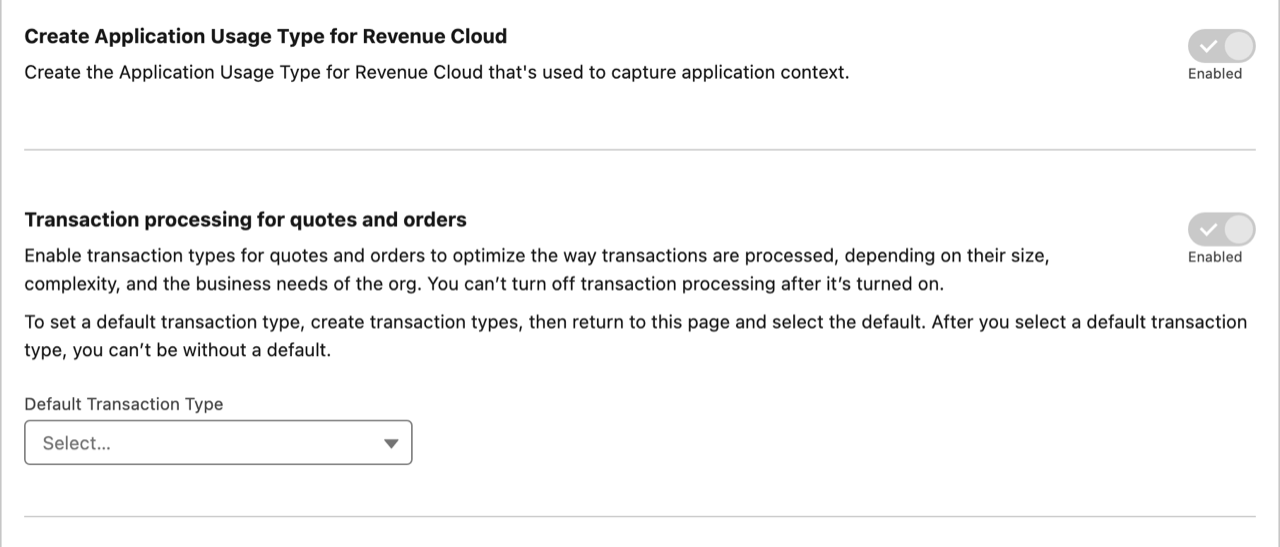
Transaction setup starts on Revenue Settings.13 The toggles the help names there include:
- Transaction processing for quotes and orders
- Advanced Order Creation From Quote
- Document Builder
- Delta Pricing
- Advanced Detail Line Pricing
- Procedure Plan Orchestration for Pricing
- Set Up Configuration Rules with Business Rules Engine, or with the Constraints Engine14
- Set Up Flow for Managing Assets, which names the amend, renew and cancel flow15
Revenue Settings is also one of three places a pricing procedure is chosen:16
| Setup page | Prices what |
|---|---|
| Product Discovery Settings | List prices while browsing |
| Salesforce Pricing Setup | Headless calls |
| Revenue Settings | Quotes and orders, such as our rep's quote |
The Transaction Processing Type (TPT) decides how a transaction is processed, for example turning on the Advanced Configurator or skipping tax.17
- TPT records are created through the Tooling API.
- The Transaction Type field on quote and order layouts lets reps override the default.
- The default can't be reversed once it's enabled.
Flows, record pages and layouts
In short: the flows ship as templates, and the line editor and viewers only work if you place them correctly.
Flows ship as templates you clone or name:18
- Discover Products for browsing. You can override it in Product Discovery Settings.19
- Default Product Configurator Flow, assigned to products or classifications.
- Create Orders From Quote.
- The asset amend, renew and cancel flow. It times out after 10 seconds. So the UI creates amend, renew and cancel (ARC) quotes with up to 300 lines, and the APIs or the Add Assets button take them to 1,000.20
Lightning App Builder placement matters. On quote and order record pages:10
- Add a Lines tab, on the default tab.
- Drag in the Sales Transaction Line Editor, with the Transaction Line Progress Indicator above it.
- Pick its Display Columns and the side panel. The side panel shows up to 200 attributes per line.
The older Transaction Line Editor still works but is no longer enhanced.
Other placements:
- Product Discovery ships four components: Product List, Product Details, Product Bundle Details and Product Attribute Details. They go on supported Service Console pages and any Experience Cloud page.21
- The Managed Asset Viewer goes on Account and Contract pages. It shows Revenue Management contracts only when an application usage assignment named
RevenueLifecycleManagementexists.22 - Page layouts. Add the Quotes related list to Opportunity and Order Actions to Order. Remove the Add Products and Edit Products buttons. Make the order product fields that pricing fills in read only.2324
Context Service
In short: a context definition describes the data a process needs; a context instance holds that data in memory while pricing, configuration and fulfillment run.
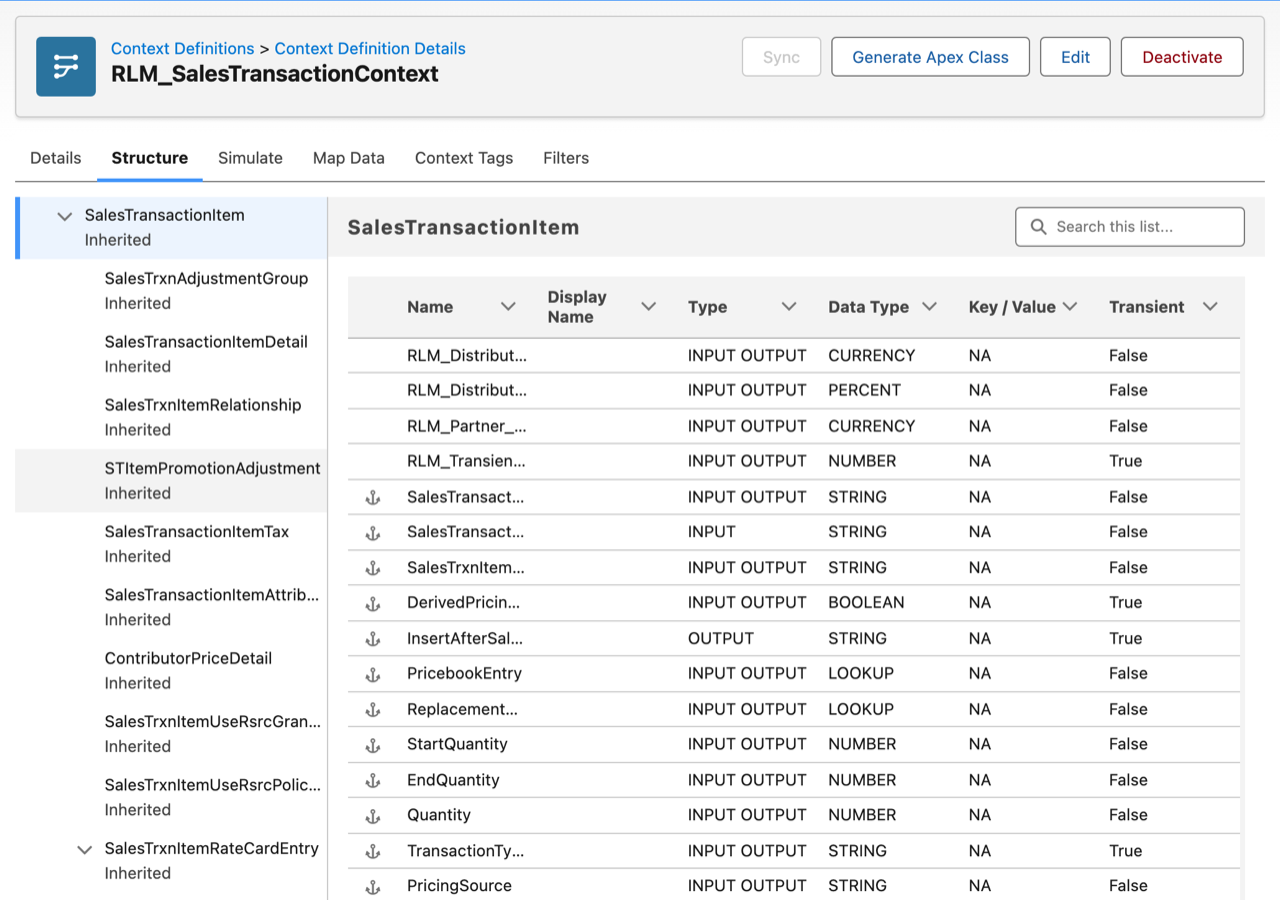
RLM_SalesTransactionContext. Each node maps to an object, here SalesTransactionItem, and its attributes are the fields pricing and the configurator read and write. Anchors mark the key attributes.Context Service is data abstraction. It hides the underlying data sources from applications, so developers work with one unified, logical data model.25
- A context definition is the metadata structure: nodes, attributes, tags and mappings.
- A context instance is the run-time copy that holds real data in a transient store, so procedures stop hitting the database.
The parts of a definition:26
| Part | What it is |
|---|---|
| Node | Maps to an object |
| Attribute | Maps to a field |
| Context tag | The alias applications query by |
| Context mapping | Loads the data at run time |
A child node marked transposable stores key-value pairs. That's how attributes such as Color and Blue reach pricing.
Design time has four steps, in this order:
- Create the definition.
- Build the structure.
- Tag it.
- Map it.
Run time is four API categories, Build, Query, Update and Persist, in the Apex IndustriesContext class. They can also transform one business object into another, such as a quote into an order.
Standard definitions can't be modified. A custom definition comes from one of three starting points:27
- From scratch.
- By extending a standard one. The inherited parts stay locked, you add nodes and attributes, and Sync upgrades the extension when the parent changes.
- By cloning.
Extend, don't clone: extending keeps the mandatory mappings and keeps Sync.
The definitions that matter:
SalesTransactionContextlinks transactions to quotes, assets and orders. Pricing, the configurator and DRO read it. Salesforce Pricing doesn't work with the base definition directly: to use pricing procedures, always extend it.28ProductDiscoveryContextholds the Catalog, Category,CategoryProduct,PricingProductand Account nodes, for qualification and list pricing.29FulfillmentAssetContextfeeds decomposition.30BillingContextmaps orders to billing schedules.31
Custom fields are the trap. Say QuantumBit adds a custom field to the QB API Management Solution quote line. Pricing can't see it until two things are done:3233
- Add it to the Sales Transaction Context as an attribute, with direction Input and Output.
- Map it to the
QuoteLineItemfield.
For orders and ARC, the entry goes on both the SalesTransactionItem and SalesTransactionItemDetail nodes, with mappings in QuoteEntitiesMapping and OrderEntitiesMapping.
One naming rule: a context tag can't share a name with a decision table's label or API name.28
Business Rules Engine
In short: Business Rules Engine runs the decisions: lookup tables find values, and expression sets chain the steps. Every pricing procedure is an expression set.
Business Rules Engine (BRE) is a suite of services, components and objects that applies advanced logic and automates complex decisions. Its three core tools are expression sets, decision matrices and decision tables, each with a visual designer in the Business Rules Engine app.34
Decision matrices and decision tables are both lookup tables. They differ like this:
| Decision matrix | Decision table | |
|---|---|---|
| Data comes from | Input and output columns you define, loaded by hand or from CSV | Salesforce object records |
| Matching | Exact match | Operators such as greater-than |
| Returns | The one matching row | One or several rows |
A decision matrix carries versions with active dates and priority, and a version can't be edited once it's active.
An expression set is the calculation engine of business rules. Variables, constants and elements run in sequence, with JSON in and out.35 The elements:
- Aggregate
- Aggregate Group
- Branch, with up to six paths including the default
- Business Elements
- Calculation
- Condition
- Conditional Group
- Lookup Table
- Sub Expression
To build one, you set dates and rank, mark elements to Include in Output, simulate, then activate. Decision Explainer explains a result.
In Revenue Cloud, the expression set is the pricing procedure, the rating procedure, the qualification procedure and the constraint model. The usage type tells them apart: DefaultPricing, PricingDiscovery, ProductQualification, DefaultRating, RatingDiscovery, Constraint.9 Our rep's quote is priced by a DefaultPricing expression set.
Rules for pricing procedures:1636
- Salesforce ships templates, not executable procedures. Clone one with Save As, then select the clone in Setup.
- Among enabled versions, the highest rank wins.
- At least one element must be included in output.
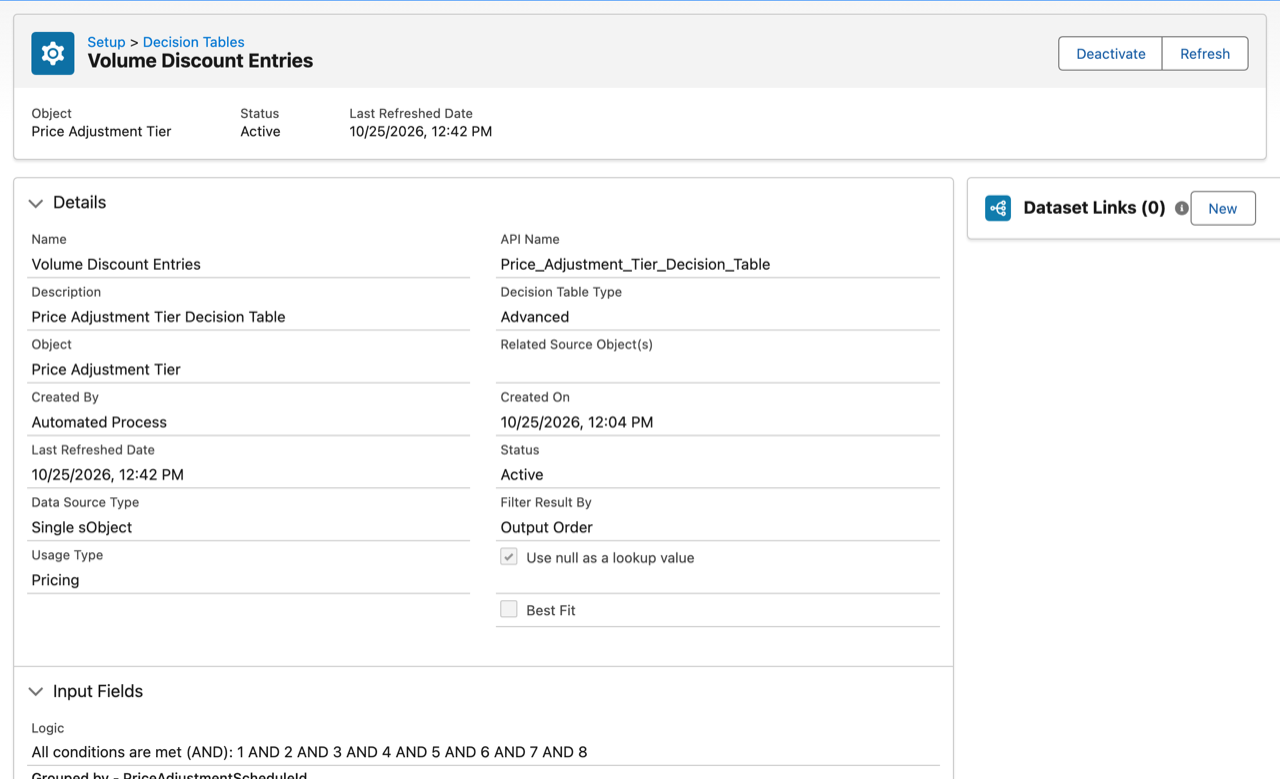
Rules for pricing decision tables:3738
- Use the Advanced type.
- Each input combination must resolve to one row.
- Sync Pricing Data in Salesforce Pricing Setup fills them. It refreshes every decision table that's mapped to a pricing recipe and has usage type Pricing. Refresh on Setup > Decision Tables does one table.
BRE is called from Flow as actions, from Omniscripts, and through Connect APIs.
Omnistudio
In short: Omnistudio is the low-code toolkit Revenue Cloud uses for guided selling and invoice documents, and only there.
Omnistudio is a low-code, declarative suite in three layers:39
| Layer | What's in it |
|---|---|
| Digital Experience | Flexcards for at-a-glance cards and Omniscripts for guided processes, both compiled to Lightning web components |
| Service Management | Data Mappers of four kinds (Turbo Extract, Extract, Load, Transform), and Integration Procedures that run several actions in one server call |
| Developer Experience | SF CLI for the standard runtime, and the Build Tool for the managed package runtime |
Updates arrive three times a year.
Revenue Cloud uses it in specific places:
- Guided Product Selection needs Product Discovery, Discovery Framework, Omnistudio, indexed search and the
ProductGuidedSelectionIntegrationOmniscript. Setup needs Omnistudio Admin; use needs Omnistudio User. It's Service Console only. Omnistudio comes with Revenue Cloud, not with Product Catalog Management alone.4041 - Invoice PDFs use Omnistudio document generation templates. A company logo means installing Omnistudio packages.42
- Quote PDFs are different. They come from Document Builder, a Revenue Settings toggle.43
- Contract documents run on Document Generation too. The Contracts page compares the two quote document paths and client-side with server-side generation.
APIs and invocable actions
In short: every component can be called without the UI; Place Sales Transaction is the one call that creates, configures and prices a quote or order.
Every component is headless:
| API | Path | What it does |
|---|---|---|
| Product Catalog Management Business APIs | /connect/pcm/ |
Serve catalogs, categories and products |
| Salesforce Pricing Business APIs | /connect/core-pricing/ |
Price a context in one call, sync pricing data, fetch the price waterfall |
| Product Configurator Business APIs | /connect/cpq/configurator/actions/ |
Stateless; bundle Context Service, BRE, the Constraint Rules Engine and Pricing |
Sources for this table.44454647
Place Sales Transaction is the one to know best: POST /connect/rev/sales-transaction/actions/place.48
- It creates or updates a quote or order from a graph of records, with configuration and pricing built in.
- pricingPref (System, Force, Skip), configurationPref and catalogRatesPref control it.
Its order of execution:49
- Header save and triggers
- Hydrate
- Configure
- ARC validation
- Pre-pricing Apex hook
- Pricing
- Post-pricing hook
- Persist
- Triggers
- Record-triggered flows
Limits: 1,000 lines and 3,000 line attributes per call. The header commits even when lines fail.32
Place Sales Transaction in Flow:50
- The Invoke Place Sales Transaction API flow action is for Agentforce Quoting flows only. It's designed for agentic use and doesn't support ramp deals or automated processes. To call the API from any other flow, use a custom Apex action that calls it directly.
- The line editor also saves through Place Sales Transaction. So when our rep edits the quote in the editor, record-triggered flows on Quote Line Group don't fire.
Invocable actions wrap the lifecycle:5152
- createContract
- createOrdersFromQuote
- createOrUpdateAssetFromOrder
- initiateAmendment, initiateRenewal, initiateCancellation
- initiateRollBackLastAction
- initiateTransfer
- deepCloneSalesTransaction
- getRenewableAssetsSummary
- Run Salesforce Pricing
When to send a developer where:
- To an API, when a custom or external UI must create priced transactions.
- To Apex hooks, when logic must run inside pricing. The Advanced section's Apex pricing hooks page builds one.
Plain sObject writes never trigger pricing. Winter '27 adds the consequence: any update to Order or Order Product records outside the line editors, through the API, Process Builder or manual edits, sets the validation result to Transaction Incomplete, and the order must be repriced before it can be activated. That covers every field, even Description. An update to Quote Line Items outside the editors invalidates the pricing status and requires Reprice All.23
Reporting, dashboards, and KPIs
In short: build dashboards per persona on the standard objects, and use the prebuilt consoles for operations.
A context-aware dashboard is one built for a persona and the lifecycle stage they own, placed where they act.
Native reports run on the standard objects:
| Object | Reports on |
|---|---|
| Quote and Quote Line Item | Pipeline and discount depth, such as our rep's $12,000 quote |
| Order | Conversion |
| Asset and Asset State Period | Install base and renewals |
| Contract | Expiring agreements |
| Invoice | Billed and outstanding amounts |
One constraint: QuoteLineItemAttribute.AttributeValue can't be used in a SOQL (Salesforce Object Query Language) WHERE clause.32
Prebuilt consoles cover operations:
- Billing Operations Console shows invoices, draft invoices, invoice batch runs and credit memos, next invoice runs, failed invoices, error logs and open disputes. You filter by 7, 14 or 30 days and by currency.53
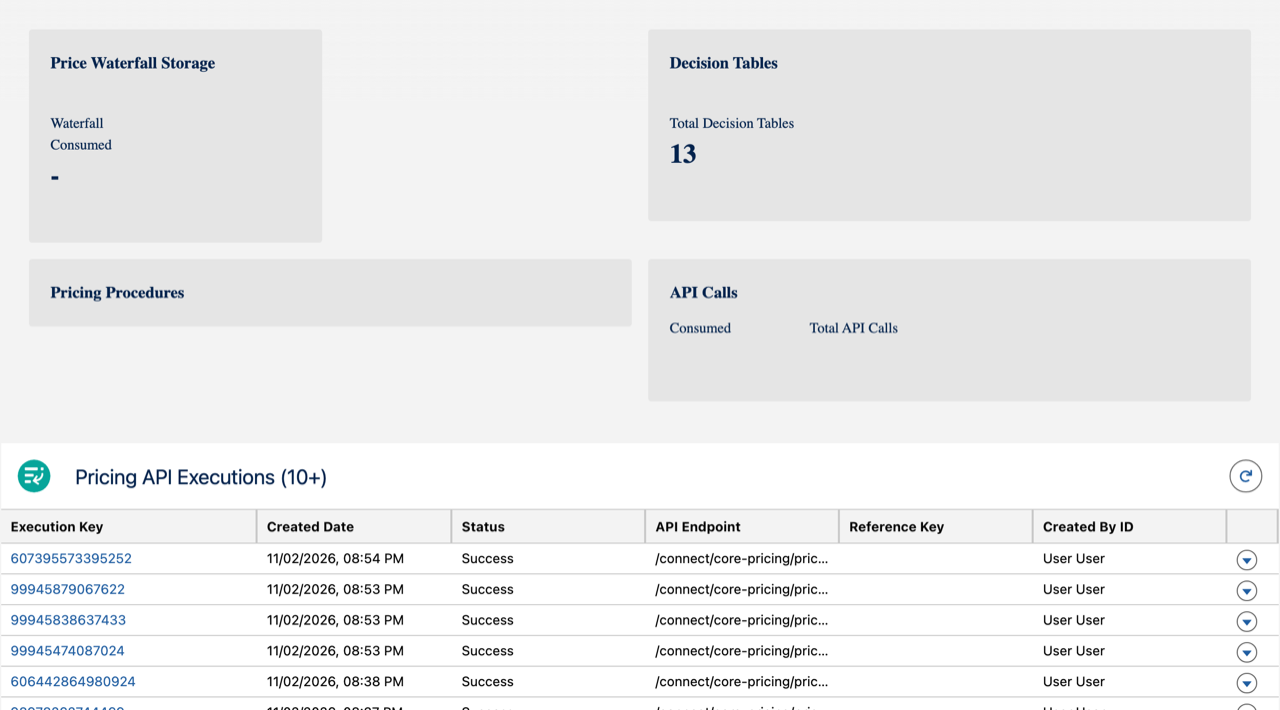
- Revenue Cloud Operations Console shows pricing API execution logs with Debug Details, plus decision table and API call usage.54
- DRO Analytics adds the Tableau dashboards Order Analysis and Order Details.55
- Unified Usage Dashboard tracks wallet balances and overages.56
Typical key performance indicators (KPIs): quote to order conversion and cycle time, average discount, order fallout, renewals due, disputed amount.
The data model
The chain to remember, following our rep's quote:
- An account has opportunities, and an opportunity has quotes.
- A quote holds quote line groups and quote line items. Each line has quote line item attributes. Bundles link parent and child lines with quote line relationships, and ARC changes add quote line details.
- Create Order turns the quote into an order with order items, which have their own order item attributes and order item details. The order carries an application usage assignment of type
RevenueLifecycleManagement. - On activation, each order item becomes an asset. Its history lives in asset state periods and asset actions, traced back by asset action sources.
- Each order item also gets one billing schedule, grouped in billing schedule groups. An invoice run turns schedules into invoice lines on an invoice.
- A contract, created from the quote, links to assets through asset contract relationships. It holds negotiated prices as contract item prices with contract item price adjustment tiers.
The diagram in "The product-to-cash lifecycle and its components" shows the same handoffs.
| Object | Fields worth remembering |
|---|---|
Quote |
QuoteNumber, Status (Draft, Accepted), QuoteAccountId, OpportunityId, Pricebook2Id, GrandTotal, IsSyncing, ContractId; Opportunity.SyncedQuoteId on the other side |
QuoteLineItem |
Product2Id, PricebookEntryId (fixes the selling model), Quantity, StartDate, EndDate, PeriodBoundary, NetUnitPrice, NetTotalPrice, QuoteLineGroupId, OpportunityLineItemId |
QuoteLineGroup |
Subtotal aggregate, group type such as RampScheduleGroup, parent-child to Quote (API 61.0 and later) |
QuoteLineItemAttribute and OrderItemAttribute |
AttributeDefinitionId, AttributeName, AttributeValue, AttributePicklistValueId, IsPriceImpacting. No custom fields, validation rules or triggers |
QuoteLineRelationship |
MainQuoteLineId, AssociatedQuoteLineId, ProductRelationshipTypeId, AssociatedQuoteLinePricing |
Order |
OrderNumber, Status (Activated is the trigger), QuoteId, TotalAmount, Transaction Type (TPT override) |
OrderItem |
Product Selling Model, Order Action, Start Date, End Date, Proration Policy, Period Boundary, Start Quantity, End Quantity, Pricing Term Count, Net Unit Price, Product Subtotal, Validation Result, Calculation Status |
ApplicationUsageAssignment |
AppUsageType RevenueLifecycleManagement on orders and contracts; required for the Managed Asset Viewer and automatic asset contract relationships |
Asset |
Lifecycle-managed asset created from order items; AssetStatePeriod holds quantity and amount per period; AssetAction and AssetActionSource record each amend, renew and cancel and trace it to the order item |
Contract |
ContractNumber, Status, StartDate, EndDate, AccountId; AssetContractRelationship links assets; ContractItemPrice and ContractItemPriceAdjTier hold contract pricing |
BillingSchedule, BillingScheduleGroup, BsgRelationship |
One schedule per order item on activation; groups consolidate schedules per asset; relationships model bundles |
Invoice, InvoiceLine |
DocumentNumber, Status (Draft, Posted), BillingAccountId, TotalAmount; InvoiceLine carries ChargeAmount |
ContextDefinition, ExpressionSet, DecisionTable, TransactionProcessingType |
DeveloperName and UsageType are the queryable metadata behind Context Service, BRE and TPT |
Sources for the object list.57582432
Which action when
PSL, permission set, or permission set group?
| Situation | Answer |
|---|---|
| A user needs a feature they have never had | Assign the prebuilt persona permission set; it grants the PSL automatically |
| You need the prebuilt permissions plus access to custom fields | A permission set group with the prebuilt set and a custom permission set |
| You need to remove a permission from a prebuilt set | A muting permission set inside the group, never a clone |
| You're counting available seats | Setup > Company Information > Permission Set Licenses |
Which permission set for the task?
| Task | Permission set |
|---|---|
| See the line editor on a quote | Any Revenue Management permission set, for example Price and Tax Calculation for Quoting |
| Create, clone or activate pricing procedures and decision tables | Salesforce Pricing Design Time User |
| Price a quote at run time | Salesforce Pricing Run Time User |
| Extend or map a context definition | Context Service Admin |
| Build the catalog, classifications, bundles and Product Discovery settings | Product Catalog Management Designer |
| Browse and add products | Product Catalog Management Viewer |
| Write configuration rules in BRE | Product Configuration Rules Designer |
| Write constraint models in CML (Constraint Modeling Language) | Product Configuration Constraints Designer |
| Set up Guided Product Selection; use it | Omnistudio Admin; Omnistudio User |
| Submit orders to DRO and have them assetized | Submit Transactions and Fulfillment User, plus Assetize Order |
| Configure billing treatments and legal entities | Billing Admin |
Sources for this table.107811415960
Where is the pricing procedure selected?
| Price shown in | Setup page |
|---|---|
| Product Discovery browsing (list price) | Product Discovery Settings |
| Headless API calls | Salesforce Pricing Setup |
| Quotes and orders | Revenue Settings, Set Up Salesforce Pricing |
Extend, clone, or start from scratch?
| Need | Choice |
|---|---|
| Add a custom field or node to a shipped definition and keep upgrades | Extend the standard definition; Sync after releases |
| Same structure with changes to inherited parts | Clone (loses Sync and mandatory mapping protection); avoid it when extending works |
| A process with no shipped definition | Start from scratch |
Decision matrix or decision table?
| Data looks like | Use |
|---|---|
| A simple spreadsheet, exact-match inputs, one output row, data you can import | Decision matrix |
| Rules stored in a Salesforce object, ranges and operators, several matching rows | Decision table |
| A sequence of calculations, branches and lookups | An expression set that calls either |
Flow, Omnistudio, or API?
| Requirement | Choice |
|---|---|
| React to a status change and call a lifecycle action | Record-triggered flow with the invocable action |
| Guided questionnaire that selects products in the Service Console | Omniscript through Guided Product Selection |
| Invoice or contract document from a template | Omnistudio document generation |
| Quote PDF | Document Builder |
| External or custom UI creating priced quotes or orders | Place Sales Transaction API |
| Place Sales Transaction from a flow that isn't an Agentforce Quoting flow | Custom Apex action that calls the API |
| Logic that must run inside pricing | Apex hook in the pricing procedure |
| Custom configurator | Configurator Business APIs or the wire adapter |
Which console or report?
| Question | Where |
|---|---|
| Failed invoices, draft totals, next invoice run, disputes | Billing Operations Console |
| Why did this price come out this way; API errors; API call usage | Revenue Cloud Operations Console and the price waterfall |
| Order fulfillment status and jeopardy | DRO Analytics (Tableau) |
| Wallet balance and overage | Unified Usage Dashboard |
| Sales pipeline, conversion, discount, renewals | Native reports on Quote, Order, Asset and Contract, with dashboard filters |
Watch out
A permission set license doesn't grant access by itself, and a permission set with no license behind it can't be assigned. The one-step fix is to assign the prebuilt permission set, because it brings its PSL with it.
Use permission set groups and muting permission sets. Don't clone a prebuilt permission set: clones stop receiving new permissions on upgrade.
The default Transaction Processing Type can't be reversed after it's enabled. TPT records are created through the Tooling API, and reps can override the default only if the Transaction Type field is on the layout.
Use the Sales Transaction Line Editor; the Transaction Line Editor is no longer enhanced. Both need the Transaction Line Progress Indicator above them, and both belong on the default tab.
Edits in the Sales Transaction Line Editor run through Place Sales Transaction, so they don't fire record-triggered flows on Quote Line Group. The help says to use Apex hooks instead.
The Invoke Place Sales Transaction API flow action works only in Agentforce Quoting flows. From any other flow, call the API with a custom Apex action.
Pricing can't see a custom quote line field until it's added to the Sales Transaction Context (Input and Output) and mapped. Plain sObject API writes never trigger pricing, and in Winter '27 they mark the order Transaction Incomplete until it's repriced.
Standard context definitions can't be edited. Extend rather than clone, so Sync keeps working and the mandatory mappings survive. A context tag can't share a name with a decision table's label or API name.
Salesforce ships pricing procedure templates, not executable procedures. Clone one with Save As, then select the clone in one of three places: Product Discovery Settings, Salesforce Pricing Setup or Revenue Settings.
Sync Pricing Data is what fills the decision tables. A new product, a new price, a new contract price or a new qualification rule all need a sync or a decision table refresh before reps see the change.
A decision matrix can't be edited once its version is active: create a new version. A pricing decision table must map each input combination to exactly one row.
Guided Product Selection needs Omnistudio, Discovery Framework, indexed search and the Lightning Service Console. Omnistudio doesn't come with Product Catalog Management on its own.
Quote PDFs come from Document Builder, a Revenue Settings toggle. Invoice PDFs and contract documents come from Omnistudio document generation. Don't mix them up.
The Managed Asset Viewer shows Revenue Management contracts only when an application usage assignment named RevenueLifecycleManagement exists on the contract.
Product Discovery Settings accepts only qualification procedures with usage type Product Qualification. A Product Category Qualification procedure can't be selected there.6162
Numbers worth knowing: 2,000 quote line items per quote and 2,000 order products per order (Winter '27 raised both from 1,000); 1,000 lines per Place Sales Transaction call; 3,000 line attributes; 5,000 total records per quote; 300 ARC lines through the UI; a 10 second asset flow timeout; 200 lines per bundle (199 children); 200 attributes in the line editor side panel; 6 paths in a Branch element; 3 places to select a pricing procedure; 4 Product Discovery components; 4 Data Mapper types; 3 Omnistudio layers; 3 BRE core tools; 4 Context Service API categories.2032
If you know Salesforce CPQ
| Salesforce CPQ term | Revenue Cloud term | What changed |
|---|---|---|
| Package settings (Installed Packages > Salesforce CPQ > Configure) | Revenue Settings, Salesforce Pricing Setup, Product Discovery Settings | Native Setup pages, no managed package; three pages instead of one tabbed dialog |
| Quote Calculator Plugin (QCP) JavaScript | Pricing procedure (expression set) with Apex pre-pricing and post-pricing hooks | Declarative elements and decision tables replace scripts; code only in hooks |
| Salesforce CPQ Admin and User permission sets | Permission set licenses plus persona permission sets per component | One PSL per component, many persona sets, grouped in permission set groups |
| Twin Fields (matching API names copy quote line to order product) | Custom fields as attributes in SalesTransactionContext, mapped in QuoteEntitiesMapping and OrderEntitiesMapping |
Explicit context mapping replaces name matching |
Quote Templates (SBQQ__QuoteTemplate__c) with template sections |
Document Builder quote templates | Native builder turned on in Revenue Settings; Omnistudio templates for invoices and contracts |
SBQQ__Quote__c and SBQQ__QuoteLine__c |
Standard Quote and QuoteLineItem, plus QuoteLineGroup and QuoteLineItemAttribute |
Standard objects; groups are records; attributes are child rows, not custom fields |
| Quote Line Editor (QLE) | Sales Transaction Line Editor | Lightning App Builder component with Display Columns and a side panel |
| Price Rules and Lookup Tables | Decision tables and expression sets in Business Rules Engine | Same lookup idea, now a platform service shared with other industry clouds |
| Product Rules and Option Constraints | Configuration rules in BRE or constraint models in CML | Split by engine, selected by the Transaction Processing Type |
Contracted Prices (SBQQ__ContractedPrice__c) |
ContractItemPrice and ContractItemPriceAdjTier |
Contract pricing is native and refreshes decision tables on activation |
Subscriptions (SBQQ__Subscription__c) and Amend or Renew on Contract |
Lifecycle-managed Asset with AssetStatePeriod and the Managed Asset Viewer |
The asset is the record of truth; amend, renew and cancel are flows and invocable actions |
| Advanced Approvals (SBAA) | Advanced Approvals on Flow Orchestration | Flow Approval Processes with serial and parallel steps |
CPQ API (QuoteAPI, QuoteCalculator) |
Place Sales Transaction API and Connect business APIs | One composite endpoint creates, configures and prices |
| Salesforce Billing | Invoice Management (Billing) | Billing schedules from order activation, native Invoice and InvoiceLine objects |
Newer than the exam
The Rev-Con-201 exam is written against Summer '25. These arrived later. They matter on real projects, but the exam won't ask about them yet.
- Pricing Operations Console renamed Revenue Cloud Operations Console, auto-numbered procedure elements, advanced price logs, if-else formulas, and procedure plans in deployment packages (Spring '26, 260).
- Elevated Data Access for pricing quotes and orders, Always On Instant Pricing, Multiple Ramp Schedules Per Transaction, and Automatic Line Item Sequencing (pilot) as Revenue Settings toggles (Spring '26, 260).
- Smart Approvals (rule-based auto-approval of resubmissions), approval email templates, Override Approval Work Item, and the Stage Exit Condition (Spring '26, 260).
- Editable Sales Transaction Item context fields, inline attribute configuration on configurator option cards, and configuration logs through Decision Explainer (Spring '26, 260).
- Context Service upgrade guidance: Sync Now for extended definitions; deployment can't activate or deactivate a definition or change a default mapping; no deployment to an older release (Spring '26, 260). Extending a standard context definition itself dates from Winter '26 (258).
- API calls from Experience Cloud sites are metered as Revenue Cloud events, and Revenue Cloud Growth customers don't get API access from Experience Cloud (Spring '26, 260).
- Large transaction scale: 15,000-line quotes and orders as a closed beta (Spring '26, 260, expanded in Summer '26, 262).
- CSV-based decision tables, up to 100,000 rows per table and 500 per org, with no versioning at launch (Summer '26, 262).
- Operations Console hover and currency columns, and 100 default tags in the Map Line Items element, up from 50 (Summer '26, 262).
- Approvals in Slack and Advanced Approvals for Contracts (Summer '26, 262).
DocGenclient-side LWC (Lightning web component) and context to DPE (Data Processing Engine) transformations for document templates (Summer '26, 262).- Quote line items and order products raised to 2,000 per quote and per order, from 1,000 (Winter '27, 264).
- The Invoke Place Sales Transaction API flow action limited to Agentforce Quoting flows; other flows call the API through a custom Apex action (Winter '27, 264).
Sources
Every numbered note above links to the Salesforce article it comes from. This page is current to Winter '27 (release 264): each note was checked against the Winter '27 version of its article.
- Screenshots from our lab org (built with Salesforce's launchpad), Winter '27 (264), taken 2026-11-08
- Salesforce Help and the Revenue Lifecycle Management Developer Guide, Winter '27 (264), as published 2026-09-04 to 2026-09-07; checked by Taggalong 2026-10-25
- Trailhead: Agentforce Revenue Management Foundations, read 2026-09-22
- Trailhead: Agentforce Revenue Management Design, read 2026-09-22
- Trailhead: Context Service Basics, read 2026-09-22
- Trailhead: Business Rules Engine, read 2026-09-22
- Trailhead: Omnistudio Basics, read 2026-09-22
-
Trailhead: Agentforce Revenue Management Foundations, Meet Agentforce Revenue Management ↩
-
Trailhead: Agentforce Revenue Management Design, Set Up Your Product Offerings ↩
-
Trailhead: Agentforce Revenue Management Design, Generate Invoices ↩
-
Checked by Taggalong with read-only queries on a QuantumBit org built from Salesforce Labs' Revenue Cloud Foundations repository, 2026-09-22 ↩↩
-
Add and Customize the Transaction Line Editor or Sales Transaction Line Editor ↩↩↩
-
Revenue Management Billable Usage Types (not in our Winter '27 snapshot, so not re-checked for this release) ↩
-
Set Up the Transaction Processing Type for Quotes and Orders ↩
-
Required Fields and Related Lists for Transaction Management ↩↩
-
Trailhead: Context Service Basics, Get to Know Context Service ↩
-
Trailhead: Context Service Basics, Explore Context Service Components and Processes ↩
-
Nodes and Attributes in the ProductDiscoveryContext Context Definition ↩
-
Checked by Taggalong in a Revenue Cloud org, 2026-09-21 ↩↩↩↩↩
-
Use Advanced Transaction Detail Line Pricing to Map Custom Fields ↩
-
Trailhead: Business Rules Engine, Build Decisions with Lookup Tables ↩
-
Trailhead: Business Rules Engine, Orchestrate Rules with Expression Sets ↩
-
Turn On Invoice PDF Document Generation and Account Statement ↩
-
Custom Configurator Development with First-Party Configurator APIs ↩
-
Understand the Order of Execution for Place Sales Transaction ↩
-
Developer Guide: Transaction Management Standard Invocable Actions ↩
-
Developer Guide: Salesforce Pricing Standard Invocable Actions ↩