
Some products are paid for by what the customer uses, not by a fixed fee. Usage Management handles them from setup to invoice: you define what is measured, set the rates, sell the product, track consumption against the allowance the customer bought, and hand invoice-ready amounts to Billing.4 This page explains how the records fit together, which choice fits which requirement, and the traps we see people fall into. On the Rev-Con-201 exam, usage questions sit inside the Configure, Price, Quote section.
The example we use throughout: Kingsbridge Digital buys the QuantumBit Complete Solution. Its Consumption group holds QuantumBit's database plans (the catalog tour opens it), and in the Kingsbridge quote Kingsbridge picks QuantumBit Database (Token Based): 12,000 a year, with 10,000 Quantum Tokens a month included. The quote stops there. This page follows what happens next. To get real numbers, we sold that plan and the default plan, QuantumBit Database, in a launchpad practice org with a start date of August 1, 2026, and recorded a month of usage on each. Every figure marked with our org note comes from QuantumBit's sample data in that org.1
How it works
Where usage fits
In short: usage runs on its own chain beside the subscription: model it, rate it, sell it, consume it, bill it.
Salesforce splits Usage Management into five parts:4
| Part | What it does |
|---|---|
| Usage Modeling | Units of measure, usage resources, product usage grants, and the policies that manage rollovers and renewals |
| Rate Management | Rate cards, rate card entries, rating procedures and rating discovery procedures, which work out the net unit rate for a usage resource |
| Usage Selling | Quotes and orders for usage products. Activation creates an asset for the product, and every usage record links to it |
| Consumption Management | Tracks consumption, draws down grants, and produces invoice-ready summaries |
| Wallet Management | One view of every purchased usage resource, by account |
In Kingsbridge's deal, the database line is a normal subscription line: 12,000 a year, billed like any other subscription (the billing page covers that part). The tokens Kingsbridge uses above its monthly 10,000 are a separate chain. They are recorded after the sale, rated month by month, and billed after each month ends.
Licenses. The Usage Management overview lists it for Enterprise, Unlimited, and Developer Editions with the Revenue Cloud Billing license.4 The setup articles for usage resources, grants and policies list either the Advanced or the Billing license.9 Invoicing usage is a Billing-license feature (see Invoice Management versus the Billing add-on).
Turning it on. In Setup, open Usage Management Settings and enable Usage Management; you need the Customize Application permission. Rate Management is turned on separately.6
Who does what. Three permission set licenses carry the usage permissions:7
| Permission set license | User permission | What it allows |
|---|---|---|
| Usage Management Design Time | Usage Management Designer | Create, read, update and delete all design-time objects; read run-time objects |
| Usage Management Run Time | Usage Management Run Time User | Create, read, update and delete all run-time objects; read design-time objects |
| Wallet Management User | Wallet Management User | Read all design-time and run-time objects |
Units of measure and usage resources
In short: a usage resource is the thing you meter, and a unit of measure says how it's counted.
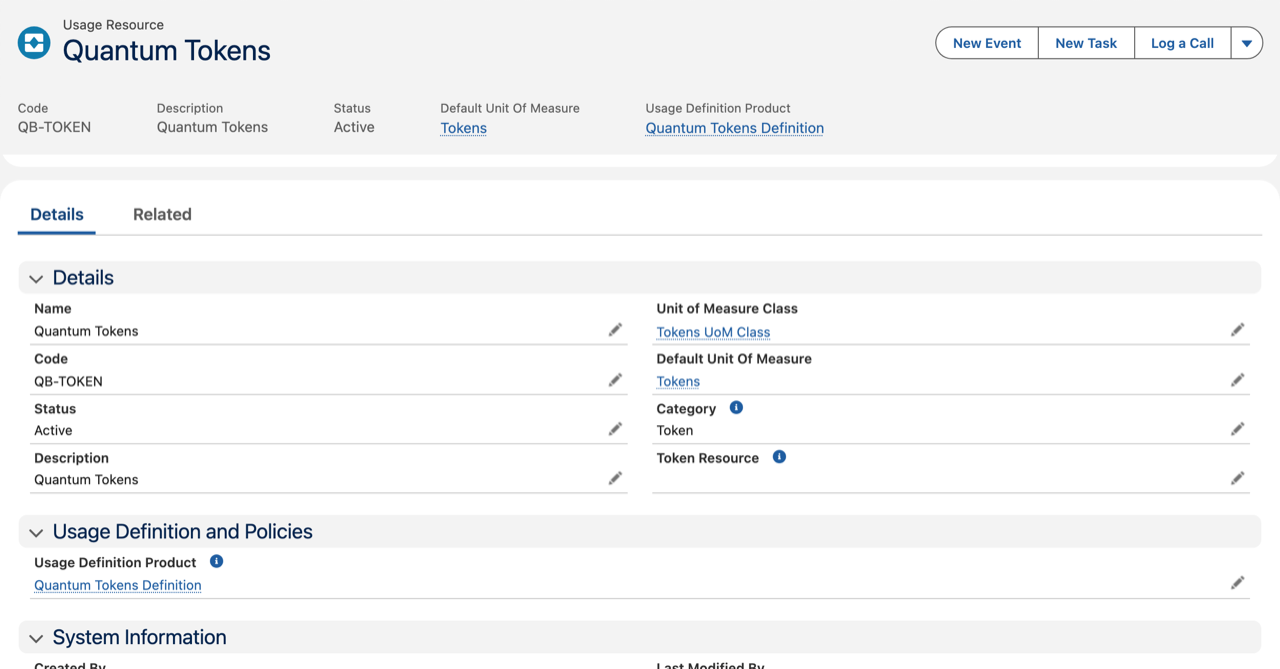
A usage resource is the entitlement or service that comes with the product you sell, such as data storage or compute time. You create the resources before you set any rates for them. Each one has:9
- a name and a unique code;
- a unit of measure class and a default unit of measure;
- a category: Usage, Token, or Currency;
- a status (Draft, Active, Inactive);
- a usage definition product, which ties the resource to a product;
- optionally, a usage aggregation policy.
The usage definition product is the product Salesforce uses to retrieve the tax policy, calculate rating during overages, and handle other invoicing actions.10 The setup overview puts it this way: Salesforce uses the usage resource to process consumption and the usage product to invoice overages.5
A unit of measure class groups units, for example GB, MB and TB in a Data class. Its type is Usage (non-currency units such as API calls or GB), Currency (such as USD or EUR), or Token (redeemable credits).11 A unit of measure belongs to a class and has a conversion factor to that class's default unit. Its Unit Code must match the currency ISO code in your org settings exactly, such as USD; a mismatch in casing or spelling hides rate cards during selling, with no error message.12
QuantumBit's two database plans meter these resources:1
| Plan | Usage resources |
|---|---|
| QuantumBit Database (QB-DB) | Compute Time (minutes), Data Storage (terabytes), Data Throughput (gigabytes) |
| QuantumBit Database (Token Based) (QB-DB-TOKEN) | Compute Time (Token) and Data Storage (Token), which convert to Quantum Tokens |
Usage products and usage model types
In short: a sellable product becomes a usage product through its usage model type, and the type decides how it behaves.
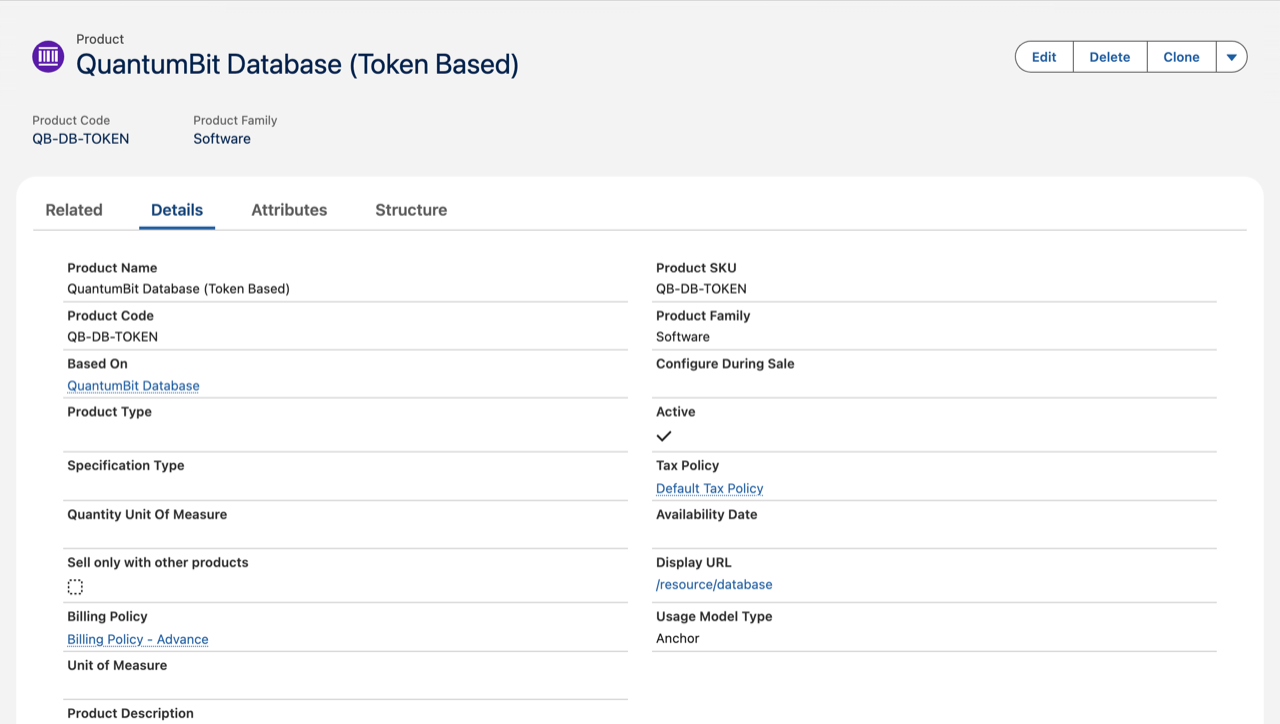
The Usage Model Type field on the product sets the kind of usage product:13
| Usage model type | What it is |
|---|---|
| Anchor | The main subscription product or service |
| Pack | An add-on that grants more usage resources to consume |
| Token Commitment | A commitment to use a minimum quantity of tokens in a defined period |
| Quantity Commitment | A commitment to use a minimum quantity in a defined period |
| Monetary Commitment | A commitment to spend a minimum amount in a defined period |
The launchpad's runbook gives the values stored in a Winter '27 org as Anchor, Pack, Commit (the token commitment), CommitmentQuantity and CommitmentSpend.2 Both QuantumBit database plans are anchors, sold on Term Annual at 12,000 a year.1
Three limits shape how usage products are sold:8
- A usage product can't be part of a bundle, neither as a child component nor as the parent. To sell several usage products together, add them as separate lines on the same quote or order. Usage and non-usage products can share an order as separate lines.
- Usage Selling doesn't support evergreen or one-time anchor products.
- A quote or order holds up to 200 lines, 200 quote line item rate card entries, and 800 quote line item rate adjustments.
Two ways to set a product up. The guided workflow is for anchor and pack products. You open the product and click Configure Usage Properties, add or create product usage resources, review the default policies it fills in, set the grants, and activate everything with one click. The manual path is for commitment products and for anyone who wants direct control of each record.514 The manual path creates records in a fixed order, because each depends on the ones before it: unit of measure class, units of measure, the product, usage resource, product usage resource, product usage grant, then the policies, ending with the commitment policy and the commitment link.16
Before activating, the guided workflow needs an active product selling model, price book, and rate card entry. After it activates, you refresh the rate card decision tables by hand.14 The guided workflow's own limits:15
- It doesn't support commitment products, inactive records, or global rate cards shared by every product that uses a resource.
- It shows up to 200 usage resources, and you select up to 10 at a time.
- It creates up to 20 product usage resources, each with up to 5 product usage grants.
- It shows up to 3 mandatory custom fields; Product Usage Resource doesn't support custom fields.
The Usage Product Validator on the product page checks the design-time setup after either path. It checks only effective, active records. It warns when there is more than 12 hours between consecutive product usage resources for one resource, between consecutive rate card entries for one product usage resource, or between a product usage resource's start or end and its first or last rate card entry.17
Product usage resources and policies
In short: a product usage resource attaches a resource to a product, and policies decide how its usage is added up, rated, and charged.
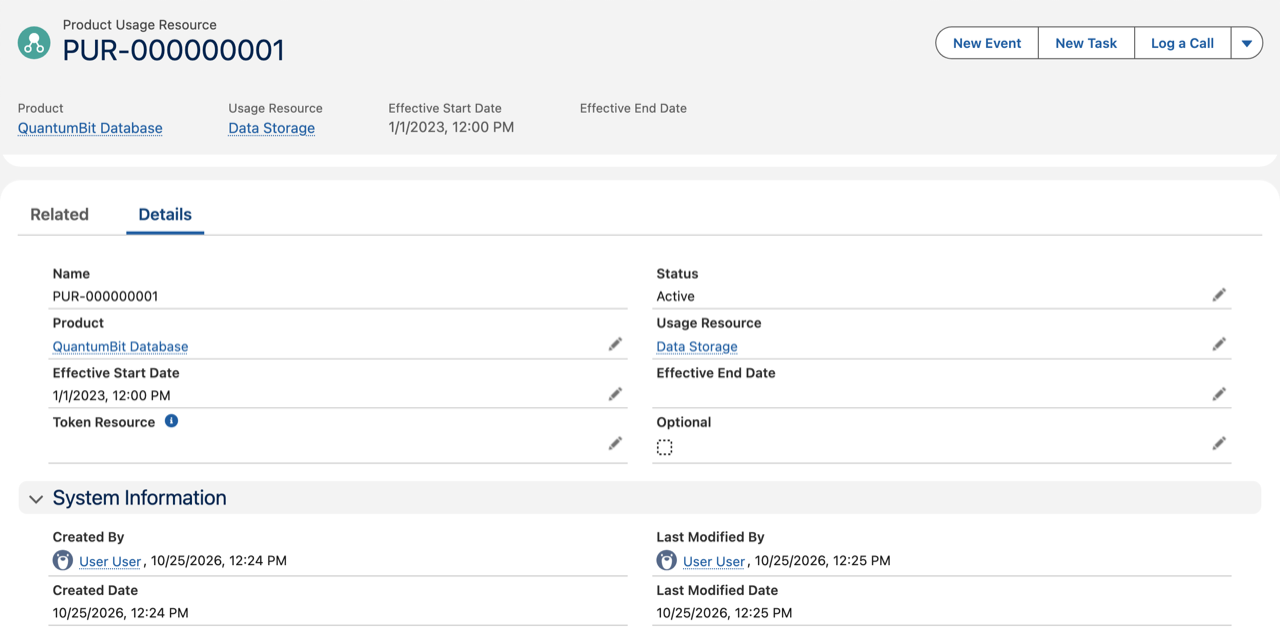
A product usage resource links a usage resource to a product that has a usage model type. It has effective start and end dates; after the end date the resource isn't part of the product. A product can have only one token resource. Optional applies only to commitment products, and marks a resource the commitment may or may not include.18
Policies govern each resource. You can set them in two places: a usage resource policy applies to the resource wherever it's used, and a product usage resource policy applies when the resource is sold with a product, overriding the resource's own policy.1920
| Policy | What it decides | Choices |
|---|---|---|
| Usage aggregation | How consumption is added up over a period21 | Sum (all events in the period) or Peak (the highest single entry), and an accumulation period |
| Rating frequency | How often rating runs22 | Daily or Monthly, with an optional delay |
| Usage overage | Whether units beyond the grant are charged23 | Chargeable or not |
| Usage commitment | The rate after a commitment is used up24 | Bounded Object Rate or Lowest Commitment Rate |
| Grant refresh | Whether grants renew, and how often25 | Refresh Allowed, a renewal frequency and unit (3 Months means quarterly) |
| Grant rollover | Whether unused units carry over after the validity period26 | Rollover Allowed, and optionally Allow Rollover Expiry after a number of rollovers |
| Grant binding | Where the grant lives27 | Self or Target |
The guided workflow creates these defaults (or reuses an existing policy with the same settings):15
| Policy | Default |
|---|---|
| Usage aggregation | Aggregate Usage Monthly by Sum |
| Grant refresh | Renew Grants Monthly |
| Grant rollover | Rollover Grants without Expiry |
| Usage overage | Overage Chargeable |
| Usage commitment | Lowest Commitment Fulfilled Rate |
| Rating frequency | Rate Usage Monthly |
The launchpad adds an observation from its own orgs: only an anchor's product usage resource policy can carry an overage policy, and the platform refuses one on a pack or a commitment.2
Grants
In short: a grant is the allowance the price already includes; only usage above it is charged.
A product usage grant sets the allowance for one product usage resource:28
- the quantity and its unit of measure class and unit;
- a type: Grant, for an anchor product, or Commit, when the anchor is committed to a quantity, spend, or tokens;
- a validity period, a unit and a term, such as 1 Month;
- optional refresh and rollover policies;
- a drawdown order;
- an effective start date and a status.
The drawdown order decides which grant is used first when a customer has several for the same resource:2829
| Drawdown order | Draws from |
|---|---|
| Expiring First (default) | The grant closest to its expiration date |
| Granted First | The oldest grant, by earliest start date |
| Granted Last | The newest grant, by most recent start date |
QuantumBit Database grants 10 TB of Data Storage, valid for 1 month, and 0 minutes of Compute Time. The token-based plan grants 10,000 Quantum Tokens a month.1 So for Kingsbridge, the first 10,000 tokens each month cost nothing extra; the 12,000 a year already pays for them.
Grant binding
In short: binding decides whether a grant belongs to one asset or is shared by many.
When you add a usage product to a quote, you choose where its grants are bound:30
| Binding target | Who can use the grant |
|---|---|
| Self | Only the asset itself. The default for all usage products |
| Product | An asset linked to a pack product or a line item |
| Account | Every asset on the account shares the pool |
| Contract | Any asset linked to the contract |
| Custom | A custom object, through the BindingObjectCustomExt object |
On the quote line, Manage Usage Resources shows the binding: Self is offered only for anchor products, and Target only for anchor or pack products.31 A commitment product can't be bound to a target.30
Binding to a target creates a usage entitlement account for that target. It stays active while any bound asset is active, and its dates run from the earliest start to the latest end of those assets. There is one wallet per binding target and usage resource, however many packs are bought.30 When two products bound to the same target have different negotiated rates for a resource, Usage Management picks the cheapest, and a later purchase overrides the existing rates.30
The binding target can't be changed after the order is activated and assetized. A wrong binding target on the design-time binding policy means redesigning the product from scratch.27 Grant binding uses the opportunity's account first, then the quote's Account for Quote, and fails if both are missing.32
Rate cards, entries, and tier adjustments
In short: a rate card entry holds the rate for one resource, and a tier rate card adjusts it by how much is used.
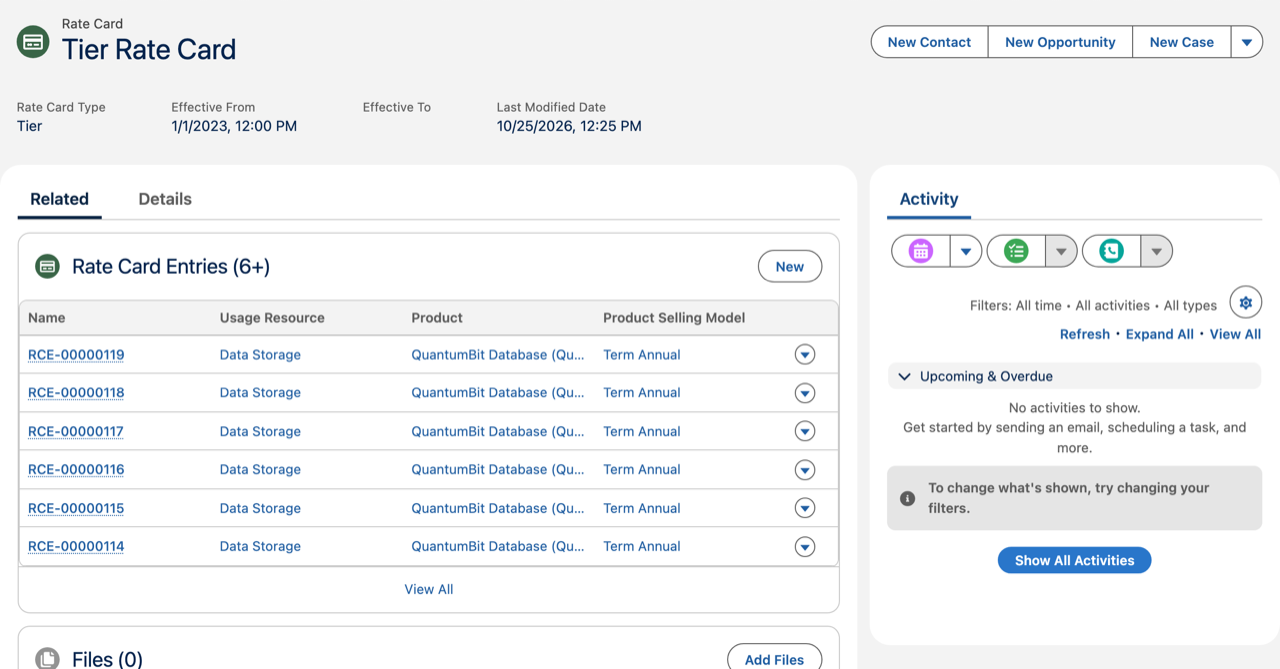
A rate card groups the rules for rating a set of usage resources. You create it as Base, a flat rate per unit, or Tier, rate adjustments by consumption quantity, with a date range.33 The developer guide also lists an Attribute type,34 but attribute-based rate cards aren't supported in Usage Selling and Consumption Management.35
A rate card entry holds the actual rate. On a base rate card you pick a usage resource, the sellable product and its selling model, then set the rate, its unit of measure (a currency or a token), whether it's negotiable, a status, and a date range.36 Only Active entries are used; Draft or Inactive rates don't appear.37
A tier rate card entry adds tiers. Each tier has a lower and an upper bound, inclusive and not overlapping, and an adjustment type:38
| Adjustment type | What the tier does |
|---|---|
| Percentage | Discounts the rate by a percentage |
| Amount | Discounts by a flat amount |
| Override | Replaces the net unit rate |
Each tier is stored as a Rate Adjustment By Tier record.39 An org can have up to 1,200 rate card entries and 3,000 tier adjustment records.35
For rates to reach a quote, a Price Book Rate Card links the quote's price book to the rate card, one record for each rate card type.40 A rating discovery procedure then fetches the binding objects, rate cards, entries and adjustments for the products in that price book, using the RatingDiscoveryContext context definition; you select it in Revenue Settings.4137 A rating procedure is an ordered stack of rating elements that calculates the final net rate.42 The quote guide covers the quoting side in Price: usage products.
When a transaction processing type sets RatingPreference to Fetch, saving a quote captures the current catalog rates as Quote Line Rate Card Entry records, and ordering turns them into Order Item Rate Card Entry records, so later catalog changes don't move the deal's rates.43
QuantumBit Database's rate cards, in USD:1
| Resource | Base Rate Card | Tier Rate Card |
|---|---|---|
| Compute Time | 0.004 a minute | 1 to 1,000: override 0.004. 1,000 to 3,000: override 0.0045. 3,000 to 6,000: override 0.005. Above 6,000: override 0.006 |
| Data Storage | 10 a terabyte | 1 to 10: Percentage 0. 10 to 25: override 12.5. 25 to 100: override 15. Above 100: override 18 |
| Data Throughput | 0.1 a gigabyte |
In our org, 5,000 minutes of compute rated at 0.005 for the whole quantity, the rate of the tier 5,000 falls in, giving 25.1
Token rating in two steps
In short: a token plan rates usage into tokens, then tokens into money.
A token is a virtual currency, such as Flex credits. Two rates define it:44
- Points Per Unit (PPU): how many tokens one unit of a service costs, set on the anchor product. For example, one SMS is five tokens.
- Price Per Point (PPP): what one token costs, such as 0.75.
So a token plan needs two kinds of rate card entry: one per resource whose rate unit of measure is the token, and one for the token itself whose rate unit of measure is a currency.45 The usage resource points at its token resource, and a product can have only one.18
Salesforce describes the consumption side for token commitments in the same two steps:46
- Usage is summarized per resource, converted to tokens, and drawn down from the anchor's buckets or from commitment grants.
- The tokens across all resources are added into one token row, drawn down from the token buckets, and any token overage is rated into currency. The invoice shows the tokens rated in the final currency.
Kingsbridge's plan works like this. Compute Time (Token) converts at 5 tokens a minute and Data Storage (Token) at 10 tokens a terabyte, from the Base Rate Card entries in Tokens; Quantum Tokens then rate at 0.50 USD each.1
Commitments
In short: a commitment is a separate product the customer promises to use or spend, in exchange for a discount on an anchor's usage.
In a commitment product, the customer commits to a quantity, a token amount, or a monetary spend, and gets discounted rates. The commitment works only once it's associated with an anchor. Consumption Management tracks usage against the committed limit; while the customer stays within it, the discounted rate applies.47
Selling one takes three steps:48
- Quote, order and assetize the anchor.
- Quote, order and assetize the commitment, as its own sale.
- Link them with a Usage Commitment Asset Related Object: Related Object is the anchor asset, Asset is the commitment asset, with effective dates. You can't link two commitments with the same validity period to one anchor.
The usage commitment policy decides the rate after the commitment is used up:24
| Commitment rate | Overage is billed at | Salesforce's example |
|---|---|---|
| Bounded Object Rate | The rate on the bound object, the anchor | 10 GB committed at 1 per GB; 12 GB used; the extra 2 GB at the anchor's 15 per GB |
| Lowest Commitment Rate | The lowest negotiated commitment rate | Standard 10 per GB, 1,000 GB committed at 8; 1,200 GB used; the extra 200 GB also at 8 |
For tokens, commitment discounts apply only when the policy uses the lowest commitment rate.44 A commitment's tier rate card can discount one resource (set the usage resource on the entry) or every resource (leave it empty). For a monetary commitment, the Is Included checkbox marks which resources get the discount.37
When one token commitment is bound to an account with several anchors, the anchors draw down in ascending order of asset billing end date, and on a tie the asset with the highest resource rate draws first.49
The launchpad's runbook adds rules it established in its own orgs:2
- The commitment drains before the anchor's grant.
- The commitment decrements by the discounted quantity; the grant decrements by the raw quantity.
- A grant is an allowance, not a discount, so the usage it absorbs is never discounted.
- QuantumBit's quantity and monetary commitments (QB-QTY-CMT and QB-MTY-CMT) keep their entitlements at PENDING in Winter '27 orgs and never rate.
That last point matches Salesforce's limits: Consumption Management doesn't process data from monetary and quantity commitment products.8
What activation creates
In short: activating the order creates the run-time records that hold the customer's allowances.
| Record | What it is |
|---|---|
| Transaction usage entitlement | How each grant is tracked: the product, resource, quantity, validity, and the refresh and rollover policies50 |
| Usage entitlement account | The customer's instance of the purchased product, with the billing cycle: frequency, bill day of month, and period dates50 |
| Usage entitlement bucket | The wallet for one resource. Grants, rollovers and renewals credit it; consumption debits it50 |
| Usage entitlement entry | One credit or debit in a bucket50 |
Buckets come in two levels. A parent bucket is the combined balance of one resource across the binding target. Child buckets hold the individual grants: a new purchase, a renewal, a refresh, a rollover, or an amendment.29 A transaction usage entitlement's processing status is PENDING until the entitlement service has processed it for Billing, then PROCESSED.51
For an order whose start date is earlier than the date it was created, run the Call Entitlement Refresh Service flow to refresh the active entitlements.52 Until a usage entitlement account is processed, its billing period dates show a 1969 placeholder.52
Billing reacts to the same activation: it creates a billing schedule and a billing schedule group for each binding instance and usage resource.53
In our org, activating the order (start August 1, 2026) created six transaction usage entitlements, all PROCESSED, and two usage entitlement accounts with billing period unit MONTH and bill day 1. The grant buckets for August held 10 TB of Data Storage and 10,000 Quantum Tokens.1
Recording usage
In short: usage arrives as transaction journal records against the asset.
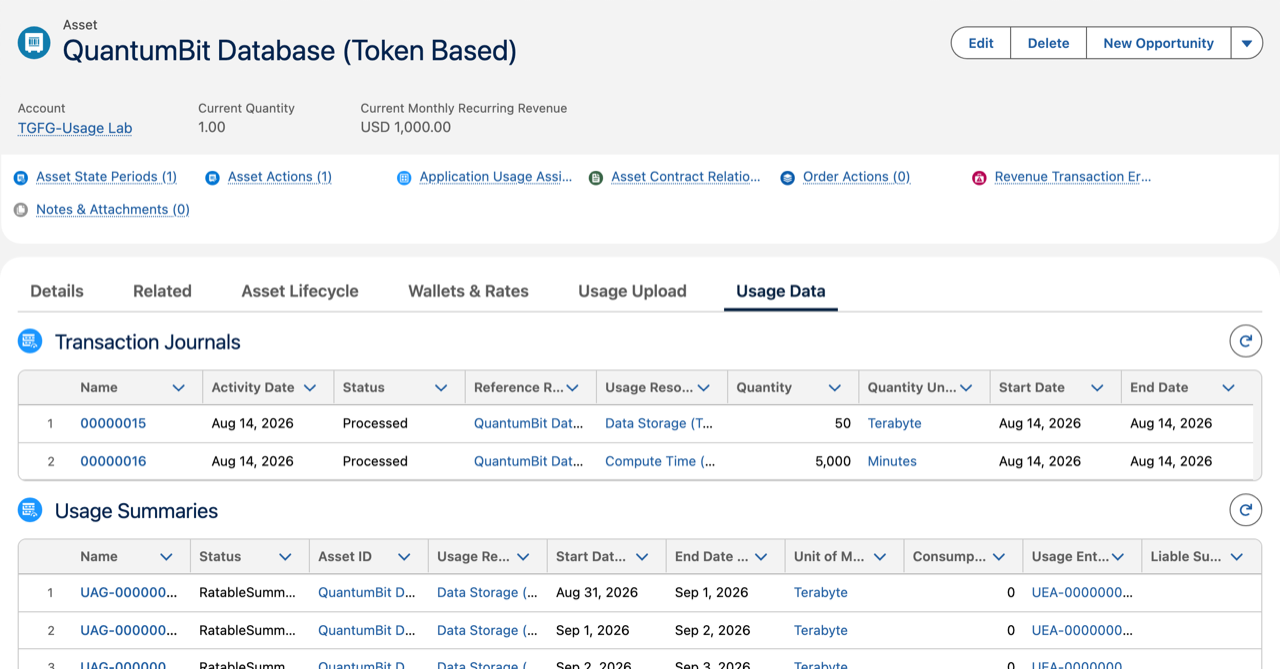
Each unit of consumption is a transaction journal record: the asset (the reference record), the usage resource, the quantity and its unit of measure, the activity date, start and end dates, a unique identifier, and the usage type UsageManagement. A new journal is Pending; the other statuses are Processed, Error, and Cancelled.54
Things to set up so the journals work:52
- Journal timestamps are in UTC.
- Set the scale of the Quantity field to 6.
- Give the Standard User profile read access to Quantity, Quantity Unit, Transaction Amount, Start Date and End Date, and set field-level security on every Transaction Journal field for the usage summary definition.
Salesforce's usage help doesn't describe a screen for uploading usage. The object supports create calls through the API, and creating journals needs the Usage Management Run Time permission set license.54 The launchpad adds its own usage uploader on the Account page, and its runbook sets three rules for recording:2
- Record a period's usage before the first orchestration of that period. The first pass closes every past period empty, and a closed summary never reopens.
- Record into a past period. The current period stays open, so its usage isn't drawn down or finally rated.
- Record against the anchor, never the commitment. Journals posted to a commitment asset stay Pending.
In our org we recorded August's usage, 5,000 minutes of compute and 50 TB of storage on each database plan, as Pending journals with usage type UsageManagement.1
Orchestration and the three summaries
In short: scheduled flows turn journals into three summaries in turn: usage, ratable, and liable.
Consumption runs on schedule-triggered flows. Before scheduling them, change their run context to System Context without Sharing, save each as a new flow, and schedule the entitlement refresh before the orchestration.55
- Schedule Entitlement Refresh and Call Entitlement Refresh Service refresh the usage entitlement buckets.
- Orchestrate Usage Management processes consumption through three subflows: Generate Usage Summary, Generate Usage Ratable Summary, and Generate Liable Summary.
The orchestration works in stages:56
- Zero-value summaries. It creates empty usage, ratable and liable summaries ahead of time, but only up to the active billing period.52
- Aggregate journals. It adds up the journals into usage summaries, following the aggregation policy. After the period ends, it waits for late usage (the rating delay, 3 days by default). Then the usage summary becomes
UsageSummaryComplete, and journals added for that period afterwards are ignored. - Process drawdowns. It debits the buckets, earliest summary first. Ties go to the asset created earliest, then to the transaction usage entitlement with the lowest record name.
- Retrieve net unit rates. It runs the rating procedure daily, so provisional overages show before the period ends, then rates the whole period cumulatively.
- Generate liable summaries. It works out the overage quantity and amount for each billing period.
| Summary | What it holds | Statuses, in order |
|---|---|---|
| Usage summary | Aggregated journals and the drawdown result for a period | New, Usage Summary In Progress, Usage Summary Complete, Drawdown Complete, Ratable Summary Complete, Liable Summary Complete |
| Usage ratable summary | Aggregated usage summaries and the rate the overage is charged at | New, Rating In Progress, Summary Created, Rating Complete (or Rating Failed) |
| Liable summary (usage billing period item) | The overage and the amount charged for it | New, Liable Summary In Progress, Liable Summary Complete, Ready for Invoicing |
Source for this table.5756 The jobs behind the stages run on three Data Processing Engine definitions: Generate Usage Summary, Generate Ratable Summary, and Generate Liable Summary.52
You can also make summaries on demand: Summarize on the Transaction Journals list creates a usage summary, and Calculate Rate on the Usage Summaries list creates a ratable summary. Both buttons need System Admin access.5859
In our org we ran the launchpad's RLM_OrchestrateUsageManagement flow about five times before every journal was Processed, then waited for the rating jobs to finish. Usage summaries were daily, per resource. Past months reached RatableSummaryComplete; the current and future months stayed UsageSummaryInProgress.1 The runbook warns that journals reaching Processed means aggregated, not rated: rating continues afterwards in Data Processing Engine jobs.2
Drawdown, overage, and rating
In short: consumption comes out of the buckets first; what's left over is overage, and only overage is rated.
When usage summaries are created, the consumed units are deducted from the buckets. Usage beyond the bucket balance becomes overage.29 An anchor's grant goes into a child bucket under a parent bucket for the resource.60 A pack adds its own child bucket under the same parent, and the drawdown order picks which child bucket to use first. With the default Expiring First, a short-lived pack is used before the anchor's grant.61
When a pack bound to an anchor carries its own rate, the rate follows two rules: Latest, the most recently started active asset wins, and Cheapest, the lowest rate wins among assets that start on the same date.62 Mid-period changes are prorated. An added grant gets a bucket for the remaining days, and a rate amended mid-period splits the period into two separately rated parts.63
Here is what our org rated for August, the month we recorded (usage ratable summaries at RatingComplete):1
| Plan and resource | Used | From the grant | Overage | Rate | Amount |
|---|---|---|---|---|---|
| QB-DB, Compute Time | 5,000 minutes | 0 | 5,000 | 0.005 (3,000 to 6,000 tier) | 25 |
| QB-DB, Data Storage | 50 TB | 10 | 40 | 15 (25 to 100 tier) | 600 |
| QB-DB-TOKEN, Compute Time (Token) | 5,000 minutes | 5 tokens a minute | 25,000 tokens | ||
| QB-DB-TOKEN, Data Storage (Token) | 50 TB | 10 tokens a TB | 500 tokens | ||
| QB-DB-TOKEN, Quantum Tokens | 25,500 tokens | 10,000 | 15,500 | 0.50 | 7,750 |
So a month of 5,000 compute minutes and 50 TB of storage would cost Kingsbridge 7,750 in token overage on top of its subscription. On the default plan the same usage costs 625.
Usage billing
In short: the liable summary is the invoice-ready record, and Billing turns it into usage invoice lines after each period.
The liable summary is the usage billing period item object.56 Billing invoices usage when all of these hold:53
- The invoice scheduler's filter is All or Usage, and the account is in a billing batch schedule.
- The liable summary is Ready for Invoicing.
- The liable summary, usage entitlement bucket, and usage entitlement account share the grant binding target.
- The usage billing schedule and the bucket are for the same usage resource.
A usage billing schedule is always Ready for Invoicing and never Completely Billed; it stays open past its end date for late usage and new orders on the same binding instance. Billing doesn't work out its own periods for it; it stamps the liable summary's start and end dates on the billing period item and the invoice line. Posting the invoice moves the liable summary to Invoiced. A draft invoice doesn't change it, and voiding a posted invoice puts it back to Ready for Invoicing.53 The resulting invoice line is marked as usage-based and carries the overage quantity and the usage product.64 The billing page covers invoice runs themselves.
In our org, August's usage billing period items reached ReadyForInvoicing with the right quantities: 25,500 tokens used and 15,500 over; 50 TB of storage used and 40 over. A draft invoice then carried usage lines (IsUsageBasedInvoiceLine true) for each resource and month, under the usage definition products QB-CPU-BLNG, QB-DATA-STORAGE-BLNG and QB-TOKEN-DEF, with the right quantities. Usage lines appeared only for completed months, billed after the month, while the subscription lines were billed monthly in advance.1
Their amounts, and the items' overage amounts, were 0. That is not how usage billing works. The launchpad documents it as a known defect in its own sample data: QuantumBit's usage definition products carry no price.3 Salesforce's considerations name a separate fix for a zero overage amount on a liable summary: ask your admin to enable Null Measure Handling.52
The Unified Usage Dashboard
In short: one screen to see a customer's balances, rates, grants and policies after the sale.
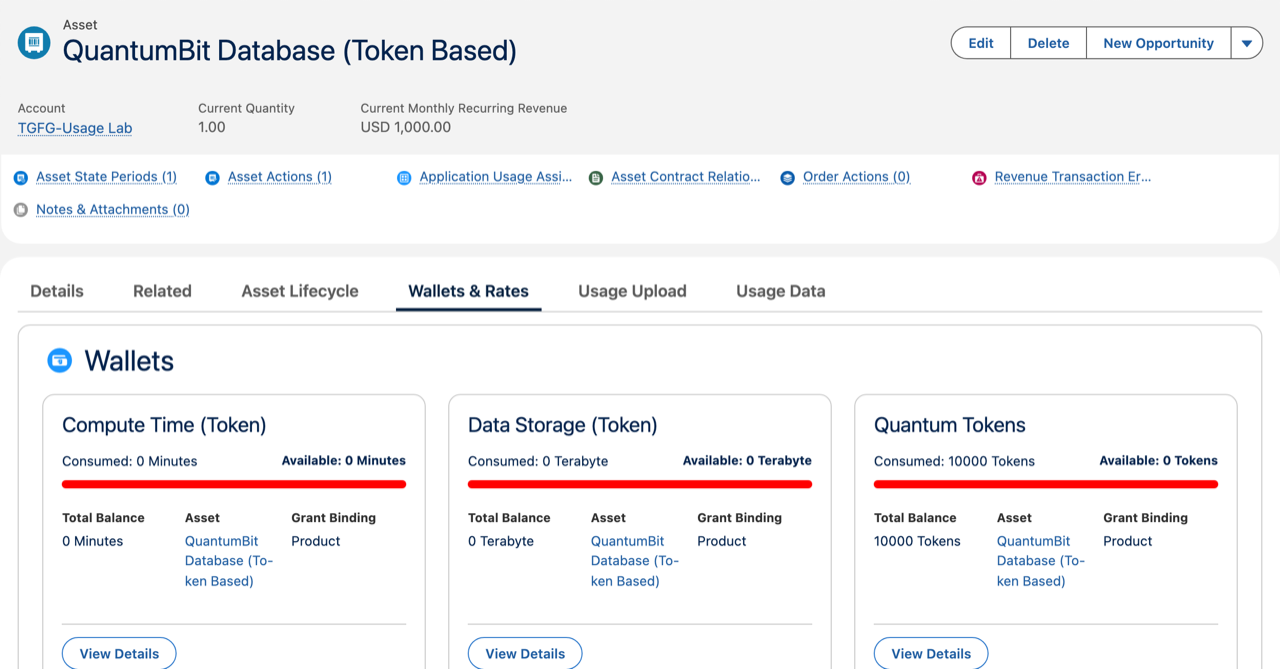
The Unified Usage Dashboard is a single view of post-sale usage: consumption, negotiated rates, and grant balances. You open it from the account page for pooled resources, or from the asset page for resources bound to one asset.66 It needs the Usage Management Run Time User permission, the latest Rating Discovery Procedure selected in Revenue Settings, and the usage component added to the record pages.65
| Tab | What it shows |
|---|---|
| Usage Details | All assets bound to the account, such as assets, contracts, or custom objects |
| Grants | Each grant, its product, its rollover and refresh policies, and its effective dates |
| Policies | The aggregation, rating frequency and overage policies for the target |
| Rates | The winning net unit rate, after the proration engine weighs overlapping assets |
| Wallets | One wallet per parent bucket, with the share consumed. View Details opens the parent bucket, Related lists its child buckets, and Wallet Statement logs every credit and debit |
Source for this table.65 Customers and partners can see their own wallets in an Experience Cloud site with a Customer Community or Partner Community license.66
The data model
The chain to remember: a unit of measure class groups units of measure. A usage resource is measured in them and points at a usage definition product. A sellable product with a usage model type gets the resource through a product usage resource, whose product usage resource policy names the aggregation, rating frequency, overage and commitment policies. A product usage grant gives the allowance, with refresh and rollover policies, and a grant binding policy decides where it lives. A rate card holds rate card entries, tier entries hold rate adjustments by tier, and a price book rate card links the price book. Activation creates transaction usage entitlements, a usage entitlement account, and usage entitlement buckets whose entries record each credit and debit. Transaction journals record usage. Orchestration turns them into usage summaries, usage ratable summaries, and usage billing period items (liable summaries), and Billing invoices those through a usage billing schedule. A usage commitment asset related object links a commitment asset to its anchor.
| Object | Fields worth remembering |
|---|---|
Product2 (usage) |
UsageModelType (Anchor, Pack, and the three commitment types) |
UnitOfMeasureClass, UnitOfMeasure |
Class: Code, Type (Usage, Currency, Token), DefaultUnitOfMeasureId, BaseUnitOfMeasureId, Status. Unit: UnitCode, UnitOfMeasureClassId, ConversionFactor, Type, Status |
UsageResource |
Code, Category (Usage, Token, Currency), UnitOfMeasureClassId, DefaultUnitOfMeasureId, TokenResourceId, UsageDefinitionProductId, Status |
ProductUsageResource |
ProductId, UsageResourceId, TokenResourceId, IsOptional, EffectiveStartDate, EffectiveEndDate, Status |
ProductUsageGrant |
ProductUsageResourceId, Quantity, Type (Grant, Commit), UnitOfMeasureClassId, UnitOfMeasureId, ValidityPeriodTerm, ValidityPeriodUnit (Month, Year, None), RenewalPolicyId, RolloverPolicyId, DrawdownOrder, UsageDefinitionProductId, Status |
ProductUsageResourcePolicy |
ProductUsageResourceId, ProductSellingModelId, UsageAggregationPolicyId, RatingFrequencyPolicyId, UsageOveragePolicyId, UsageCommitmentPolicyId |
UsageResourceBillingPolicy (aggregation), RatingFrequencyPolicy |
Aggregation: UsageAccumulationMethod (Sum, Peak), UsageAccumulationPeriod (Daily, Monthly). Rating: RatingPeriod (Daily, Monthly), RatingDelayDuration, RatingDelayDurationUnit (Days, Hours) |
UsageOveragePolicy, UsageCommitmentPolicy |
OverageChargeable (Yes, No); CommitmentRate (Bounded Object Rate, Lowest Commitment Rate) |
UsageGrantRenewalPolicy, UsageGrantRolloverPolicy |
IsRenewalAllowed, RenewalFrequency, RenewalFrequencyUnit (Month, Quarter, Year); IsRolloverAllowed, ShouldAllowRolloverExpiry, MaximumRolloverCount |
UsagePrdGrantBindingPolicy |
Product2Id, GrantBindingType (Self, Target), GrantBindingTargetType (Product, Account, Contract, Custom) |
RateCard, PriceBookRateCard |
Type (Base, Tier, Attribute), EffectiveFrom, EffectiveTo; PriceBookId, RateCardId, RateCardType |
RateCardEntry |
RateCardId, RateCardType, ProductId, UsageResourceId, ProductSellingModelId, Rate, RateUnitOfMeasureId, RateNegotiation (Negotiable, NonNegotiable), Status (Draft, Active, Inactive), EffectiveFrom, EffectiveTo |
RateAdjustmentByTier |
RateCardEntryId, UsageResourceId, LowerBound, UpperBound, AdjustmentType (Percentage, Amount, Override), AdjustmentValue |
UsageCmtAssetRelatedObj |
AssetId (the commitment), RelatedObjectId (the anchor asset, account, or contract), EffectiveStartDateTime, EffectiveEndDateTime |
TransactionUsageEntitlement |
AssetId, ProductId, UsageResourceId, GrantBindingTargetId, UsageModelType, GrantType (Grant, Commit), EntitlementQuantity, ValidityPeriodTerm, ValidityPeriodUnit, ActionType (New, Amend, Renewal, Cancellation, Ramp), EntitlementProcessingStatus (PENDING, PROCESSED) |
UsageEntitlementAccount |
GrantBindingTargetId, ProductId, BillingPeriodTerm, BillingPeriodUnit (MONTH), BillDayOfMonth, BillingPeriodStartDateTime, BillingPeriodEndDateTime |
UsageEntitlementBucket, UsageEntitlementEntry |
Bucket: UsageResourceId, ParentId, TransactionUsageEntitlementId, BucketBalance, TotalAsOfBalance, ProvisionalBucketBalance, TotalProvisionalBalance, ConsumedEntitlement, CompletedRollovers. Entry: TransactionType (Credit, Debit, Expired), TransactionReason, OpeningBalance, ClosingBalance |
TransactionJournal |
ReferenceRecordId (the asset), UsageResourceId, Quantity, QuantityUnitOfMeasureId, ActivityDate, StartDate, EndDate, Status (Pending, Processed, Error, Cancelled), UsageType (UsageManagement), UniqueIdentifier, UsageSummaryId |
UsageSummary |
Status, ConsumptionUnits, DebitedUnits, OverageUnits, StartDateTime, EndDateTime, UsageEntitlementBucketId, RatableSummaryId, LiableSummaryId |
UsageRatableSummary |
Status (New, InProgress, SummaryCreated, RatingComplete, RatingFailed), TierQuantity, OverageQuantity, NetUnitRate, TotalAmount, SourceUsageResourceId, RatingRequestId |
UsageBillingPeriodItem (liable summary) |
Status (New, InProgress, LiableSummaryComplete, ReadyForInvoicing, Invoiced, InvoicingFailed), TotalUsedQuantity, OverageQuantity, OverageAmount, StartDateTime, EndDateTime |
BillingSchedule, BillingPeriodItem, InvoiceLine (usage) |
Schedule: BillingMethod (Usage), UsageResourceId. Period item: TotalUsedQuantity, OverageQuantity. Line: IsUsageBasedInvoiceLine, UsageOverageQuantity, UsageProductId, UsageProductBillSchdGrpId |
Which action when
Which usage model type?
| Customer needs | Usage model type |
|---|---|
| The main metered subscription, with its own allowance | Anchor |
| A top-up or booster for an existing plan | Pack, bound to the anchor or to the same target as the anchor |
| A discount in exchange for promising to use a number of tokens | Token Commitment (Commit), linked to the anchor |
| A discount in exchange for promising to use a quantity of one resource | Quantity Commitment, linked to the anchor |
| A discount on overall spend, not tied to one resource | Monetary Commitment, linked to the anchor |
Guided workflow or manual setup?
| Situation | Path |
|---|---|
| First anchor or pack product, and you want default policies and cross-object checks | Guided workflow (Configure Usage Properties) |
| A commitment product, or you need to control each policy record | Manual setup, in the documented order |
| Either way, before activating orders | Run the Usage Product Validator |
Who shares the grant?
| Requirement | Binding |
|---|---|
| Each purchase tracks its own consumption | Self (the default) |
| A pack tops up a specific anchor | Target, Product |
| Every department on the account draws from one pool | Target, Account |
| Usage is tied to one agreement's terms and dates | Target, Contract |
| Pools are keyed by something else, such as a tenant ID | Target, Custom (BindingObjectCustomExt) |
| A commitment product | No binding; link it with a Usage Commitment Asset Related Object |
Which rate card setup?
| Requirement | Setup |
|---|---|
| One flat price per unit | Base rate card entry |
| Cheaper per unit as volume grows | Tier rate card entry with Override or Percentage tiers |
| A fixed amount off within a band | Tier rate card entry with Amount tiers |
| Usage billed in credits that convert to money | Two entries: resource to token (rate unit the token), token to currency (rate unit the currency) |
| Rates that depend on an attribute of the usage | Not available in Usage Selling or Consumption Management |
| A sales rep negotiates the rate | Mark the entry Negotiable, then Override Rate on Manage Usage Resources |
Which policy setting?
| Customer says | Setting |
|---|---|
| "Bill on total usage for the month" | Aggregation policy, Sum |
| "Bill on our busiest moment, not the total" | Aggregation policy, Peak |
| "Our allowance resets every quarter" | Refresh policy, Refresh Allowed, frequency 3, unit Month |
| "Unused units should carry over, but not forever" | Rollover policy, Rollover Allowed with Allow Rollover Expiry and a rollover count |
| "Use the add-on that expires first" | Drawdown order Expiring First (the default) |
| "Don't charge for going over" | Overage policy, not chargeable |
| "Once we pass the commitment, charge the normal rate" | Commitment policy, Bounded Object Rate |
| "Keep our discount even past the commitment" | Commitment policy, Lowest Commitment Rate |
Where to look when a number is wrong?
| Symptom | Check |
|---|---|
| No rates on the quote | Active rate card entries, a Price Book Rate Card for the quote's price book, a Rating Discovery Procedure in Revenue Settings, and the currency unit's Unit Code |
| Late usage never rated | The usage summary's status: after Usage Summary Complete, new journals for that period are ignored |
| A backdated asset has no balances | Run Call Entitlement Refresh Service |
| Overage amount is 0 on the liable summary | Null Measure Handling, and a price on the usage definition product |
| Commitment discount not applied | The Usage Commitment Asset Related Object link, and the commitment policy |
| Usage not on the invoice | Liable summary Ready for Invoicing, scheduler filter All or Usage, account in a billing batch schedule |
Watch out
A grant is an allowance, not a discount. The usage it covers is free because the product's price already pays for it; only usage beyond it is rated. QuantumBit Database's 10 TB storage grant turns 50 TB of usage into 40 TB of overage.
Usage products can't be bundled, as a child or as the parent. Sell them as separate lines on the same quote or order. QuantumBit's sample catalog still lists its database plans in the Complete Solution's Consumption group, so check a bundled usage design against the limits article before you build on it.
The binding target can't change after the order is activated and assetized, and a wrong target on the binding policy means redesigning the product. Decide Self or Target, and which target, before the first order.
A commitment does nothing until it's linked to the anchor with a Usage Commitment Asset Related Object. It's a separate sale, it can't be bound to a target, and you can't link two commitments with the same validity period to one anchor.
Consumption Management doesn't process monetary and quantity commitment products. In the launchpad's Winter '27 orgs, those entitlements stay PENDING and never rate. Token commitments do rate.
Late usage has a deadline. After the period ends and the rating delay (3 days by default) passes, the usage summary is complete and journals added for that period are ignored. The launchpad's rule is stricter: record before the first orchestration, because that pass closes every past period, empty.
A Unit Code that doesn't match the org's currency ISO code exactly, casing included, hides rate cards during selling with no error message.
Attribute-based rate cards exist in the object model but aren't supported in Usage Selling and Consumption Management. Use base and tier rate cards.
A usage billing schedule is always Ready for Invoicing and never Completely Billed. That's by design: it stays open for late usage and later orders on the same binding instance.
Draft invoices don't move the liable summary; only posting marks it Invoiced. Voiding a posted invoice puts it back to Ready for Invoicing for rebilling.
A usage line billed at 0 with the right quantity usually means the price is missing, not that the usage was free. In QuantumBit's sample data the usage definition products have no price, so the launchpad's usage lines bill 0.
Numbers worth knowing: 200 lines, 200 quote line item rate card entries and 800 quote line item rate adjustments per quote or order; 1,200 rate card entries and 3,000 tier adjustment records per org; one token resource per product; 3 days of default rating delay; 12 hours of gap before the validator warns; in the guided workflow, 200 resources listed, 10 selected at once, 20 product usage resources, 5 grants each, 3 mandatory custom fields.
If you know Salesforce CPQ
The legacy comparison for this area is consumption pricing in Salesforce CPQ and usage billing in Salesforce Billing, the blng package.
| Salesforce CPQ term | Revenue Cloud term | What changed |
|---|---|---|
| Consumption Schedule and Consumption Rate on the product | Rate card, rate card entry, and Rate Adjustment By Tier | Rates live on rate cards found through a Price Book Rate Card and a rating discovery procedure, not on the product |
| Consumption schedule tiers | Tier rate card entry with Percentage, Amount, or Override adjustments | Tiers adjust a base rate rather than each carrying a price |
| Included quantities handled in pricing or contract terms | Product usage grant, held in usage entitlement buckets | Grants are records with validity, refresh, rollover and drawdown order |
Usage (blng__Usage__c) records |
Transaction journals against the asset and a usage resource | Journals stay Pending until orchestration aggregates them |
Usage Summary (blng__UsageSummary__c) |
Usage summary, usage ratable summary, and liable summary (usage billing period item) | Three summaries: aggregation and drawdown, rating, then invoice-ready amounts |
| Invoice run picks up usage summaries | Invoice scheduler with the All or Usage filter picks usage billing schedules whose liable summary is Ready for Invoicing | Usage invoicing needs the Billing license |
| No legacy equivalent | Tokens, commitments, packs, grant binding, and the Unified Usage Dashboard | New in Revenue Cloud |
Newer than the exam
The Rev-Con-201 exam is written against Summer '25. These arrived later. They matter on real projects, but the exam won't ask about them yet.
- Quantity and monetary commitment products (Winter '26, 258).
- Usage Product Validator, saving quote and order rates against later catalog changes, the Consumption Agent, and Salesforce Go setup for usage selling and rate management (Spring '26, 260).
- Wallet views for customers and partners in Experience Cloud sites (Spring '26, 260).
- Early renewal of active usage assets and late renewal of expired ones, with adjusted rates and grant quantities, and early renewal of ramped usage assets. Not available in orgs that have both the Advanced and Billing licenses with the Usage Management add-on (Winter '27, 264).
- Overridden Usage Management flows must use version 4 Data Processing Engine definitions; version 3 definitions can't be opened, edited, or run (Winter '27, 264).
- Fields deprecated in API version 65.0 are removed in 67.0 and later:
OverageChargeableonProductUsageGrant(use the usage overage policy),UsageResourceBillingPolicyonUsageResource, andUsageResourceand Product onRatingFrequencyPolicy(use the product usage resource or usage resource policy). FourTransactionUsageEntitlementfields are deprecated, to be removed later (Winter '27, 264). - The Winter '27 help spells out the bundle restriction (no usage product as a bundle's child or parent), lists more unsupported lifecycle changes, and adds worked examples for both commitment rates and a warning that the binding target can't change after activation (Winter '27, 264).
Sources
Every numbered note above links to the Salesforce article it comes from, except the notes for our org and the launchpad's own guides. This page is current to Winter '27 (release 264): each Salesforce note was checked against the Winter '27 version of its article.
- Screenshots from our lab org (built with Salesforce's launchpad), Winter '27 (264), taken 2026-11-08
- Salesforce Help and the Revenue Lifecycle Management Developer Guide, Winter '27 (264), as published 2026-09-04 to 2026-09-07; checked by Taggalong 2026-11-02
- The launchpad's Usage and Consumption Runbook and QuantumBit Consumption Demo Scenarios, read 2026-11-02
-
Checked by Taggalong in a launchpad practice org with QuantumBit's sample data, 2026-11-02 ↩↩↩↩↩↩↩↩↩↩↩↩
-
The launchpad's own guidance, not Salesforce's: Usage and Consumption Runbook (docs/guides/usage-consumption-runbook.md in the launchpad repository), read 2026-11-02 ↩↩↩↩↩
-
The launchpad's own guidance, not Salesforce's: QuantumBit Consumption Demo Scenarios (docs/guides/qb-consumption-demo-scenarios.md in the launchpad repository), read 2026-11-02 ↩
-
Manage and Track Usage-Based Products in Revenue Management ↩↩↩